The Audit-First Pardot Exit: De-Risking a 190,000+ Record Migration to HubSpot

Marketing automation migrations fail quietly, through records that never arrive and records that should never have come. For a publicly traded media and entertainment technology company, the move from Pardot and Salesforce to HubSpot started with a full-platform audit of a 190,000+ record database, because at that scale the sync boundaries between three systems decide what the new portal contains before anyone imports a thing.
Executive Summary

Context
The client's B2B marketing operation ran on Pardot Advanced Edition wired to Salesforce: roughly 194,000 prospects, 367 lists, 120 automation rules, and 116 forms accumulated over years of campaigns. An audit came first. It inventoried every object and sync relationship and produced the action plan the migration then executed.

What We Built
A full Pardot and Salesforce pre-migration audit covering prospects, data quality, lists, forms, automations, scoring, and reporting, plus the migration controls it prescribed: purge lists, integration-user permissions, a field-mapping workbook, and rebuilt lead scoring in HubSpot.

Tech Stack
- HubSpot Marketing Hub Enterprise
- Pardot (Advanced Edition)
- Salesforce
Not a fit for small databases with a single system of record, where an export-and-import handles the move without sync-boundary analysis.

The Challenge
The Pardot database had grown for years without anyone governing what came in. Sixty-five percent of the 194,000 prospects were marked never-active against a benchmark of under ten percent, and sixteen percent were unmailable. The opt-in field wasn't reliably used: filtering for records with a name and a true email opt-in returned under 7,000 leads, which meant a naive import could mark contacts as marketable that the company had no permission to email. The sharper risks sat at the sync boundaries. 7,461 Pardot prospects were not syncing to Salesforce and would silently miss the migration; 11,000+ Salesforce records were not in Pardot and would silently come over. Neither population had been reviewed.

Our Approach
The audit treated the three-system topology as the migration plan's first draft. Every object got counted and every sync relationship mapped: prospects by mailability status, 367 lists (54 with zero members), 120 automation rules of which only 78 were active, 116 forms triaged into top, middle, and bottom-of-funnel value tiers. We made the hard call on the two silent populations first. Un-synced Pardot prospects were flagged for review and manual export rather than left to vanish, and integration-user permissions were prescribed to control whether the Salesforce-only records entered HubSpot at all. Unmailable and unsubscribed records were mapped to non-marketing status, so the new portal's marketable count started honest. Duplicate leads and contacts sharing an email address were reconciled to HubSpot's one-record-per-email model before import.
This engagement is part of our migration work for telecommunications & media organisations.

Impact

Two Silent Data-Loss Paths Caught Before Import
A Marketable Count the Company Can Defend
Automation Debt Cut to the 78 That Matter
Of 120 Pardot automation rules, the 42 paused or inactive rules were separated from the 78 active ones that defined the real migration scope, so rebuild effort landed only on automation that runs.
Scoring Rebuilt Instead of Transplanted
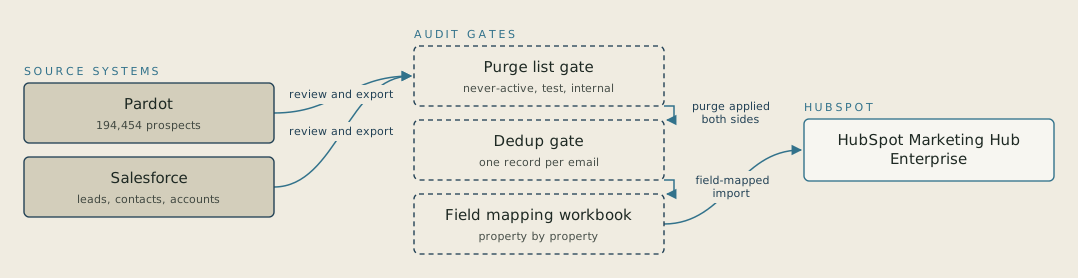
Two groups of records used to go unreviewed: 7,461 Pardot prospects not syncing to Salesforce and 11,000+ Salesforce records missing from Pardot. A plain import would have dropped the first group and admitted the second unchecked. Now each group meets a decision gate. Un-synced prospects are flagged for review and export, and integration-user permissions decide whether Salesforce-only records enter HubSpot at all.

FAQ
Because the default sync makes two silent mistakes at once: records that exist only in the marketing platform never arrive, and records that exist only in the CRM arrive unreviewed. At 190,000+ records those populations were 7,461 and 11,484 respectively. The audit converts both into deliberate decisions before a single record moves.