

Nurture workflow build for a telehealth provider
A direct-to-consumer telehealth provider ran contacts through a lead-status pipeline from New to Qualifying to Customer, but no email program moved them along it. A contact could remain in Qualifying for days with nothing behind it but an internal reminder to a rep. We built four nurture tracks in HubSpot with lifecycle stage gating, a workflow that catches sales-qualified contacts left without a deal record, and an SMS channel tied to the consult booking itself.
Executive Summary

Context
The client is a direct-to-consumer telehealth provider whose product uses assessment-quiz lead routing: a quiz sends patients to either a low-touch, online-only medication pathway or a pathway requiring a doctor consultation. Its HubSpot portal already tracked contacts through five lead statuses, but the pipeline had no matching set of nurture emails behind it.

What We Built
We built four lifecycle-stage-gated nurture tracks in HubSpot, Customer Welcome, Lead, SQL, and MQL with SMS, plus a Custom Pathway workflow that flags SQL-stage contacts with no deal record and notifies the contact owner directly.

Tech Stack
- HubSpot Marketing Hub, HubSpot Sales Hub, SMSGlobal, Stripe
Not a fit if your CRM doesn't have a lead-status model yet. This build layers stage-keyed nurture tracks onto statuses that already exist, and it doesn't design that model from nothing. It also assumes a marketing team that can turn campaign copy around on its own timeline, since a completed workflow can sit unsent for months waiting on a signed-off draft.

The Challenge
The provider's lead-status pipeline moved a contact from New to Attempted to Contact to Qualifying to Open Deal to Customer. If a lead stayed in Qualifying with no task assigned, an internal reminder fired after two to four days. That reminder told a rep to act, but nothing in the system moved the contact itself, so progress depended on someone catching the reminder in time.
The gap was worst at the SQL stage. A contact who was already qualified could still end up with no deal record attached, which made them invisible to pipeline reporting and to the rep who should have owned them. Any fix had to work inside the lead-status property and pipeline stages already in place, because rebuilding either was out of scope for the retainer.

Our Approach
We built four nurture tracks with lifecycle stage gating rather than a shared send calendar: a three-email Customer Welcome track, a four-email Lead track, a three-email SQL track, and a four-email MQL track that adds SMS through the SMSGlobal integration. Each track's entry condition is the lead-status property itself, so a contact moves into the right track the moment its status changes, without a manual list pull.
For the SQL-stage gap, we built a separate Custom Pathway workflow keyed off a saved list of SQL contacts who already have a deal created. Any contact missing from that list triggers an internal notification to the contact owner instead of another nurture email, because the fix here is a human follow-up. The MQL track's SMS messages are timed to the consultation itself, firing the day before and the day of a booked appointment, and again when a medication order is being prepared or shipped.
We also built an Abandoned Cart workflow for the health-assessment checkout flow, keyed to the contact or cart record at the point of abandonment. We left its send step switched off, because the client hadn't signed off on the copy, and sending unapproved messaging to this audience carried more downside than a delayed launch.

Impact

Every lifecycle stage now moves contacts with an email, not just a reminder
The four stage-keyed tracks mean a lead-status change starts a contact's nurture, not a rep noticing a task. A contact entering Qualifying now receives a track built for that stage, so progress through the pipeline no longer depends only on staff catching each status change in time.
SQL-stage contacts with no deal record surface to the person who owns them
The Custom Pathway workflow checks the SQL-stage population against the list of contacts who already have a deal, so any contact missing from that list is flagged and routed to their contact owner automatically. That closes the handoff gap where a qualified contact could go unassigned, with no deal and no visibility, until someone checked the list by hand.
Cart abandonment nurture is built and ready on a single approval
Because the Abandoned Cart workflow is already built against the checkout flow's contact and cart record, turning it on needs no new development, only signed-off copy. The provider can launch the workflow the moment its own review clears, rather than waiting on another engineering cycle once approval comes through.
Consultation and shipment reminders reach patients by text as well as email
The MQL track's SMS messages fire through SMSGlobal on a fixed schedule tied to the booked consult and the medication-shipping status, reaching a patient even when they skip the matching email. That gives the highest-intent segment of the funnel a second channel at the two moments, before a consult and during shipping, where a missed message costs the most.
Four HubSpot workflows, Customer Welcome, Lead, SQL, and MQL, each gate enrolment on the contact's lead-status property rather than on a shared send calendar. A contact's own property value is the only key the workflows read, so a status change moves someone from one track into the next.
A workflow named Custom Pathway compares the SQL-stage contact population against a saved list of contacts who already have a deal created, treating any contact absent from that list as its trigger. On a match it sends an internal notification to the contact owner rather than touching the contact directly.
The workflow keys off the contact or cart record at the point of checkout abandonment in the health-assessment flow, and its enrolment logic is built and tested. Its send step stays switched off rather than removed, so it can go live on a copy approval alone.
The SMSGlobal integration adds a text message to the MQL track at two scheduled points: the day before and the day of a booked doctor consultation, and again when a medication order is being prepared or shipped. The trigger is the same lifecycle-stage property the email steps read, so the SMS step runs alongside them rather than as a separate system.
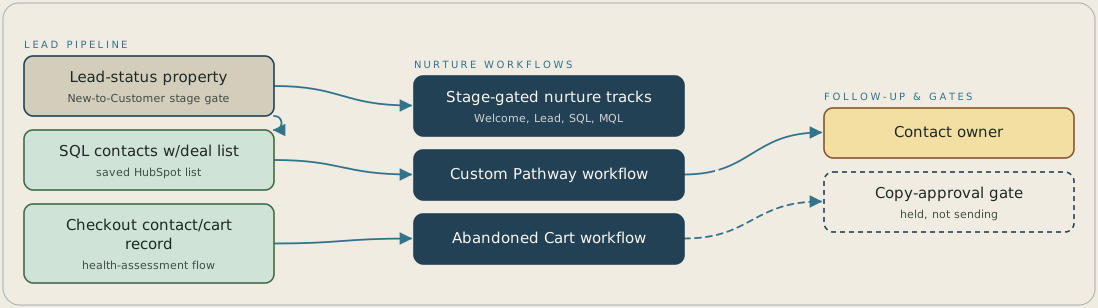
A contact's lead-status property decides which of four nurture tracks it enters, so a status change in HubSpot starts the matching Customer Welcome, Lead, SQL or MQL track. Contacts at the SQL stage are checked against a saved list of those who already have a deal, and anyone missing from it triggers the Custom Pathway workflow, which notifies the contact owner. Separately, a contact or cart record at checkout abandonment enrols in the Abandoned Cart workflow, which is built but held at a copy-approval gate and isn't sending.
FAQ
Enrolment is keyed to the contact's own lead-status or lifecycle-stage property, so a status change is what moves someone into Customer Welcome, Lead, SQL, or MQL. Nothing waits on a manual list pull or a scheduled batch.
It stays built and switched off rather than shipped with placeholder copy. The Abandoned Cart workflow is enrolled and ready against the checkout flow, and turning it on is a copy approval away, not a new development cycle.


