

Replacing two conflicting lifecycle stages with one workflow

A client running four sibling brands through one shared HubSpot portal had built a brand-specific lifecycle stage property alongside HubSpot's own standard property, and the two disagreed about where the same contact sat. One read Lead, the other read MQL, and every SMART Goal report told a different story about the same funnel.
Executive Summary

Context
The client is a multi-brand business process outsourcing and customer experience group operating across the Asia-Pacific region, running contacts through a HubSpot Marketing Hub Enterprise portal under an ongoing monthly retainer. A ten-value brand-specific lifecycle stage property, running parallel to HubSpot's own lifecyclestage field, had been advancing and retreating independently of it on the same records.

What We Built
An audit naming the exact property conflict behind unreliable SMART Goal reporting, and a governance design to replace it: one workflow writing a single lifecycle stage forward only, plus one master industry property in place of four competing fields.

Tech Stack
- HubSpot Marketing Hub Enterprise
- HubSpot Workflows
Not a fit if your organisation runs a single lifecycle stage property with one workflow writing to it, since there is no second model to reconcile. It also assumes your reporting already depends on that property enough that a conflicting value matters, rather than a field nobody reports against.

The Challenge
The client's HubSpot portal carried two lifecycle-stage models at once: the platform's own lifecyclestage property, and a ten-value Probe Lifecycle Stage property built for the brand. A form submission or a manual change could update either one independently, and nothing coordinated which one a report should trust for a given contact.
The same fragmentation showed up on the industry axis, where four separate fields held classification data for the same company records, and none was designated as the field reporting should key against.
A January 2026 SMART Goals workshop had already set KPIs and lifecycle definitions for the retainer's reporting plan. But because the property model disagreed with itself, those definitions couldn't be enforced.

Our Approach
In the retainer's February 2026 lifecycle and property audit, we traced both fragmentations to their source. We named the two properties in conflict and found where each diverged on the same contact.
We then recommended collapsing the update path to one Form to Lifecycle stage workflow, the only mechanism meant to write the property. It carries a one-directional lock: a contact's stage can advance, but the workflow won't write a value that moves it backwards.
For the industry axis, we recommended declaring Industry Dropdown the single Master Industry property and retiring the other three as inputs, so that every report and workflow keys against one field.

Impact

One workflow, not two properties, decides a contact's stage
A single Form to Lifecycle stage workflow as the only path that writes the property removes the condition that let lifecyclestage and Probe Lifecycle Stage disagree in the first place: one property to read, one mechanism to write it.
A lifecycle stage can advance but cannot be talked back
The one-directional lock blocks a contact's stage from moving backwards once it reaches a later value, so a stage a report counted last month can't quietly disappear this month because a later update wrote an earlier value over it.
Four industry fields resolve to one the reports can key against
Naming Industry Dropdown the single Master Industry property gives every future report one field to query, instead of a choice between a free-text field, a sub-categorised field and a separate Industry2 field each holding a different slice of the same classification.
The January KPI definitions get a property model that can hold them
The SMART Goals workshop had already set the KPI and lifecycle definitions the retainer reports against. Governing the lifecycle property down to one workflow and one master field lets those definitions describe a model that behaves the way they assume, rather than one that contradicts itself underneath the report.
The audit worked from HubSpot Marketing Hub Enterprise's standard lifecyclestage property and a parallel, brand-specific Probe Lifecycle Stage property carrying ten values, Prospecting, Subscriber, Lead, MQL, SQL, Opportunity, Customer, Evangelist, Other and Former Customer, and traced where the two properties held different values for the same contact.
Rather than reconcile the two properties case by case, we recommended retiring the parallel update paths in favour of one workflow triggered by form submission. It would be the sole mechanism meant to write the stage going forward, so a contact's stage has exactly one place it can change.
The recommended workflow gate compares an incoming stage value against the contact's current one and only commits the write if it moves forward. That stops a stale or manual update from regressing a contact that already reached a later stage.
Against four competing fields (Industry free-text, Industry Dropdown, Industry With Sub-Category, Industry2), the audit recommended Industry Dropdown as the single Master Industry property every report and workflow should reference, retiring the other three as reporting inputs.
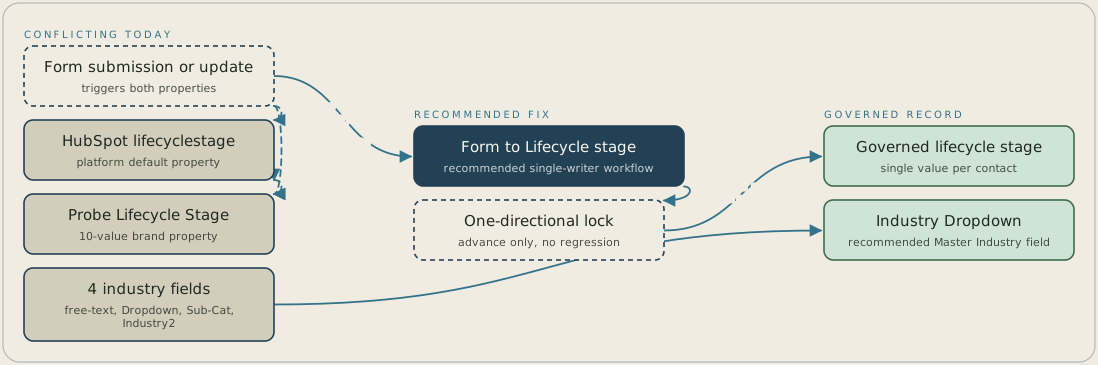
Today a form submission or update writes both HubSpot's lifecyclestage and the ten-value Probe Lifecycle Stage property, and the two disagree about the same contact. The recommended design replaces both paths with one Form to Lifecycle stage workflow. It checks the direction of each change and only lets a stage move forward, so each contact ends up with a single governed value. Separately, the four industry fields consolidate into Industry Dropdown as the Master Industry property.
FAQ
Because SMART Goal reporting had to choose one property to count from, and lifecyclestage and Probe Lifecycle Stage held different values for the same contact. A report built against one property told a different funnel story than the same report built against the other, so the conflict changed the number a stakeholder saw, not just a label on a record.
It stops a later update, manual or automated, from writing an earlier stage value over a contact that has already reached a later one. Without the lock, a contact recorded as an Opportunity last month could be written back to Lead this month, and a report run today would undercount a stage already reached.


