

Talisma to HubSpot CRM Migration for a Health Sciences University's Admissions Pipeline
Eight years of admissions history sat inside Anthology Talisma, the university's outgoing CRM, with no vendor-built path to HubSpot. Salted Stone migrated every contact and lead with an associated record created on or after September 1, 2016, plus interactions, prior lead-source data, school and account records, and Events, matching each incoming record to HubSpot on exact email address. Up to 25 custom fields carried data HubSpot had no native column for, while the legacy Social Security Number field was pulled from the automatic transfer and flagged for a person to review.
Executive Summary

Context
The university's admissions counselors had years of prospect and enrollment activity recorded inside Anthology Talisma, its legacy CRM, while HubSpot was becoming the system counselors actually worked from day to day. Every record Talisma held had to move across without creating a second copy of a contact who already existed in HubSpot, and without carrying a sensitive legacy field into the new system unreviewed.

What We Built
We migrated eight years of Talisma contact, lead, interaction and event history into HubSpot on an exact email-match key, configuring up to 25 custom fields to carry the data across while routing one sensitive legacy field to manual review instead of automatic transfer.

Tech Stack
- Anthology Talisma
- HubSpot Sales Hub
- HubSpot Marketing Hub
- field-mapping workbook
- FTP batch transfer
Not a fit if nobody on the client side can make judgment calls on flagged fields during the migration. This build routed one sensitive legacy column, a Social Security Number field, to manual review instead of automatic transfer, and that review needed a person empowered to decide its fate. A migration with no one assigned that decision either stalls on the field or defaults to skipping it, worse than reviewing it up front.

The Challenge
Admissions counselors had years of prospect and enrollment history inside Anthology Talisma, with contacts, leads, interactions, lead-source data, school and account records, and Events spread across its tables. Talisma had no export built for handing that history to another CRM, so every record had to be pulled, matched and mapped by hand. A prospect who had reached out more than once risked landing in HubSpot as two separate contacts unless the migration caught the match, and Talisma held Social Security numbers on the same tables as ordinary contact fields, a value the university could not carry into a new system unreviewed. Internal guidance ahead of discovery flagged plainly that this category of data could not sync to HubSpot the way the rest of a contact's record could.

Our Approach
Talisma had no supported export for a CRM handoff, so the team built the migration around a field-mapping workbook instead of a vendor tool, deciding column by column whether each field should transfer automatically, wait for review, or drop. Deduplication matched incoming records against existing HubSpot contacts on exact email address, the one identifier both systems carried in comparable form, and the workbook scoped the pull to contacts with a lead created on or after September 1, 2016, so older records with no live lead in that window never entered HubSpot. Up to 25 custom fields held data HubSpot had no native column for, alongside the standard contact, lead, interaction, school, account and Event structures. The workbook's one exception was the legacy SSN field, tSSN_CC: the team marked it "Discuss" rather than "Transfer" and held it for manual review rather than moving it automatically like every other column. Because the custom SIS integration was still being scoped in parallel, an interim monthly delta pull kept HubSpot current against Talisma, and a January 2024 workshop check found 95 to 98 percent of leads already present in HubSpot from that bridge, ahead of the SIS integration's own go-live.

Impact

Years of admissions history moved without duplicating a single contact
A Talisma record only matched an existing HubSpot contact when their email addresses matched exactly, so a prospect who already had a HubSpot contact picked up their legacy history instead of generating a second entry. Contacts with no lead created on or after September 1, 2016 were left out of the pull, carrying forward live admissions history and leaving dormant, undated records behind in Talisma.
An interim bridge closed most of the gap before the custom sync went live
A monthly delta pull kept HubSpot in step with Talisma while the custom SIS integration was still being built, so counselors were not left working from a stale system. By January 2024, 95 to 98 percent of active leads were already reflected in HubSpot from that interim pull, giving the SIS integration a near-complete base to extend rather than a cold start.
Sensitive student data got a review step instead of a silent import
Rather than writing the legacy SSN field into HubSpot with the rest of a contact's history, the workbook marked it "Discuss" and held it out of the automatic transfer, so no Social Security number moved into the new system without a person deciding to move it. The migration's default for a sensitive column was review, not transfer.
Interactions and lead-source history carried their context forward, not just names
Interactions, prior lead-source data, school and account records, and Events moved alongside each contact and lead, on the custom fields configured for data HubSpot had no native column for. Admissions staff working a migrated record kept the history that explained how a prospect had gotten there, rather than a bare name and email.
Every incoming Talisma record matched against existing HubSpot contacts on exact email address, the identifier both systems carried in comparable form. A record that matched merged into the existing contact's history instead of creating a second one.
Only contacts with a lead created on or after September 1, 2016 were pulled into the migration; contacts without a lead in that window were excluded. The date gate scoped the migration to admissions history still relevant to active or recent prospects rather than Talisma's full archive.
The field-mapping workbook flagged the legacy tSSN_CC field on tblCustomer_SisConnector as "Discuss" rather than "Transfer", the one column routed to a person instead of the automatic pipeline. Every other mapped field, including the custom fields and the interaction, lead-source, school, account and Event records, moved on the standard transfer path.
Before the custom SIS integration went live, a monthly delta pull kept HubSpot synced against Talisma on a recurring batch schedule rather than a single cutover, the bridge that carried admissions through the gap before the bidirectional sync existed.
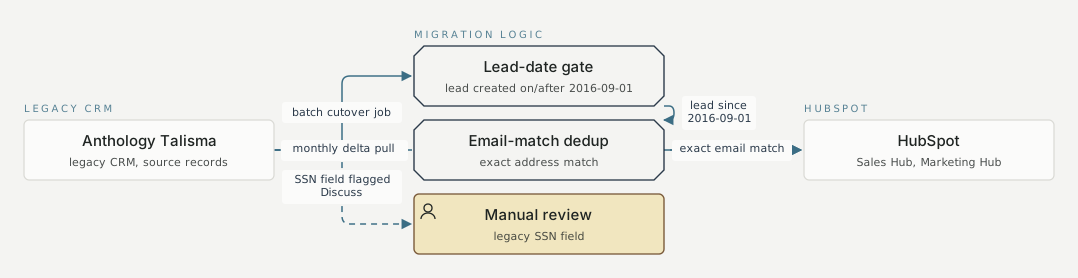
Legacy CRM Migration logic HubSpot Anthology Talisma legacy CRM, source records Lead-date gate lead created on/after 2016-09-01 Email-match dedup exact address match Manual review legacy SSN field HubSpot Sales Hub, Marketing Hub batch cutover job mechanism 2 lead since 2016-09-01 mechanism 2 exact email match mechanism 2 SSN field flagged Discuss mechanism 2 monthly delta pull mechanism 2
FAQ
Because email was the one identifier both Anthology Talisma and HubSpot carried in comparable form, an exact match avoided merging or duplicating a contact without a shared ID neither system natively held. A stronger key, like the one the later SIS integration used, was not available here, since Talisma issued no equivalent identifier HubSpot could read.
The field-mapping workbook marked the legacy SSN field for manual discussion rather than automatic transfer, so it did not move into HubSpot with the rest of the migration. Every other mapped field, including the custom fields configured for the university's own data, moved on the normal transfer path.


