

Lead scoring and deal prioritization for a molecular diagnostics lab
A molecular diagnostics and clinical toxicology testing laboratory ran its pipeline on HubSpot Marketing Hub, Sales Hub, and CRM with a single native score attached to the contact, not the account, and a Deal Priority Automation workflow that could score a deal only once. We built a multi-factor scoring model spanning demographic, firmographic, and activity signals, specified a Company Score property for the level HubSpot has no native equivalent for, and a numeric Deal Score to replace the workflow's boolean checks.
Executive Summary

Context
The lab's sales team worked from a CRM where contacts carried a score but companies did not, so account-level prioritization had nothing to read from. Deal records inherited whatever score their primary contact carried, so a more engaged secondary buyer's signal never entered the calculation.

What We Built
We built a multi-factor lead and company scoring model layered onto HubSpot's native contact score, and specified a numeric Deal Score property to replace Deal Priority Automation's boolean pass or fail logic, banded into Low, Medium, and High tiers.

Tech Stack
- HubSpot Marketing Hub
- HubSpot Sales Hub
- HubSpot CRM
Not a fit if your HubSpot deployment doesn't yet span Marketing, Sales, and CRM at a tier that supports custom properties and workflow branching, or if your team can't commit stakeholder time to sign off on scoring criteria before build. This engagement held a set of criteria in a pending state for months because that sign-off never landed, and a scoring model with unconfirmed criteria scores nothing reliably.

The Challenge
HubSpot scored every contact who touched the lab's marketing, but the platform has no equivalent property for the company behind that contact. That left account-level prioritization with nothing to draw on, and sales reps chased whichever deal looked loudest that week instead of the ones with real signal behind them.
The Deal Priority Automation workflow already live in Sales Hub had its own gaps. It read its score from the deal's primary associated contact only, so a more engaged secondary buyer never changed a deal's priority unless someone promoted that buyer to primary. The workflow also had re-enrollment switched off, so a deal scored once kept that score for its entire life.
Several of the new scoring model's criteria, covering ideal job levels, target industries and priority regions, stayed marked Pending Feedback while the client's stakeholders reviewed them. So the model meant to replace the guesswork went live only partially built.

Our Approach
We started from HubSpot's native contact score, which already captured email opens, clicks, form fills and site visits as they came in. That property carried no firmographic or account-level weight, so we specified a parallel Company Score property, plus the workflow logic to populate it from company fields the native engine ignores. The model spans more than 40 weighted signals across contact demographics, activity and company firmographics.
Those signals are gated by criteria lists that the client's stakeholders were still confirming. That's why part of the model stayed dormant instead of scoring against assumptions nobody had approved.
The Deal Priority Automation workflow triggered on contact and deal property changes, but its key was locked to the primary associated contact's score, and re-enrollment was disabled so a deal was evaluated once. We chose not to patch that boolean check in place. Instead we specified a numeric Deal Score property banded into tiers: 0 to 100 reads as Low, 101 to 500 as Medium, and 501 or higher as High. That way priority can shift as engagement does instead of freezing at first touch.

Impact

The account itself now carries a score
The lab's native HubSpot score only ever touched the contact record, so two companies with identical activity looked identical to sales even when one held three engaged buyers and the other held none. The specified Company Score property is designed to roll up firmographic and activity signals the native engine never reads, so an account could carry a weight a rep can act on before a deal exists.
Deal priority reflects the whole buying group
Deal Priority Automation read only the primary associated contact's score, so a second buyer who requested three demos never moved a deal's priority unless promoted to primary. Feeding company-level scoring into the same workflow is designed to let priority reflect every contact tied to the deal, not just the one HubSpot recorded first.
Deal priority recalculates as engagement continues
The existing workflow had re-enrollment disabled, so a deal scored once kept that score for its entire life. The Deal Score property replaces that boolean check with a banded number, Low, Medium, or High, that moves as engagement moves, so priority stays current instead of locking in on day one.
A model built to activate in full once sign-off lands
A portion of the model's criteria remained unconfirmed while stakeholders reviewed them, so the build shipped as a structure ready to take those answers rather than guessing at them. The remaining signals can switch on without rebuilding the model, because the properties and workflow logic they need already exist.
A company-level score property fills the gap HubSpot's native scoring leaves at the account level. It rolls up firmographic and company-activity signals the contact-level score never sees, keyed to the company record rather than any one person on it.
The scoring model weighs demographic, firmographic, and activity signals, more than 40 in total, against confirmed criteria for ideal job levels, industries, regions, and funnel stage. Each signal adds or withholds weight from the HubSpot Score property depending on which lists a contact matches.
The Deal Score property is specified to replace a boolean pass or fail check with a number banded into Low (0 to 100), Medium (101 to 500), and High (501 and above). Calculated rather than flagged once, it is designed to update as engagement on the account changes.
The original workflow triggered on contact and deal property changes but had re-enrollment switched off, so it evaluated a deal exactly once. Keying it to the Deal Score property instead of a single contact lets the same workflow re-fire as new signals arrive.
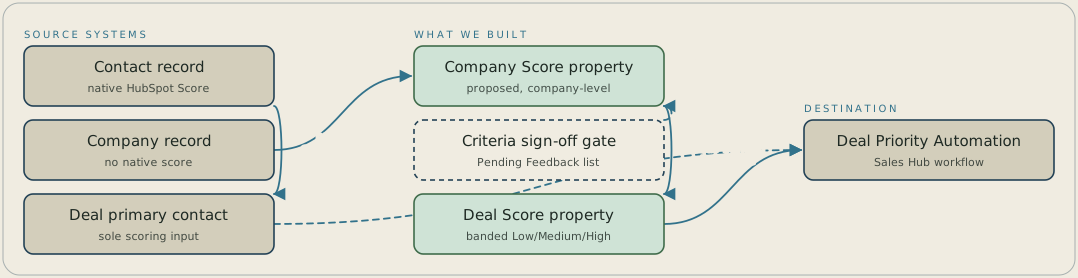
The lab's contacts carry HubSpot's native Score, but companies have no native score, so a proposed Company Score property is calculated from company property changes. Criteria that stakeholders haven't signed off on stay in a Pending Feedback list and are withheld from that score. The existing Deal Priority Automation workflow reads only the deal's primary contact and scores a deal once, so the Company Score feeds a banded Deal Score of Low, Medium or High that recalculates deal priority.
FAQ
HubSpot's native scoring engine is built entirely around the contact record, so it has no property or calculation path for a company as its own entity. You can approximate one with a custom property and workflow logic that rolls contact and firmographic signals up to the company level, which is what a Company Score property does.
If re-enrollment is off, a deal keeps whatever score it received the first time the workflow ran, even as the buying group's engagement keeps changing. You can fix this by keying priority to a property that recalculates, like a numeric Deal Score with banded tiers, and rebuilding the workflow so it re-evaluates a deal instead of scoring it once.


