

Family Support ticket routing on HubSpot Service Hub

A Family Support team covering a 47+ campus network needed every new ticket to land with somebody in a predictable way. HubSpot's rotate-record action can only spread tickets equally and randomly across a set of eligible users, never to a chosen count per person. We set eligibility to staff holding paid Sales Enterprise seats, which reached 12 of the team's 13 Family Support agents. We also paired the rotation with automated priority and location prefill, so a ticket already carries its category-driven priority, its campus and its region before anyone opens it.
Executive Summary

Context
The same national network behind the client's enrolment pipelines generates its own stream of Family Support tickets, each raised from a different campus and needing consistent priority and routing regardless of where it started. The Family Support pipeline in HubSpot Service Hub also carried custom views built by subject line and by status.

What We Built
We built a round-robin assignment workflow on the Family Support ticket pipeline, distributing every new, unowned ticket among eligible staff on creation. A companion workflow reads each ticket's FST Category value, sets its Priority accordingly, copies Campus from the associated contact and defaults Region from that Campus, all before an agent opens the record.

Tech Stack
- HubSpot Service Hub, Family Support ticket pipeline, round-robin assignment workflow, FST Category to Priority mapping, Campus and Region ticket properties
Not a fit if a support roster doesn't already sit on the seat tier a rotation depends on. Here, only staff with paid Sales Enterprise seats were eligible, so one of thirteen Family Support agents stayed outside it. It also assumes a single pipeline is the right scope. The category-to-priority and location prefill logic was built for the Family Support pipeline specifically, and extending it further was left for the client to confirm.

The Challenge
A new Family Support ticket arrived from any of 47+ campuses with no owner and no guaranteed priority. Assigning it by hand meant somebody deciding who picked it up and how urgent it was.
HubSpot's rotate-record action offered a fix, but it distributes tickets equally and randomly among eligible users, not to a fixed count per agent. Eligibility carried its own constraint too. Only staff holding paid Sales Enterprise seats could join the rotation, and one of the team's thirteen members didn't hold one.

Our Approach
The round-robin triggers on any Family Support ticket with no owner and a New status. It rotates the ticket among the team's paid Sales Enterprise seat holders using HubSpot's native equal-and-random distribution, which is as far as a rule-based assignment could go. We accepted that ceiling rather than build a workaround outside the native action.
Alongside it, a second workflow reads FST Category when a ticket is created and sets Priority from a fixed mapping. It then copies Campus from the ticket's associated contact and defaults Region from that Campus.
We scoped both workflows to the Family Support pipeline alone. Extending the category and location logic to the client's other pipelines was left for the client to confirm.

Impact

A new ticket reaches an agent without anyone assigning it
Any Family Support ticket with no owner and a New status rotates automatically to one of the paid Sales Enterprise seat holders on the team, replacing a manual assignment step with a rule triggered by ticket creation.
Round-robin eligibility follows a named seat rule
Round-robin eligibility follows the team's Sales Enterprise seat licensing directly. Twelve of thirteen Family Support agents qualify, and the thirteenth sits outside the rotation for the same stated reason, not an unstated assumption about who belongs in it.
Priority follows category instead of an agent's judgement call
FST Category sets Priority the moment a ticket is created, so two tickets in the same category land at the same priority regardless of which agent triages them or which campus raised them.
Campus and Region arrive on the ticket already filled in
Campus copies from the ticket's associated contact and Region defaults from that Campus, so an agent opening a new ticket already knows where it came from without checking the contact record first.
The workflow triggers when a Family Support ticket has no owner and a New status, then rotates it among staff holding paid Sales Enterprise seats using HubSpot's native equal-and-random distribution, the only distribution shape the action supports.
On ticket creation, the FST Category property sets Priority from a fixed mapping, so priority follows category rather than a judgement call made ticket by ticket.
Campus copies from the ticket's associated contact and Region defaults from that Campus, both set on creation, so location context travels with the ticket instead of requiring an agent to look it up.
Alongside the automation, the Family Support pipeline carried custom views built by subject line and by status, giving the team a way to read ticket volume by topic and by stage on top of the automated routing.
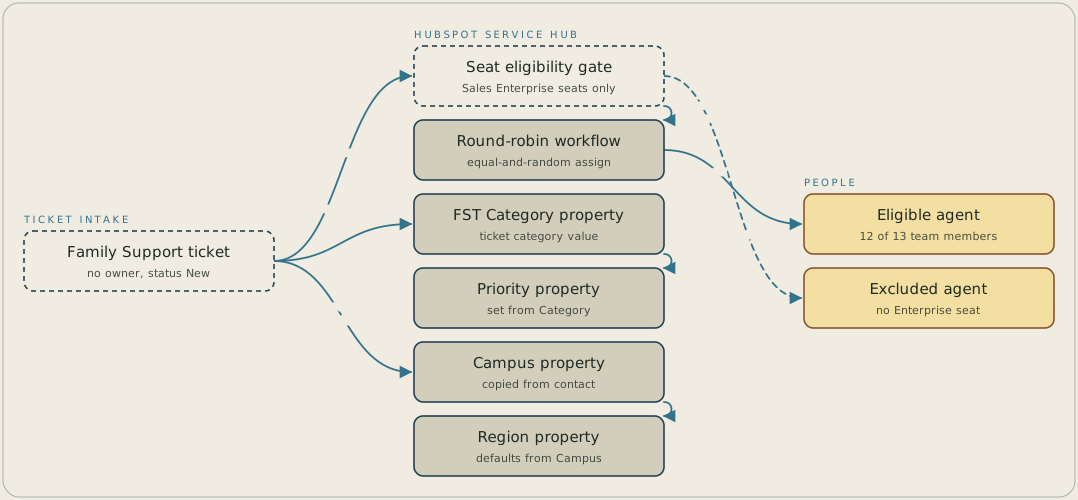
A new Family Support ticket with no owner and a New status triggers two automations. One rotates the ticket, equally and randomly, among staff holding paid Sales Enterprise seats, which reaches twelve of the thirteen agents and leaves one out. The other reads FST Category and sets Priority from a fixed mapping, then copies Campus from the associated contact and defaults Region from that Campus.
FAQ
Eligibility for the rotation is tied to holding a paid Sales Enterprise seat. Twelve of the team's thirteen Family Support agents held one at the time. The thirteenth didn't, and HubSpot's rotate-record action has no mechanism to include a user outside that eligibility set.
Not with the action used here. HubSpot's rotate-record distribution is equal and random across eligible users, and it has no setting for a fixed count or a weighted share per agent. So we accepted that ceiling rather than building a workaround outside the native action.


