

A Course Completion Signal Stock HubLMS Could Not Send
A stock HubLMS template could host video lessons, but it couldn't gate them past the first module, run a call to action inside a quiz, or serve a downloads module. So a developer built each one before the course could ship. Finishing every module then had to change a HubSpot contact into a marketing-qualified lead on its own, without anyone checking a list by hand.
Executive Summary

Context
A Sydney market research and FMCG product innovation consultancy asked us to build a free HubLMS course on new product development inside its own HubSpot CMS. The aim was to test appetite for a future paid programme before committing to build one.

What We Built
We built a ten-module course on HubLMS inside the client's HubSpot CMS. We scripted and filmed each lesson and customised the stock templates so content could be gated, a quiz could carry its own call to action, and a downloads module could sit inside a lesson. Finishing the course triggers HubSpot to enrol the participant as a marketing-qualified lead.

Tech Stack
- HubLMS
- HubSpot CMS Hub
- HubSpot Marketing Hub
- HubSpot contact enrollment workflow
Not a fit if a course only needs to be watched. Developer work on a stock LMS template earns its cost when completion changes something else: a contact record, a lifecycle stage, a nurture enrolment. A course with no gate and no destination system needs only a native video embed on a landing page.

The Challenge
HubLMS ships with a template library built for a generic course, not one meant to filter and hand off finishers. The brief called for every module past the first to be gated behind sign-up, a call to action inside the quiz itself, and a place inside a module for a participant to take supporting material away. None of those three existed in the stock template set.
None of them would have mattered without a way for the platform's own completion data to reach HubSpot. A course that couldn't report who finished it couldn't qualify anyone.

Our Approach
A visitor signs up through a landing page or an Expressions of Interest list, then picks modules from a course library rather than working through a fixed sequence. The client chose no lesson-to-lesson dependency, so every lesson becomes available the moment someone signs up. Content still gates from the second module onward, a rule the stock template didn't support.
A developer built that gate directly, then added a call to action inside each quiz and a downloads module, neither of which existed in the template library. Engagement data from HubLMS feeds back into HubSpot as modules complete. When the participant finishes the course, their record changes to a marketing-qualified lead and they're enrolled in a nurture, without anyone reviewing a completion list by hand.

Impact

A gate the stock template did not include
Modules past the first stayed locked until sign-up. The stock HubLMS template set didn't offer that on its own, so a developer built the gate directly into the course rather than relying on the platform's defaults.
A call to action living inside the quiz itself
Each module's quiz carried its own call to action rather than waiting for a course-level summary page. The template library didn't provide that, so it had to be added by hand for this brief.
A downloads module the platform did not ship with
Supporting material needed a place inside a module, and the stock template didn't offer a downloads module. So we built one, and a participant could take material away without leaving the lesson.
Completion that changes a HubSpot record on its own
Finishing the course reaches HubSpot as engagement data and changes the participant's record to a marketing-qualified lead, enrolling them into a nurture without a person checking who finished.
Every module past the first stays locked until sign-up completes. The rule is built directly into the course, because the template set had no equivalent setting.
A call to action sits inside each module's quiz rather than only at the end of the course, prompting a participant while still inside the lesson.
A module can carry a downloads section for supporting material, a component the stock template set didn't include.
HubLMS reports engagement data back into HubSpot as a participant finishes modules, and completing the full ten-module course changes that contact's record and enrols them into a nurture as a marketing-qualified lead.
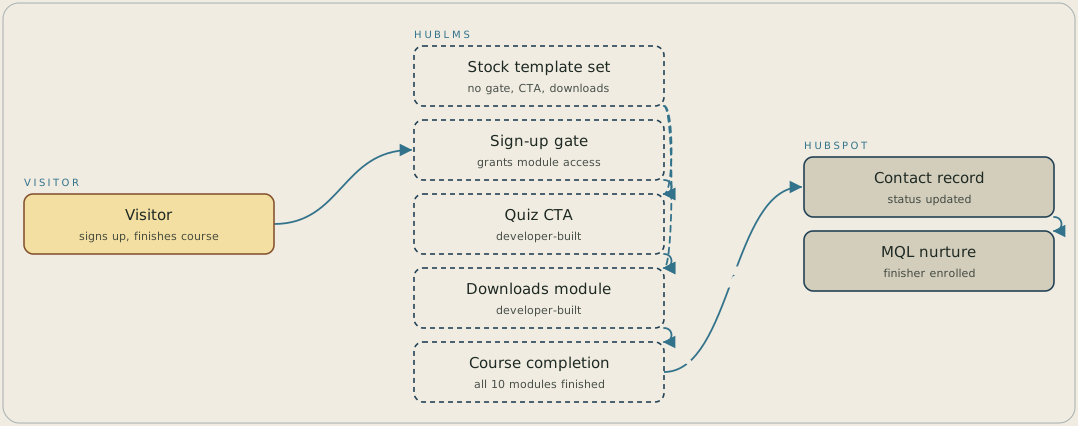
A visitor signs up, and from the second module onward that sign-up is what unlocks access in HubLMS. The stock template set had no gate, no quiz call to action and no downloads module, so a developer built each of them. When the visitor finishes all ten modules, HubLMS syncs the engagement data to HubSpot, which updates the contact record and enrols the finisher in a marketing-qualified nurture.
FAQ
The stock HubLMS template set didn't support gating content past the first module, placing a call to action inside a quiz, or adding a downloads module to a lesson. All three had to be built directly into the course before it could ship the way the brief called for.
Completing all ten modules changes the participant's contact record and enrols them into a nurture as a marketing-qualified lead, driven by engagement data HubLMS feeds back into HubSpot as modules are completed.


