

A custom HubSpot Person object for donor records that share one email address

A private university's advancement office keeps one donor behind a shared email more often than most CRM vendors expect: a spouse, an assistant answering for someone, a parent and child under one household address. HubSpot's Contact object deduplicates strictly on that address, collapsing distinct people into one record. We built a custom Person object as the sync's target, bridged back to Contact by workflows.
Executive Summary

Context
The client is a private university's advancement division, migrating donor and alumni marketing onto HubSpot Marketing Hub Enterprise while a separate integration connects HubSpot to the university's Blackbaud CRM, the system of record for every constituent and gift. That CRM's export includes constituents who share one email, a shape the Contact object can't represent.

What We Built
We built a custom Person object as the primary target for the daily sync, matched through multi-key ID matching so a shared email never collapses two people into one record. A signed webhook carries subscription changes back to the source CRM, and a phased deactivation sequence governs when a shared-email Contact is suppressed.

Tech Stack
- Custom HubSpot Person object, HubSpot Contact object, HubSpot workflows, HubSpot public app (signed-request auth), a client-owned integration platform, a client-owned data warehouse, MuleSoft middleware, a Constituent System ID used in multi-key ID matching.
Not a fit if your organization doesn't have an engineering resource of its own to build the integration-tool side of the sync: this assumes a developer on your team owns that build while the architecture and spec are handled externally. It also assumes your team can run a second, independent portal alongside a simultaneous migration elsewhere.

The Challenge
HubSpot's standard Contact object deduplicates records on email alone. The university's donor data often puts more than one real person behind a single address: a spouse, an assistant who answers for an alumnus, or a parent and child linked to one household inbox.
A straight sync into Contact would have merged those constituents into single records. It would also have left no route back to the Blackbaud CRM, which remains the system of record.

Our Approach
We ruled out syncing into the standard Contact object first. HubSpot's deduplication treats one email as one person, so the sync would have merged spouses, parent and child pairs, and an alumnus's assistant into a single record.
Instead we built a custom Person object, filled by a daily batch that runs multi-key ID matching: HubSpot's own ID first, then the Constituent System ID, with email last. Workflows bridge Person back to Contact.
Subscription status needed the same care in reverse. HubSpot doesn't expose a single workflow token for which subscription changed, so a watcher workflow writes that identity onto the contact. A second workflow then signs a request to the university's middleware. We authenticated it with HubSpot's own signature scheme rather than an API key, which meant building a new public app once the legacy developer-portal path was retired.

Impact

Real constituents stay distinct instead of merging into one record
The multi-key match checks HubSpot's own ID and the Constituent System ID before falling back to email, so two people sharing an inbox arrive as two Person records rather than one merged Contact. Advancement staff can still solicit each constituent individually.
Subscription changes reach the source CRM without a manual export
A watcher workflow captures which subscription just changed and hands it to a second workflow that signs a request to the middleware. HubSpot's own tooling can't do that in one step. A signature and freshness check travel with the request, so it reaches the source system inside the one-minute window the design set.
Deactivation follows the same shared-email logic all the way through
A Contact tied to more than one Person isn't marked non-marketable until every linked Person is deactivated on the source side, so a shared-email couple don't lose marketing status when only one is removed. The hard delete that follows is held back sixty to ninety days, keeping engagement statistics intact.
The architecture is signed off ahead of the build that depends on it
Discovery, the requirements document, and the HubSpot-side architecture were declared complete and billable before the university's own developer began the build those specifications drive. The object model, the matching key, and the webhook contract were fixed first, so the build that follows has a specification to build against.
Each record from the daily batch goes through multi-key ID matching: HubSpot's own record ID first, then the Constituent System ID, then email as a fallback. Email runs last because it is the one key Contact already treats as unique.
A watcher workflow runs per subscription type, writing the changed subscription's ID and name onto two contact properties and flipping a trigger property that enrolls the contact in one outbound workflow. That workflow signs the request, since HubSpot doesn't expose a single workflow token that names which subscription changed.
The outbound request carries a signature from the app's client secret, the HTTP method, the URI, and the raw body, checked against a freshness window on the receiving end. Building the app required the newer Projects and CLI framework, since the legacy path for creating one had already been retired.
A Contact is flagged non-marketable only once every Person record tied to it is deactivated on the source side, since a shared-email Contact can still have an active Person attached. The hard delete that follows waits sixty to ninety days, preserving engagement statistics through the send window.
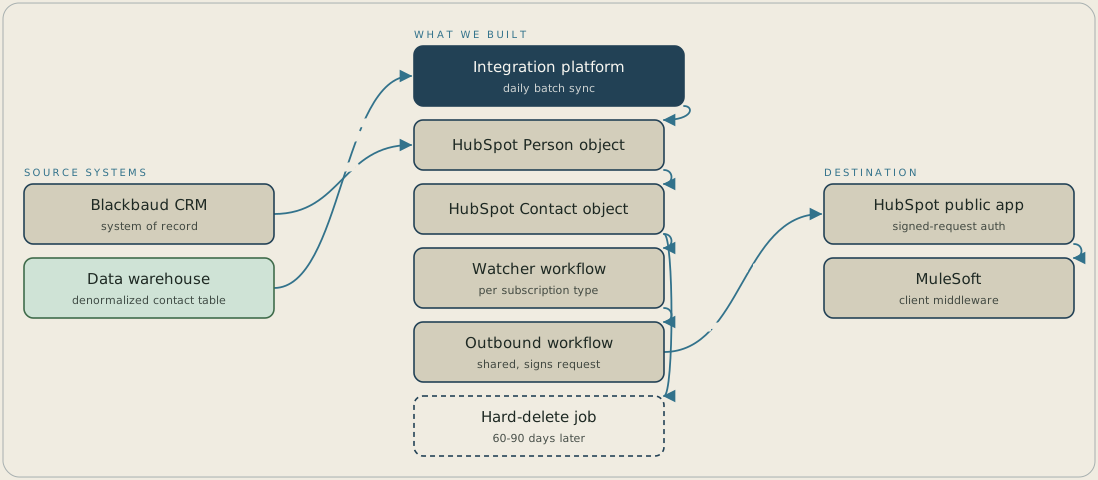
Each day the integration platform reads a denormalized contact table built from Blackbaud CRM and matches each record on HubSpot record ID, then Constituent System ID, then email, before writing it to the custom Person object that workflows bridge to Contact. When a contact's subscription changes, a watcher workflow hands off to a shared outbound workflow, which signs a request through a HubSpot public app to the university's MuleSoft middleware in under a minute. When a constituent is deactivated in the CRM, the Contact is flagged non-marketable only once every linked Person is deactivated, and the hard delete follows 60 to 90 days later.
FAQ
It checks HubSpot's own record ID and the Constituent System ID before matching on email, and writes into a custom Person object rather than the standard Contact record. Email comes into play only as a last resort, so a shared inbox keeps separate records instead of one merged Contact.
HubSpot's workflow tooling doesn't expose a single token inside one run for which subscription just changed. A watcher workflow writes that identity onto the contact first, and a second workflow reads it and signs the request to the university's middleware.


