

A Legacy CRM Migration Built Around HubSpot's De-duplication Key

A professional services firm running its sales pipeline on ACT! CRM needed roughly 9,000 contacts, their companies, and years of notes and activities moved into HubSpot before a self-set January deadline, and close to 1,500 of those contacts had no email address, the field HubSpot uses to prevent duplicate records. We staged the cutover: a reviewed test import first, then a full move that resolved the missing-email gap, rebuilt company hierarchy, and reassigned ownership for departed staff.
Executive Summary

Context
An Australian valuation and auctioneering firm serving commercial property, healthcare, plant and equipment, and business valuations ran its sales pipeline on ACT!, a desktop CRM used for years across four state offices. The firm had already set its own deadline to retire ACT! in favour of HubSpot as the primary sales system.

What We Built
We migrated the firm's ACT! contact and company database, including historical notes and activities, into HubSpot, then rebuilt the ownership and company-hierarchy structure ACT! had never modelled.

Tech Stack
- ACT! CRM, HubSpot Sales Hub
Not a fit if your HubSpot subscription tier isn't settled yet, since which automation features are available, such as Workflows, depends on that choice. It should be locked in before a migration plan is built around it. It's also not a fit if departing or external staff still need to own CRM records but won't get an active HubSpot user login, since the owner field can't resolve to anyone without one.

The Challenge
The firm ran roughly 9,000 contacts and companies through ACT!, a desktop CRM built up over years across four state offices. It also held notes and activities that ACT! couldn't hand off to HubSpot natively. HubSpot's contact model prevents duplicates by matching on each record's email address, but close to 1,500 legacy contacts didn't have one on file, so that match couldn't work for them.
ACT! had also never modelled a company as anything other than one record per branch office, so the same company could appear several times under different addresses. Some account managers that ACT! still listed as record owners had already left the firm. HubSpot's owner field only resolves to an active user account, so those records needed a different destination before cutover.

Our Approach
We ran a reviewed test import first, loading sample Contacts and Companies into the live HubSpot portal to check what carried over before the full cutover. For the contacts with no email address, we flagged the roughly 1,479 affected records rather than forcing them through HubSpot's email key, and put the decision on excluding them to the firm.
Rather than import ACT!'s one-company-per-branch-office structure as it was, we consolidated matching names and rebuilt roughly 20 to 30 larger accounts as parent and child companies, using the firm's own list of which office belonged under which parent. Ownership followed the same rule: any contact whose ACT! owner no longer had a HubSpot login was reassigned to a current staff member.
Notes and activities didn't have a native import path, so that data waited for a separate paid third-party tool, brought in once the Contact and Company records had landed. We set notes to be held for 10 years and activities for 5, per the firm's policy, with HubSpot's 90-day deleted-record window as a safety net.

Impact

A single CRM record for every client relationship
Every contact, company, and linked note that HubSpot's import tools could carry moved out of ACT! into one system, so the sales team stopped checking two platforms for a client's history.
Account ownership that always resolves to a real person
Every migrated contact carries an owner field pointing at someone currently on staff, since any account manager who had left was remapped to a current team member rather than left unassigned. A rep opening any of the roughly 9,000 records finds a live owner to follow up with.
Company records that match how the business is structured
Roughly 20 to 30 larger accounts now sit in HubSpot as parent and child companies instead of separate records per state office, since the migration consolidated ACT!'s one-record-per-branch pattern. The sales team gets a single company view across locations.
A CRM ready for daily use across every team
Email and calendar connections, the Meetings tool, and Team Inbox were configured and documented in a set-up guide, and a six-tier permission structure was built across four business units, each scoped to its own work.
HubSpot treats email address as the unique key for a contact record, so an import must resolve every record against that field. Roughly 1,479 legacy contacts had no email on file, so those records were flagged separately and excluded pending a direct decision from the firm.
ACT! stored each branch office of the same company as its own record, with no relationship between them. HubSpot's parent and child company associations replaced that pattern for roughly 20 to 30 larger accounts, using the firm's list of which office belonged under which head company.
The HubSpot contact-owner field resolves only to an active user account, so any ACT! record whose account manager had left, or had no login, needed a new owner before cutover. Those records were remapped to a current staff member.
HubSpot doesn't have a native path for importing ACT!'s notes and activities, so that history moved through a third-party migration tool once the Contact and Company records were in place. Retention followed the firm's policy of 10 years for notes and 5 for activities.
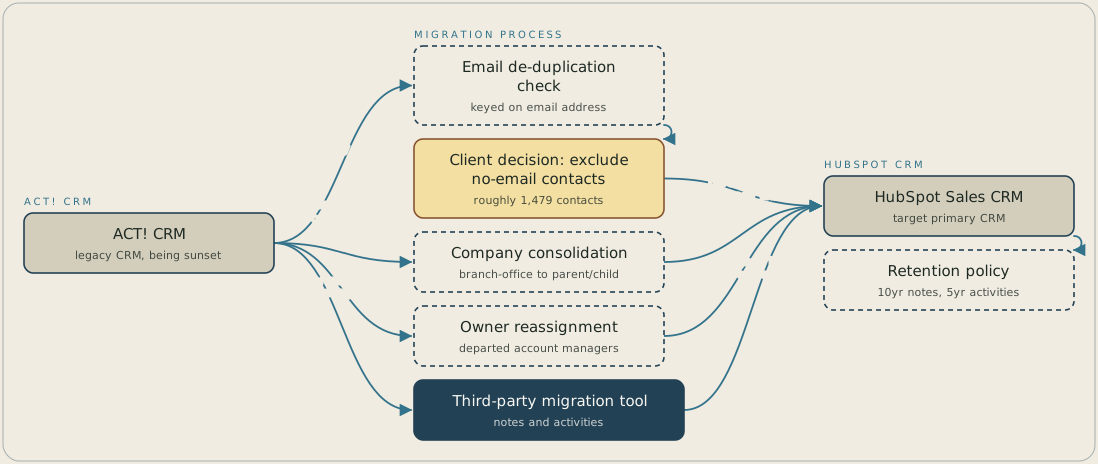
Contacts and companies leave ACT! CRM and pass an email de-duplication check on the way into HubSpot Sales CRM. A contact with no email address stops at a client decision on whether to import or exclude it. Company records are consolidated from ACT!'s one-record-per-branch-office pattern into parent and child companies, and contacts whose owner has left are reassigned to an active user. Notes and activities travel separately through a third-party migration tool, and only after the Contact and Company records have landed.
FAQ
If a legacy contact doesn't have an email address, HubSpot can't match it against an existing record, so it can't be de-duplicated automatically. On this migration, roughly 1,479 contacts fell into that group, and the decision on bringing each one across was put directly to the client.
HubSpot doesn't have a native import path for ACT!'s notes and activities, so that history travels through a separate paid third-party tool once the linked Contact and Company records are already in HubSpot. Retention afterwards follows whatever policy you set, with HubSpot's 90-day deleted-record window as a recovery safety net.


