

Knowledge Base Instances Split by Domain, Login, and Partner Brand
A native Knowledge Base instance ties to one domain, so a reverse brief naming three separate domains meant three separate builds, not one shared instance with a filter on top. The brief split an on-demand pharmacy's self-service content by audience: a public FAQ for retail customers, a login-gated library for internal support staff, and an instance built to a referral partner's own branding for customers arriving through that partnership.
Executive Summary

Context
An Australian on-demand pharmacy and medicine delivery service needed self-service content for three audiences who should not see the same thing. Customers asked about orders and scripts, staff needed detail no customer should read, and customers referred through a health-insurance partnership expected that partner's own look. One Service Hub feature, configured three times, served all three from one set of client-supplied FAQ material.

What We Built
We built three separate HubSpot Knowledge Base instances from one reverse brief: an open FAQ for retail customers, a gated instance for internal staff, and a partner-branded instance designed in Figma. Each drew its categories from the same client-supplied FAQ material.

Tech Stack
- HubSpot Service Hub
- Figma
Not a fit if one public FAQ already serves every audience a business has, since separate instances only pay off once audiences need different content, access, or a look. Also not a fit without one existing FAQ set ready to split, since three taxonomies depend on that material already existing before any instance gets built.

The Challenge
Three audiences needed three different experiences from what HubSpot ships as one Knowledge Base feature. Retail customers needed a public instance answering ordering, delivery, script, and medication questions with no internal detail beside it. Staff needed a second instance carrying operating detail no customer should see, so it could not sit on the public domain. Customers referred through a health-insurance partnership needed a third instance reading as that partner's own product, not the pharmacy's support page under someone else's name. A native instance binds to one domain, so three domains meant three instances, each still drawing from the same underlying FAQ material rather than three independently written sets.

Our Approach
The reverse brief set the domain, audience, and category structure for each instance before any build started: one open customer domain, one internal domain behind a login, one partner domain matching the referral partner's own colour scheme. The staff instance was gated with an email and password login so operating detail stayed off the public instance entirely. The partner instance was designed in Figma to the partner's branding rather than the pharmacy's, so a referred customer would recognise the partner, not a third-party tool. All three categorised the same source material, covering ordering, delivery, scripts, and medications, differently per audience rather than duplicating one taxonomy three times.

Impact

a public FAQ instance carrying only customer-facing content
Retail customers reached one instance built solely around ordering, delivery, script, and medication questions, with no staff process detail or partner branding anywhere near it, keeping the public domain focused on what a customer actually asked.
an internal instance staff could use without exposing process detail publicly
Support staff got a second instance behind an email and password login, so operating detail that never belonged on a public page had somewhere to live without becoming a public exposure question of its own.
a partner-branded instance that reads as the partner's, not the pharmacy's
Customers referred through a health-insurance partnership reached an instance designed to that partner's own branding, supporting the referral relationship without turning the partner's customers into visitors on an unfamiliar third-party support page.
three instances from one FAQ source, not three separately written ones
Every instance drew its categories from the same client-supplied FAQ material, so building three audiences' worth of content meant re-categorising one source three ways rather than commissioning three unrelated content sets.
The customer-facing instance used its own public domain, scoped to ordering, delivery, script, and medication questions pulled from the client-supplied FAQ material, with no internal or partner content anywhere on it.
The staff-facing instance required an email and password login before any page loaded, the mechanism that let it carry operating detail the public instance could not, without that detail becoming visible outside the support team.
The third instance was designed in Figma to a referral partner's own colour scheme and identity rather than the pharmacy's, so customers arriving through that partnership saw the partner's branding, not a generic knowledge base.
Each instance organised the same underlying client-supplied FAQ material, covering ordering, delivery, scripts, and specific medications, into its own category structure suited to its audience rather than reusing one taxonomy across all three.
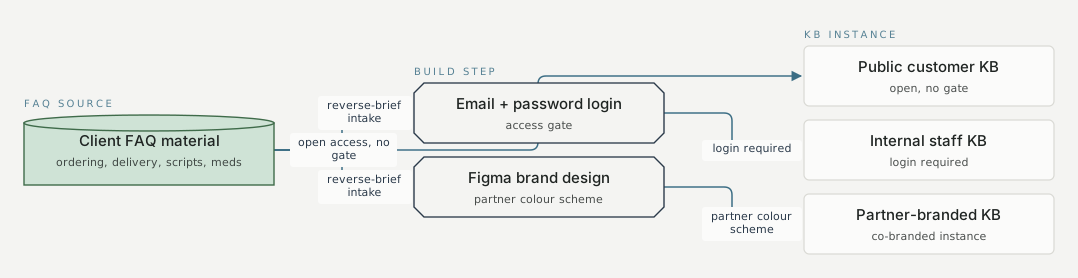
FAQ source Build step KB instance Client FAQ material ordering, delivery, scripts, meds Email + password login access gate Figma brand design partner colour scheme Public customer KB open, no gate Internal staff KB login required Partner-branded KB co-branded instance open access, no gate reverse-brief intake (domain, branding, categories) reverse-brief intake reverse-brief intake (domain, branding, categories) login required requires an email and password login reverse-brief intake reverse-brief intake (domain, branding, categories) partner colour scheme partner co-branded
FAQ
Because a native Knowledge Base instance binds to one domain. Three audiences needed three different domains, an open one for customers, a login-gated one for staff, and a partner-branded one for referred customers, so three domains meant three instances rather than one instance with a filter layered on top.
All three instances drew their categories from the same client-supplied FAQ material covering ordering, delivery, scripts, and medications. Only the domain, the access gate, and the Figma-designed branding changed between them, so the underlying content stayed one consistent source even as its presentation differed by audience.


