

A Service Hub Audit Built Around a Medical-Data Compliance Gate
Support agents were logging customers' disclosed medications and a custom Medicare Number field directly against Contact and ticket records, the exact pattern HubSpot's own Terms of Service treats as making Service Hub noncompliant for regulated health data. We audited every inbox, chatflow, and ticket pipeline the support team used inside Service Hub, isolated the three capture points responsible, and defined a remediation gate the client could action from its own admin settings.
Executive Summary

Context
An Australian on-demand pharmacy and medicine delivery service ran its post-purchase support entirely through HubSpot Service Hub: shared inboxes, two chatflows answering medication questions, and a ticket pipeline built up over tens of thousands of cases. A base of 140,000-plus customers meant every channel carried real prescription detail into a CRM built for general records, not health data.

What We Built
We delivered a Service Hub audit naming every inbox, chatflow, and property capturing sensitive medical detail, and handed the client a remediation gate: disable free-text input on the two medication chatflows, turn off automatic ticket creation, and remove the Medicare Number property.

Tech Stack
- HubSpot Service Hub, Zendesk, Aircall
Not a fit if you're running Service Hub work inside a fixed, hours-capped engagement too short to act on more than a portion of what a full review finds, since naming every capture point across inboxes, chatflows, and properties takes real audit time before remediation hours are even spent. It is also not a fit if the account still carries an old, uninstalled integration nobody has decommissioned, since a stray legacy property can carry the same exposure forward.

The Challenge
Two chatflows, a triage bot and a pharmacist-search bot, appeared on the Help, FAQ, About, Contact, and Ask-a-Pharmacist pages, taking free-text input from customers who often typed the exact drug and dose they were asking about. That text saved to the conversation record and, at times, the Contact record, alongside a custom Medicare Number property tracking a government rebate identifier. Shared inboxes and a ticket pipeline spanning tens of thousands of cases carried the same detail into ticket fields, with a legacy Zendesk integration's old properties still present. HubSpot's Terms of Service does not cover protected health information at that level, so each capture point put the account on the wrong side of the platform's terms. A six-month bucket funded the review, so the audit ranked which points to name first.

Our Approach
We reviewed the account inbox by inbox and pipeline by pipeline rather than pulling a portal-wide report, since one dashboard view would hide which stage actually captured the risky text. For each medication chatflow we traced the path: page-targeted display, a free-text question field, and a Customer Satisfaction Survey at close, with no validation step before the transcript saved. A blanket ban on chatbot free text would have broken the pharmacist-search flow's purpose, so the gate targets specific fields instead: disable free text on the two chatflows, turn off automatic ticket creation, and remove the Medicare Number property outright. The legacy Zendesk properties were flagged for cleanup rather than migration, since no workflow still read them. Every recommendation targets a setting or property the client's own admin can action, not a platform migration.

Impact

every capture point named, not just the obvious one
The Medicare Number property was easy to spot, so the review did not stop there: it named the two chatflows and the shared inboxes as capture points too, since removing only the property would leave free-text medication detail landing in ticket transcripts. The client now holds one list covering every place sensitive detail can enter Service Hub.
a remediation gate the client can action without a rebuild
Every recommendation ties to a Service Hub setting or property: disable free text on two named chatflows, turn off automatic ticket creation, delete one property. The client can act inside its existing admin console rather than commission a new project, so the bucket's remaining hours go towards the fix, not the specification.
a ticketing history checked for exposure, not just the live inboxes
The audit also traced legacy Zendesk ticket properties still present after that system's uninstall, since an old field left active could keep carrying medical detail even after Service Hub itself gets remediated. Flagging those for cleanup closed a path the live-channel fixes alone would have missed.
a ranked list inside a fixed-hours window
With sixty service hours and a six-month validity capping what could be actioned, the audit ranked the capture points instead of listing them without order, so the client's team knew which change to make first if hours ran out before the list did.
Every shared inbox and ticket pipeline was checked on its own rather than through one aggregate report, so a risky pattern in a single pipeline could not average out against cleaner ones. Each finding was matched back to the specific inbox or pipeline it came from.
The triage and pharmacist-search chatflows both close on a Customer Satisfaction Survey after taking a free-text question, and that field was the capture point: a customer typing a drug name or dose saves it to the record with no validation step. The gate disables free text on these two flows specifically, not chat generally.
A custom contact property had been added to store a government rebate identifier against the Contact record, a field a native HubSpot property was never built to hold. The gate calls for removing it rather than restricting its visibility, since a hidden field is still a stored field.
A prior ticketing system's properties remained on ticket records after that integration was uninstalled, with no active workflow reading them. The audit flagged them for cleanup rather than migration, since carrying an unused field forward would move the same exposure into a system nobody queries.
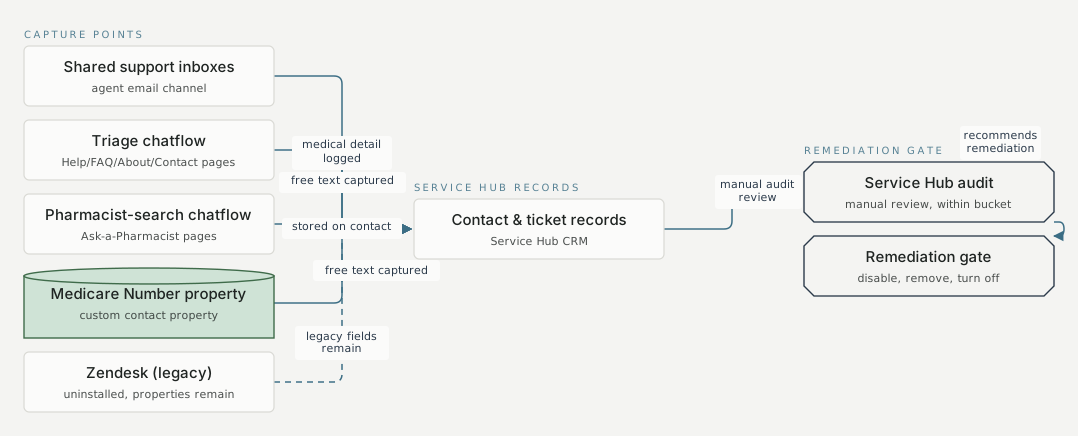
Capture points Service Hub records Remediation gate Shared support inboxes agent email channel Triage chatflow Help/FAQ/About/Contact pages Pharmacist-search chatflow Ask-a-Pharmacist pages Medicare Number property custom contact property Zendesk (legacy) uninstalled, properties remain Contact & ticket records Service Hub CRM Service Hub audit manual review, within bucket Remediation gate disable, remove, turn off medical detail logged mechanism 1 free text captured mechanism 2 free text captured mechanism 2 stored on contact mechanism 1 legacy fields remain mechanism 1 manual audit review mechanism 1 recommends remediation mechanism 1
FAQ
Not without changes to what a portal's inboxes, chatflows, and properties are set up to capture. Here, a custom property built to hold a health identifier, plus two chatflows taking free-text medication questions, were the exact points a Terms of Service compliance review flagged, each with its own fix inside existing admin settings.
It goes inbox by inbox and pipeline by pipeline rather than pulling one portal-wide report, tracing where free-text input or a custom property lands against a Contact or ticket record. The output is a named list of capture points and a remediation gate, not a general compliance score.


