

HubSpot Filters Cannot Time Hour-Scale Suppression Windows

More than thirty hand-written Marketo rules matched a contact's UTM and referrer values to a lead source. None ported literally, because the suppression logic layered on top needed something HubSpot's list filters and date branches do not offer: a way to ask whether a value was set within the last hour, not the last calendar day. We rebuilt the rules as one HubDB table and split the four suppression windows across native workflows and a custom-coded timestamp check.
Executive Summary

Context
The same global enterprise SaaS company consolidating its demand generation stack onto HubSpot depended on accurate lead-source attribution to route and score inbound contacts reaching its Salesforce CRM. More than thirty Marketo rules, plus a suppression layer preventing a later touch from overwriting an earlier source, had to move onto HubSpot unchanged.

What We Built
We built a HubDB table keyed on lead_source, lead_source_channel and lead_source_offer that replaces the legacy rules with one governed lookup, plus a four-window suppression layer. Two windows run on native boolean-flag-and-delay workflows; the two measured in hours run on a stored timestamp checked by custom code instead.

Tech Stack
- HubSpot
- HubDB
- Marketo
- Google Tag Manager
Not a fit if your suppression logic only compares against whole days, since the hybrid design exists for the two windows that do not. It also assumes UTM data reliable enough for one rules table, and a willingness to run the new layer alongside the legacy one.

The Challenge
Lead-source matching in Marketo ran on more than thirty separate UTM and referrer rules, each a potential source of drift if a campaign's tagging changed and nobody updated the rule reading it. A four-window suppression design sat on top: twelve hours against a paid touch, one hour each on a form submission and a qualified event, twenty-four hours on record creation. The two one-hour windows were the problem: HubSpot's filters and date branches compare against whole days, with no native condition for whether a field changed within the last hour.

Our Approach
The Marketo rules became one HubDB table keyed on lead_source, lead_source_channel and lead_source_offer, so reclassifying a channel is an edit to one row, not a search through dozens of rules. Google Tag Manager still delivers the values the table matches against.
The four windows split on what HubSpot could evaluate natively. The twelve-hour and twenty-four-hour windows run as boolean-flag-and-delay workflows: a property flips true, a timed delay holds it for the window, and the flag blocks or clears the write when the delay ends. The one-hour windows could not use that pattern, since a delay branch cannot tell whether an hour has elapsed against a rolling clock. Those two write a timestamp on the triggering event instead and check elapsed time with custom code, the design HubSpot's own recommendation settled on once the platform limit ruled out an all-native build. The client runs this layer alongside legacy Marketo logic through IP-warming.

Impact

One governed table replaces thirty scattered rules
Every rule that used to live as its own Marketo rule now reads from a single HubDB table. Reclassifying a channel is a row edit, not a search through more than thirty separate rules for the one that needs to change.
The two windows native workflows could not time now resolve correctly
The one-hour form-submission and qualified-event guards run against a stored timestamp checked by custom code rather than a native date branch that cannot see a rolling hour. A later touch inside that hour is suppressed instead of overwriting the source HubSpot already recorded.
The two day-scale windows stay native, with no custom code where none is needed
The twelve-hour and twenty-four-hour windows stayed on native boolean-flag-and-delay workflows, since HubSpot's own timed delay already evaluates a day-scale window correctly. Custom code was reserved for the two windows that actually needed it.
Go-live carries no unproven dependency on the new suppression layer
The new layer runs alongside legacy Marketo logic through IP-warming instead of replacing it outright at cutover. If the rebuild behaves unexpectedly against live traffic, the existing system is still the one setting lead source.
More than thirty Marketo UTM and referrer rules were consolidated into one HubDB table keyed on lead_source, lead_source_channel and lead_source_offer. Google Tag Manager still delivers the values the table matches against; one governed lookup now does the matching.
Four windows guard against a later touch overwriting an earlier lead-source value: twelve hours after a paid touch, one hour each after a form submission and a qualified event, and twenty-four hours after record creation. Each triggers on its own event.
The twelve-hour and twenty-four-hour windows run as native boolean-flag-and-delay workflows, where a timed delay branch correctly evaluates a day-scale wait. The two one-hour windows write a timestamp on their triggering event and check elapsed time with custom code instead, since HubSpot's date conditions cannot evaluate a rolling hour natively.
Rather than gate go-live on the new suppression layer, the client kept legacy Marketo lead-source logic running in parallel through IP-warming, proving the rebuild against live traffic with the existing system still in force.
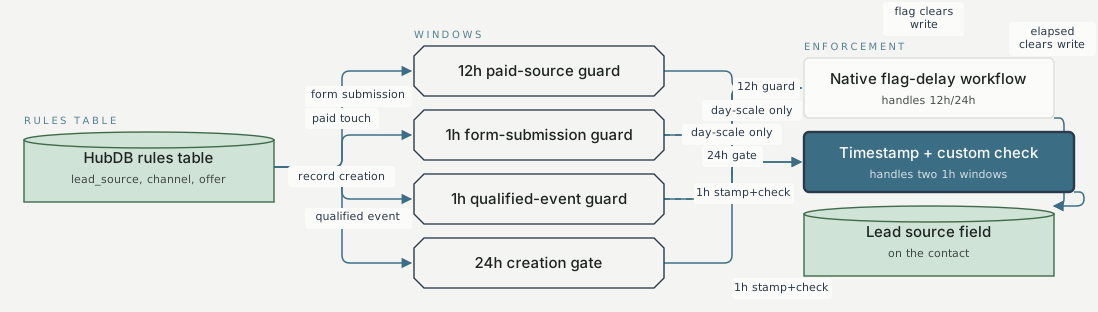
Rules table Windows Enforcement HubDB rules table lead_source, channel, offer 12h paid-source guard 1h form-submission guard 1h qualified-event guard 24h creation gate Native flag-delay workflow handles 12h/24h Timestamp + custom check handles two 1h windows Lead source field on the contact paid touch a paid touch, form submission, qualified event, or record creation form submission a paid touch, form submission, qualified event, or record creation qualified event a paid touch, form submission, qualified event, or record creation record creation a paid touch, form submission, qualified event, or record creation 12h guard 12-hour paid-source guard 24h gate 24-hour creation gate day-scale only cannot cleanly evaluate a rolling hour-scale window day-scale only cannot cleanly evaluate a rolling hour-scale window 1h stamp+check 1-hour form-submission guard 1h stamp+check 1-hour qualified guard flag clears write mechanism 5 elapsed clears write mechanism 5
FAQ
HubSpot's list filters and workflow date branches compare against whole calendar days, not a rolling count of hours. A rule asking whether a value changed within the last hour has no native condition to check against. The fix writes a timestamp on the triggering event and checks elapsed time with custom code, reserved for the two hour-scale windows while the day-scale windows stayed native.
The rebuilt layer had not yet run against a full cycle of live traffic, so the client runs it alongside legacy Marketo logic through IP-warming rather than cutting over in one step, keeping a working fallback while the new table and its windows prove themselves.


