

Modelling Shared-Email Contacts in HubSpot for Aged Care
A Power of Attorney holder, a carer, a social worker, and a treating doctor can share one household email address, and HubSpot allows exactly one contact record per address. We modelled each relationship as its own contact, joined to the resident through a same-object association and a label naming the relationship, ruling out a custom object and the dummy-email workaround the client had already flagged as junk data.
Executive Summary

Context
Residential care, home care, and retirement living enquiries pass through one shared Contact Centre, where a Power of Attorney holder, a carer, a social worker, or a doctor often shares the resident's own email address or one used across the household. The Centre needed each relationship visible on the resident's own record, not buried in a note or missing because HubSpot rejected a duplicate email.

What We Built
A same-object association pattern for HubSpot Contacts: every person sharing an aged-care resident's email gets a contact record with no email set, joined to the resident through an association carrying a label naming the relationship, Power of Attorney, carer, social worker, or doctor.

Tech Stack
- HubSpot Contacts, same-object contact associations, association labels
Not a fit if a related contact needs its own marketing emails or activity logging, since no email is set on that record. Also not a fit where related roles per person are unbounded; the label was built for a small, named set of relationships.

The Challenge
HubSpot treats an email address as a contact's unique identifier, so a second person with the same address can't get a second standard record. For this Contact Centre the collision was routine. A resident's Power of Attorney holder often manages correspondence from the resident's own inbox, and a carer, a social worker or a doctor often appear under that same address.
Recording only the resident would have hidden who was actually allowed to decide on a file.

Our Approach
We considered two workarounds before the build started: a custom object for related parties, and a dummy email per role. The custom object would have moved every non-resident contact outside HubSpot's native contact tools. The dummy email would have satisfied HubSpot's uniqueness rule but created junk data, which the client had already rejected.
So we gave each related person a real contact record with no email set, joined to the resident through a same-object association that carries a label: Power of Attorney, carer, social worker or doctor. Project Governance Meeting #1 confirmed this as the standing data model for every shared-email case. The trade-off is that a related contact can't receive its own marketing emails or have activity logged against an address, because no email is set on that record.

Impact

Every related contact is visible on the resident's own file
A rep opening a resident's record sees the Power of Attorney holder, carer, social worker, and doctor as associated contacts, each carrying a label naming the relationship, rather than names buried in a note.
No placeholder emails polluting the contact database
Rejecting the dummy-email workaround keeps every contact's email field genuinely unique or genuinely empty, so a future list segment or deduplication pass never has to filter out placeholder addresses first.
One data model for every shared-email case, not a one-off fix
The association-label pattern generalises to any relationship a resident's file needs, so a role the Centre hasn't yet met needs only a new label value, not a new workaround.
Related contacts stay inside native HubSpot tools
Each related person stays an ordinary contact record rather than a row in a separate custom object, so the Centre's existing lists, sequences, and reporting work on them exactly as they do on any other contact.
HubSpot uses a contact's email as its de-duplication key, so a second contact submitted with an email already on file updates the existing record instead of creating a new one. A shared household or Power-of-Attorney email runs into that rule the moment more than one person needs their own file.
A custom object for related parties was set aside because it would have moved every non-resident contact outside HubSpot's native contact tools, the lists, sequences, and workflows the Centre already relied on. A dummy email per role satisfies the uniqueness rule on paper, but the client had already ruled it out as junk data.
Each related person gets a standard contact record with no email set, joined to the resident's record through a same-object association. The association carries a label, Power of Attorney, carer, social worker, or doctor, naming the relationship rather than leaving it to memory or a note.
Project Governance Meeting #1 confirmed same-object associations as the approach for every shared-email case the Centre would meet, closing off the custom-object and dummy-email options project-wide.
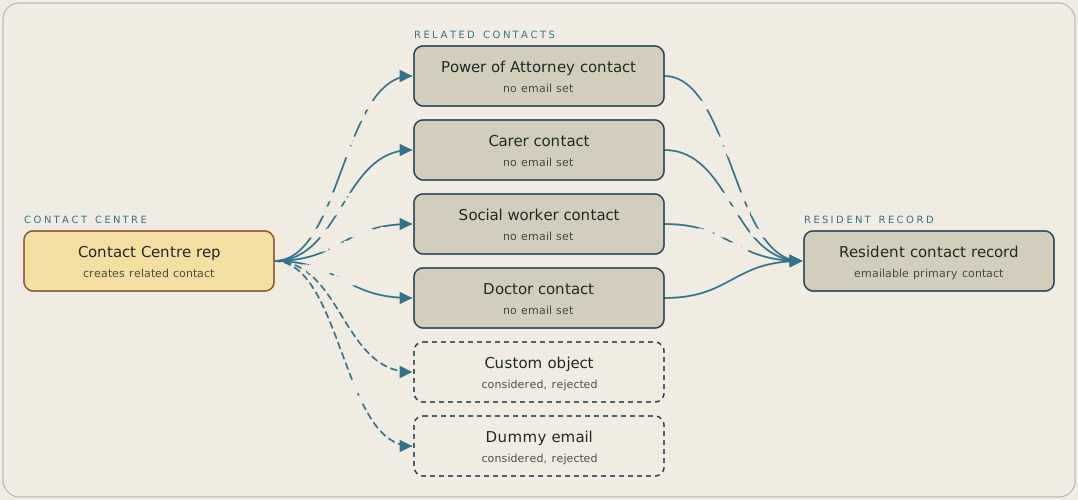
A Contact Centre rep creates a separate contact for each person who shares a resident's email address: a Power of Attorney holder, a carer, a social worker or a doctor. Each of those contacts has no email set and is joined to the resident's record by a same-object association, whose label names the relationship. A custom object and a dummy email per role were both considered and rejected.
FAQ
A custom object would have kept every related contact outside HubSpot's native contact tools: the lists, sequences, and workflows the Centre already uses. Same-object associations keep each related person as a real contact the rest of the portal already works with.
The client rejected a placeholder email per role before the build began, because it manufactures junk data: an address nobody reads on a record that looks like a live contact. The empty email field and the association label avoid that outcome.


