

Copper to HubSpot CRM Migration for a Gamified Training Platform

A training-software provider's legacy CRM carried roughly fifty duplicate custom fields on every object, from numbered social-profile fields to a dozen phone-number variants, none with a home in the platform it was moving to. We mapped every Copper property to its HubSpot equivalent, marking each one Keep, Archive, or Discuss before a single record moved. A Discuss flag held the import open until the client signed off, so the new CRM inherited a data model someone had reviewed.
Executive Summary

Context
A gamified sales and employee training software provider was switching its CRM from Copper to HubSpot as part of a broader marketing-management handoff from its previous agency. Years of ad hoc customization had left Copper's records carrying dozens of near-duplicate fields nobody had cleaned up.

What We Built
We mapped every Copper Lead, People, Company, and Opportunity property to its HubSpot Contact, Company, or Deal equivalent, disposition by disposition, and gated any ambiguous field behind a client sign-off before it reached the import.

Tech Stack
- Copper CRM (formerly ProsperWorks), HubSpot CRM, Marketing Hub, Sales Hub, Intercom, Typeform, Stripe, WordPress
Not a fit if your outgoing CRM vendor or agency still controls admin access. This migration only started once the prior agency stepped back, and until then a field-by-field mapping has nothing to run against. It also assumes real duplicate-field debt; a CRM with a small, already-unique property set does not need a review this heavy.

The Challenge
Copper's object model had grown numbered fields the way spreadsheets do: Social 1 through Social 51, Website 1 through Website 17, and a dozen Phone Number variants. They had been added years apart and never consolidated.
HubSpot had no equivalent property for the great majority of them. A mechanical import would have carried that sprawl into the new system and treated years of debt as if it belonged there.
The prior agency's departure also set a hard deadline. The mapping had to be right before the handoff closed, because nobody was coming back to redo it once records went live.

Our Approach
We considered a direct field-for-field import first, keeping Copper's schema intact. But HubSpot has no slot for a fifty-first social handle or a twelfth phone number, so anything copied over verbatim would have sat unused or failed silently.
Instead, we gave every property a disposition. Keep meant a live HubSpot equivalent, Archive meant duplicate sprawl with no destination, and Discuss meant the field was ambiguous. A Discuss flag worked as a gate rather than a note: the field stayed out of the import queue until the client signed off, ahead of go-live.
The trade-off is that we gave up speed for correctness. The client ended up with a HubSpot instance that answers only to Contact, Company and Deal.

Impact

A CRM schema built to be used, not just moved
Every property that survived the migration had a working HubSpot destination, because the Keep, Archive, and Discuss disposition ruled out the alternative before go-live. The client took over a Contact, Company, and Deal model built for its own team to query against, not one still shaped by Copper's years of custom fields.
A sign-off gate instead of a silent default
Any field marked Discuss stopped the import cold until the client reviewed it, so an ambiguous property never defaulted to Keep or Archive on someone else's call. That gate gave the client a documented decision on every uncertain field rather than a migration log to audit after the fact.
A clean base for the workstreams that followed
Because the object model landed clean, the multi-touch attribution build and the lead-scoring rollout that followed could write their own hidden properties directly onto Contact and Company records, instead of untangling which Copper fields still meant something. The migration became the foundation the rest of the HubSpot work stood on.
A handoff the team didn't have to freeze for
The mapping closed as a one-time pass ahead of go-live, timed to the prior agency's departure rather than a slow trickle of decisions made after records were live. The client made each Keep, Archive, or Discuss call once, during the handoff window, not repeatedly as edge cases surfaced later.
Every Copper property on the Lead, People, Company, and Opportunity objects got one of three dispositions before any data moved. Keep meant a direct match onto the HubSpot equivalent; Archive meant no destination existed; Discuss meant it needed a human call.
A field flagged Discuss did not import under a default assumption. It sat outside the migration queue until the client reviewed it and returned a decision, which the mapping document then recorded against that property before the one-time, pre-go-live import ran.
Copper's numbered fields, Social 1 through Social 51, Website 1 through Website 17, Phone Number 1 through Phone Number 12 among them, were assessed as a group, since HubSpot had no equivalent slot for the pattern. Most were dispositioned to Archive rather than carried forward unused.
The mapping translated Copper's Lead, People, Company, and Opportunity objects onto HubSpot's Contact, Company, and Deal structure, the same object model the engagement's later workflows, including lead scoring and multi-touch attribution, were built against.
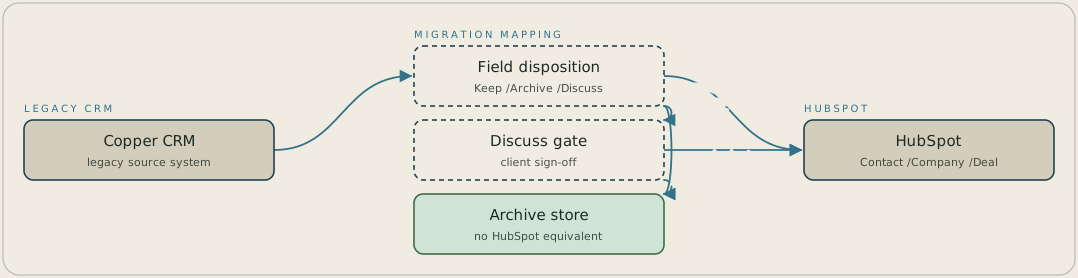
Every property on Copper's Lead, People, Company and Opportunity objects passes through a field-by-field mapping, where it's marked Keep, Archive or Discuss. Keep fields with a live HubSpot equivalent go straight into Contact, Company or Deal records, and Archive fields with no equivalent go to an archive store. A Discuss field waits at a client sign-off gate, and then either imports into HubSpot or is archived instead.
FAQ
They get dispositioned to Archive rather than forced into a mismatched HubSpot property. Copper's duplicate numbered fields, dozens of them per object, had no destination in HubSpot's schema, so the mapping preserved their record outside the live system instead of importing unused properties.
The client does, on anything ambiguous. Every property got a Keep, Archive, or Discuss disposition, and a Discuss flag held that field out of the import until the client signed off, so the decision sat with the people who knew what the data was for.


