

Salesforce-to-HubSpot Integration for a Multi-Brand Aged Care Charity
An independent charitable aged-care and home-care provider ran several affiliated brands, from residential care to a training arm, through one shared HubSpot portal. But Salesforce held the consumer and lead data behind it, with no native way to push a submitted web form record across. We built a relay through the client's own server and the HubSpot Forms API instead. A Salesforce confirmation decides whether HubSpot can market to the new contact, and Business Units, Team Access Rules and Content Partitioning keep one brand's team from opening another's records inside the same portal.
Executive Summary

Context
The provider's marketing and admissions data sat in Salesforce, fed by Forms Assembly web forms. Several sibling brands, including a dementia-care arm and a sales-enablement division, needed to operate inside one shared HubSpot portal. Salesforce had no native connector to push a submitted form record into HubSpot, and none of the brands could be allowed to see another's contacts once the data arrived.

What We Built
We built a relay from Forms Assembly through Salesforce to the client's own server, with a custom API layer against HubSpot's Forms API. The relay is gated on a Salesforce confirmation and a status-change suppression rule. We also layered HubSpot Business Units with Team Access Rules and Content Partitioning across the sibling brands, so each brand's contacts stayed inside its own team's view.

Tech Stack
- HubSpot, Salesforce, Forms Assembly, HubSpot Forms API, HubSpot Business Units, Team Access Rules, Content Partitioning
Not a fit if you operate a single brand inside one HubSpot portal, since the Team Access Rules and Content Partitioning here exist to keep separate brand teams apart, not to organise one team's own data. It's also not a fit without a server of your own to run as middleware, because the relay depends on a client-owned server sitting between the source CRM and the HubSpot Forms API.

The Challenge
Consumer and lead data for the provider's aged-care and home-care brands lived in Salesforce, fed by Forms Assembly web forms on the public site. Salesforce didn't have a native way to push a submitted form into HubSpot, so the marketing team couldn't act on a new lead the moment it arrived. Someone had to move each record across by hand, or wait for a batch process. The problem grew as sibling brands, including a dementia-care arm and a training arm, joined the same HubSpot portal, because HubSpot's marketing lists depended on data that only existed on the Salesforce side of a missing bridge.
Bringing those brands onto one shared portal also created a second problem. HubSpot Business Units group brands together but don't, on their own, stop one brand's team from opening another brand's contact records.
With aged care, home care, a dementia-care arm and a sales-enablement division all in one contact database, a support rep on one brand could see, and potentially edit or message, a lead belonging to another brand. A shared charitable network couldn't accept that exposure.

Our Approach
We first looked at a direct Salesforce-to-HubSpot sync, but Salesforce didn't have a native path to push a Forms Assembly submission through to HubSpot, so we ruled it out before building anything. We designed a relay instead. A submission posts into Salesforce, and a process on the client's own server, acting as middleware, picks it up and posts it on to HubSpot through a custom API layer built against the HubSpot Forms API. The relay keys on Contact Name, Email and the Brand or Division field.
Two gates control what happens next. HubSpot adds a contact to the correct Division's marketing list only after Salesforce confirms it created the record. A second gate watches for a status change, such as a contact becoming a customer or opting out, and removes or re-routes that contact out of marketing communications.
On top of the relay, Business Units, Team Access Rules and Content Partitioning scope View, Edit, Delete and Communicate access on every contact to Everything, Team Only, Owned Only or None. That scoping ties to the Brand or Division property that a workflow sets when a record is created. It trades one flat contact database for four separate views of it, which is the logical partitioning the portal needed once Business Units alone proved insufficient.

Impact

New leads reach marketing the moment Salesforce confirms them
A Forms Assembly submission now flows through Salesforce and the client's own server to the HubSpot Forms API without anyone moving the record by hand. A new lead reaches the correct Division's marketing list once Salesforce confirms the contact exists. A second gate watches for a status change, so a contact who becomes a customer or opts out is removed or re-routed automatically.
One brand's team can no longer open another brand's contacts
Every contact now carries a Brand or Division property set when the record is created, and View, Edit, Delete and Communicate access is scoped to Everything, Team Only, Owned Only or None for each user and role. That closed the exposure Business Units alone left open. A support rep on one sibling brand can no longer see, edit or message a lead that belongs to a different brand on the same portal.
The relay closed a gap no native connector could reach
Salesforce didn't have a built-in way to push a form submission to HubSpot. The client's own server now sits in the middle of that handoff as middleware, translating a Salesforce record into a HubSpot Forms API call as soon as it appears. The lead pipeline keeps moving without waiting on a Salesforce feature that was never going to ship.
Every sibling brand runs on the same isolation rules
The Division property, the two-gate suppression logic and the Team Access Rules apply the same way across every brand on the shared portal, so a brand added later inherits the same partitioning instead of needing a one-off build. That consistency let the aged-care, home-care, dementia-care and sales-enablement teams share one HubSpot instance without one team's send list including another's contacts.
A consumer's Forms Assembly submission posts into Salesforce first. A process on the client's own server watches for new records and posts each one on to HubSpot through a custom API layer built against the HubSpot Forms API. The relay keys on Contact Name, Email and the Brand or Division field, so nobody needs to re-enter a submission by hand.
The first gate holds a new contact out of any Division's marketing list until Salesforce confirms the record exists, so HubSpot never sends to a lead that Salesforce hasn't yet accepted. The second gate watches for a status change and removes or re-routes the contact out of marketing communications on that same signal.
A HubSpot workflow sets the Brand or Division property as soon as a contact record is created, and ties it to a Contact Owner and a Team. Every downstream permission and marketing-list decision reads from this one property, so the relay and the access rules stay in sync.
HubSpot Business Units group the sibling brands, but View, Edit, Delete and Communicate access on each contact still had to be scoped separately to Everything, Team Only, Owned Only or None. Team Access Rules and Content Partitioning carry that partitioning, and they close the gap Business Units leave open between brands sharing one portal.
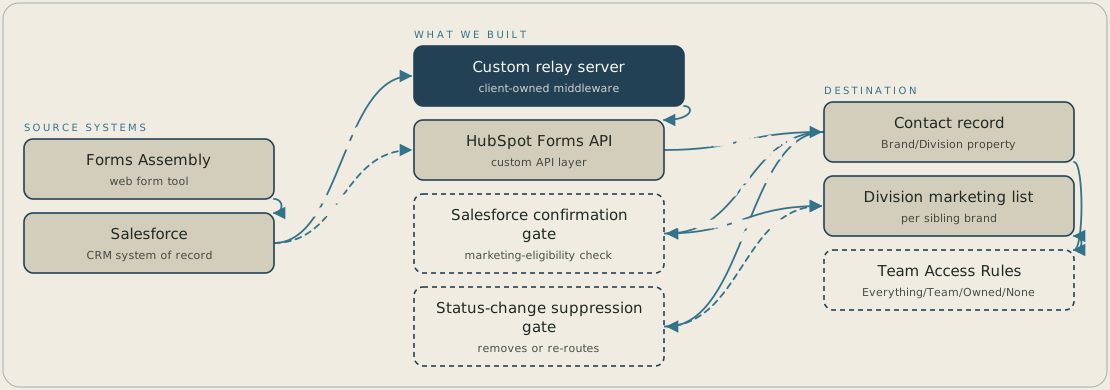
A consumer submits a Forms Assembly form, which lands in Salesforce. Salesforce has no native path into HubSpot, so a relay on the client's own server picks up each submission and posts the name, email and Brand or Division key through the HubSpot Forms API to create the contact. The contact joins its Division's marketing list only after Salesforce confirms the record, and a status change such as becoming a customer or opting out removes or re-routes it. Team Access Rules, keyed to the Brand or Division property set at creation, limit which brand team can open each list and contact.
FAQ
HubSpot's native Salesforce connector assumes Salesforce can push records to HubSpot directly, and this client's Salesforce setup didn't have a path for a Forms Assembly submission. So a native connector was never an option for this data flow. We built a relay through the client's own server and a custom API layer against the HubSpot Forms API instead.
HubSpot Business Units organise the sibling brands but don't restrict who can open a record. So we layered Team Access Rules and Content Partitioning on top, scoping View, Edit, Delete and Communicate access on every contact to Everything, Team Only, Owned Only or None. That scoping reads off the Brand or Division property that a workflow sets when a contact record is created.


