

Lifecycle Stage Automation for a National Membership Organization

A national membership organisation's HubSpot portal held more than 150,000 contacts sitting across the platform's five default lifecycle stages, subscriber through customer, with no logic assigning a contact to any of them. We rebuilt the property into a nine-stage model matching the organisation's real recruitment funnel and built a single workflow that assigns each stage from touchpoint activity.
Executive Summary

Context
The client is a national trade union and membership body recruiting and retaining members through a HubSpot portal with more than 150,000 contact records. Its lifecycle stage property had never moved past HubSpot's defaults, so a recruiter couldn't tell a hot prospect from a lapsed member without reading raw history.

What We Built
We replaced the default lifecycle stage set with a nine-stage model spanning Unqualified, Cold, Warm, Heating Up, and Hot Lead through Member, Resigned Member, and Engaged or Unengaged Supporter, and built a workflow that assigns every contact its stage automatically from touchpoint activity rather than a manual tag.

Tech Stack
- HubSpot Marketing Hub, HubSpot workflows, Google Analytics, UnionWare
Not a fit if your portal is already close to its workflow allowance with no governance pass planned first, since this adds another automation the account has to hold. It also assumes a committed pair of staff who can sit through live training across several months, since the model only holds once they understand why each threshold moves a contact.

The Challenge
The organisation's HubSpot portal carried its lifecycle stages exactly as HubSpot ships them: subscriber, lead, marketing qualified lead, sales qualified lead, and customer. None of those five values means anything to a person deciding whether to join a union, and nothing moved a contact from one to the next as they engaged.
So staff read touchpoint history contact by contact to judge whether someone was warm, cooling, or gone, because the property didn't carry any signal. The default set was built for demand generation, not for a body that recruits and retains individual members.

Our Approach
We first considered keeping HubSpot's five stages and layering manual list views on top, sorting contacts by touchpoint count without renaming anything. That would have left the guesswork in place. And because the portal's workflow allowance had room for only twenty more automations, the fix couldn't be a set of small rules added one at a time.
So we rebuilt the stage property into a nine-stage model that matches the organisation's own recruitment funnel. A single workflow reads touchpoint activity (email opens and clicks, form submissions, page views and ad clicks) inside a rolling three-month window. It keys on the member status property combined with a running touchpoint count: one touchpoint moves a contact to Warm, two to Heating Up, and three to Hot Lead. A flag marks whether the contact currently falls inside or outside that coverage window.
Consolidating the logic into one workflow kept the build inside the portal's remaining automation headroom, at the cost of putting every stage rule in a single workflow.

Impact

Staff can see exactly where a contact stands in the membership funnel
A contact's lifecycle stage now updates from its own touchpoint history, so a recruiter sees Warm, Heating Up, or Hot Lead instead of a raw activity log, because the workflow recalculates it on every new touchpoint.
The funnel now speaks the organisation's own recruitment language
The nine stages carry the organisation's own terms, from Unqualified through Member, Resigned Member, and Engaged or Unengaged Supporter, so a report built on lifecycle stage speaks the membership team's language instead of subscriber and customer.
Dashboards can now filter on a real stage instead of a proxy
Because the stage property now reflects an actual funnel position, campaign and onboarding dashboards can segment by lifecycle stage directly, rather than falling back to touchpoint counts as a stand-in.
The fix fit inside the portal's own automation limits
Consolidating stage assignment into one workflow, rather than a rule per segment, kept the build inside the roughly twenty remaining workflow slots the portal had left.
The stage property was rebuilt from HubSpot's five defaults into nine values, Unqualified through Member, Resigned Member, and Engaged or Unengaged Supporter, naming a funnel position rather than a generic sales stage.
A single workflow evaluates touchpoint activity, email opens and clicks, form submissions, page views, and ad clicks, inside a rolling three-month window, and moves a contact between stages once it crosses one, two, or three touchpoints.
The workflow keys its logic on the member status property, member, pending, pending-failed online join, or resigned, combined with the touchpoint count, so a stage reflects both join progress and engagement, not either signal alone.
A separate flag marks whether a contact currently falls inside or outside the touchpoint-tracking window, so a contact who goes quiet doesn't stay pinned at Hot Lead. That distinguishes current engagement from a stage that has simply gone stale.
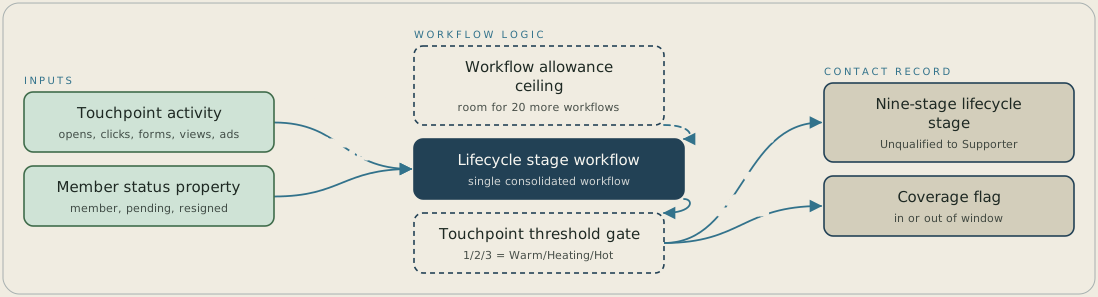
Touchpoint activity from a rolling three-month window (email opens and clicks, form submissions, page views and ad clicks) and each contact's member status property both feed one lifecycle workflow. The portal had room for only twenty more workflows, so all of the logic sits in this single workflow. It applies the thresholds, where one, two or three touchpoints mean Warm, Heating Up or Hot Lead, and writes the matching stage from the nine-stage lifecycle property. It also sets a flag showing whether the contact is currently inside or outside the coverage window.
FAQ
Not without rebuilding the stage property itself. HubSpot ships five stages built for demand generation, and none describes someone deciding whether to join an organisation or renew a membership. You can rename the labels, but nothing moves a contact between them until you build the assignment logic yourself.
Consolidate the assignment logic into a single workflow keyed on one property and a rolling touchpoint window, rather than a separate rule per segment. That keeps the automation count to one addition, which matters most on a portal already close to its workflow allowance.


