

A self-service HubSpot portal for a school furniture supplier's quotes and orders

General Users at the schools this furniture supplier serves had no way to check contract pricing, submit a quote, or track an order without going through a sales rep by phone or email. Approvers had no view of which quotes were sitting in their queue. We built a role-based HubSpot CMS Membership portal that gates the Products, Quotes, Orders, Tickets, and My Account pages by an association label between each Contact and their Company. It reads directly from HubSpot CRM and HubDB instead of a parallel system.
Executive Summary

Context
A furniture manufacturer and supplier to the education sector runs a contract pricing model across more than 400 SKUs, with school customers buying under negotiated Contract Type tiers rather than list price. Staff at those schools had no self-service way to check pricing, submit a quote, or see what had shipped, and every request routed through a sales rep by phone or email.

What We Built
We built a role-based HubSpot CMS Membership portal that gates the Products, Quotes, Orders, Tickets, and My Account pages by a Contact-to-Company association label. It replaces a manual, rep-mediated quote and order process with a self-service system that reads directly from HubSpot CRM and HubDB.

Tech Stack
- HubSpot CMS Hub (Membership), HubSpot CRM, HubDB, HubSpot Workflows
Not a fit if you don't already run a mature HubSpot CMS instance with an established theme, since this build extends an existing design system rather than creating one. It also depends on a Company-level pricing property already being in place. And it assumes that a fixed, modest delivery budget is acceptable in exchange for CRM-native approvals rather than a custom-built approve or reject interface.

The Challenge
General Users at the schools had no way to check contract pricing, submit a quote or track an order without going through a sales rep by phone or email. Approvers had no view of which quotes were sitting in their queue. The catalogue carried more than 400 SKUs, each configurable by finish and part, with tote boxes modelled as their own Part rather than a fixed accessory.
Early technical discovery explored a custom pricing engine, serverless logic and multi-part product configuration. That work would have taken the build well past the signed statement of work. A fixed Phase 1 budget of roughly 150 hours meant we had to drop that path and design around existing HubSpot CRM properties and Membership functionality instead.
HubSpot Membership added a second constraint, because it doesn't have a native permission tier that separates a General User from an Approver.

Our Approach
Our first read of the requirements pointed towards a purpose-built approve and reject interface on top of a custom pricing engine that could calculate quantity-based discounts on the fly, but that would have run past the signed scope of roughly 150 hours. We built approval around a HubSpot Deal record instead. A quote request creates one Deal, and a Sales Rep reviews it and sets a Ready for Approval property before the Approver sees it.
A workflow reminds the Approver after five days of no action, and a rejection requires a dropdown reason before the deal can move again. Approved deals route automatically into the Orders pipeline, so a Sales Rep never re-enters an approved quote by hand. Role separation uses the same CRM-native logic: an association label between the Contact and Company record marks a person as a General User or an Approver, and the portal's Membership rules read that label to gate the Approver-only pages.
The catalogue has its own constraint. HubDB rows can't be associated directly to HubSpot Line Items, so SKU is the join between a catalogue row and the line item a quote turns into once approved. The label approach carried one risk, which showed up in an April 2026 client test round when the label failed once, and the fix held on retest.

Impact

Quote requests reach an approver without a rep re-keying anything
A General User's quote request becomes a HubSpot Deal the moment it is submitted, so a Sales Rep reviews the same record an Approver later acts on instead of re-keying it into a second system. Approval is a Deal-property edit inside the CRM the team already used, so Approvers needed no new interface and no separate approval database to keep in sync.
Approvers stop losing quotes to a full inbox
A workflow reminds the Approver after five days of no action on a quote sitting in the Ready for Approval state, so a request no longer stalls silently in someone's queue. Because a rejection requires a dropdown reason before the deal can move again, a Sales Rep always knows why a quote stopped instead of guessing from a one-line email.
A 400-plus SKU catalogue with configurable finishes stays inside one data model
A school browsing the catalogue sees the right finish and part options for each of the 400-plus SKUs, including tote boxes offered as their own Part rather than folded into a generic accessories line. That catalogue was keyed on SKU rather than a native HubSpot object relationship, so the quote-to-order path kept working without a second product database to maintain.
Support tickets arrive already linked to the account that filed them
A ticket submission auto-links to the submitting Contact and Company, so the person triaging it doesn't have to search for who sent it or which school it belongs to. General Users see only their own tickets while Approvers see every ticket filed under their company, so one submission form served both roles.
The portal checks a label on the association between a Contact and its Company record to decide whether that person is a General User or an Approver, since HubSpot Membership doesn't have a native permission tier for the distinction. An April 2026 punch-test round found that the label didn't display reliably in the UI for one contact. That defect was resolved on retest.
Each of the 400-plus products has its own SKU-keyed row in HubDB, with a separate Colours & Finishes table carrying finish and part combinations, tote boxes included. Because HubDB rows can't associate directly to a HubSpot Line Item, SKU is the value both sides share when a quote's products become deal line items.
A quote request opens one HubSpot Deal, which a Sales Rep reviews and marks Ready for Approval before it reaches the Approver's queue. A five-day reminder workflow re-notifies the Approver if the deal sits untouched, and an approved deal moves automatically into the Orders pipeline.
The Contract Type property on the Company record determines which price tier a General User sees for a given SKU, so the same catalogue page renders different pricing depending on the school's contract. That property already existed on the CRM before this build.
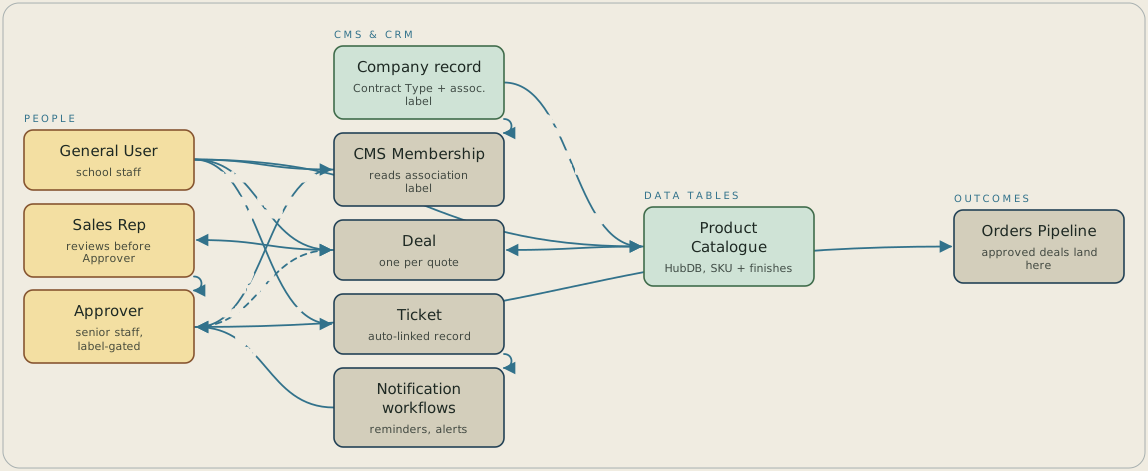
A school staff member logs in to the CMS Membership portal, which reads a label on the association between their Contact and Company records to decide whether they're a General User or an Approver. They browse the HubDB product catalogue, where the Company's Contract Type sets the price tier, and submit a quote request that creates one HubSpot Deal, with SKU as the join between the catalogue row and the line item. A Sales Rep reviews the Deal and marks it Ready for Approval, a workflow reminds the Approver after five days, and an approved Deal routes into the Orders pipeline while a rejection needs a dropdown reason. Support tickets submitted through the portal link automatically to the submitting Contact and Company.
FAQ
It reads an association label between the person's Contact record and their Company record, since HubSpot Membership doesn't have a native permission tier for two customer-facing roles. Approver-only pages check that label before rendering, so a Contact's CRM record decides the role split rather than a second authentication system. A test round did catch the label failing to display correctly for one contact, and the fix held on retest.
The signed scope held delivery to roughly 150 hours, which ruled out a custom approval interface and the serverless logic that would have gone with it. Instead, a Sales Rep marks a Deal Ready for Approval and the Approver acts on that same property, with a five-day reminder workflow if nobody has acted.


