

Wiring a Country-Level HubSpot Portal into a Global Salesforce Org for a Crop-Protection Manufacturer

An Australian crop-protection business had a HubSpot integration switched on during its global Salesforce rollout and never put to work: no routing, no lifecycle governance, no way for marketing data to survive the trip into a globally standardized org. We designed the bi-directional sync, built record-type routing for farmers, distributors, and agronomic influencers, and mapped crop-level data so segmentation held on both sides.
Executive Summary

Context
The Australian arm of a multinational crop-protection manufacturer, selling through distributor and retail networks to farmers. Its Salesforce instance followed a global 80/20 package model: standard functionality worldwide, a narrow local layer for country requirements. The HubSpot connection had to fit inside that governance, not around it.

What We Built
A bi-directional HubSpot-Salesforce integration with three lead record types, crop-level field mapping into a Salesforce junction object, duplicate governance rules, and an in-Salesforce timeline of HubSpot marketing activity.

Tech Stack
- HubSpot Marketing Hub
- HubSpot CMS
- Salesforce Sales Cloud
- Visualforce
- Salesforce record-triggered automation
Not a fit if you sell direct to a single customer type through one Salesforce instance, with no distributor, retailer, or influencer layer to route around. This design exists to separate a multi-role channel into distinct record types and field maps inside a shared global package. Without that channel complexity, the routing and field-mapping discipline built here has no ambiguity to resolve and only adds configuration overhead.

The Challenge
During the first phase of the country rollout, the HubSpot integration was implemented but never used from a business standpoint. Leads arriving from campaigns had no lifecycle: no assignment rules, no qualification path, no reliable way to tell a farmer from a distributor employee from an independent agronomist. The channel model made this harder. The company sells B2B2C, from manufacturer to distributor to farmer, sometimes with a retailer in between, so a single lead picklist could not describe who was actually filling out a form. And the Salesforce connector imposed a hard constraint: it creates new records as either leads or contacts, not both, which meant every decision about where a record entered the org had downstream consequences for duplicates and conversion.

Our Approach
We designed the integration around Salesforce's global 80/20 package model, keeping the local layer thin. Every HubSpot form submission created or updated a contact in HubSpot, then synced to Salesforce as a lead carrying a role value that assigned one of three record types: Farmer by default, Distributor, or Influencer, each with its own field map and page layout. Accounts already in Salesforce were mirrored into HubSpot with their Salesforce IDs, refreshed on a quarterly cycle, so new leads could arrive pre-associated to the right account. Where a contact entered Salesforce without an account, automation converted it to a lead and removed the orphan contact to keep the database clean. Australia was excluded from the global matching rules so the integration could create leads freely; duplicate surfacing moved to the super users managing qualification. We later extended into the demand side: a filterable field-trials hub on HubSpot CMS, where growers browse trial results by product, state, key issue, and crop.
This engagement is part of our systems integration work for agriculture, food & beverage organisations.

Impact

One Governed Path for Every Lead
Duplicate Risk Contained by Design
Crop-Level Segmentation That Survives the Sync
Marketing Activity Visible Inside Salesforce
The connector creates new Salesforce records as either leads or contacts, never both. When a contact lands in Salesforce without an account, automation clones its details into a new lead assigned to the marketing team, then deletes the contact record. The pattern preserves clean ownership without manual cleanup.
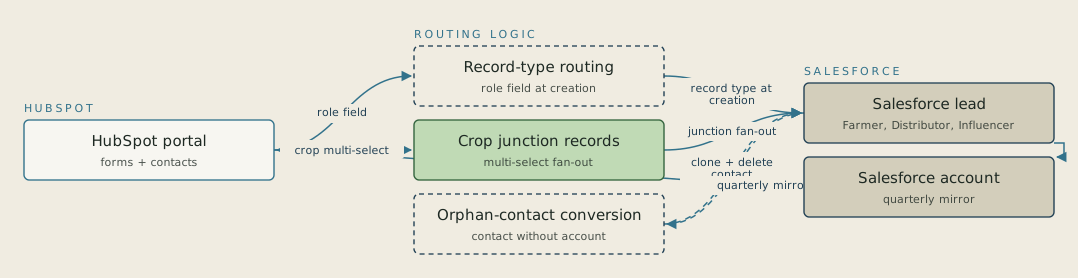
The connector creates new Salesforce records as either leads or contacts, not both. A single lead picklist also couldn't tell a farmer from a distributor employee from an independent agronomist. Now each form submission syncs as a lead with a role value that assigns one of three record types: Farmer by default, Distributor or Influencer. Each type has its own field map and page layout.
FAQ
The connector creates new records as either leads or contacts, so the entry object has to be chosen once and designed around. Leads won because they carry record types, assignment rules, and a formal qualification step before an account and contact are created. The one exception, contacts arriving in Salesforce without an account, is handled by automation that recreates them as leads and deletes the orphan record.


