

Gating Salesforce Lead Routing on a Confirmed Sync, Not a Form Submission

Four HubSpot form families needed to hand a qualified lead straight to a Salesforce Qualification Task, but HubSpot's native Salesforce-task action stops at title, priority, due date and notes. We built a central sync-flag gate so each intake workflow waits for a confirmed Salesforce sync before it creates a task, and left Task Type to Salesforce, where the record-type rule already lived.
Executive Summary

Context
The client's Salesforce Sales Cloud stayed its system of record through a parallel Marketo-to-HubSpot migration, so lead routing had to keep working exactly as before while the automation platform and its forms changed. Marketo's routing logic needed a HubSpot equivalent, matched field for field, before Marketo access closed on a fixed date.

What We Built
We built a central sync-flag workflow and four form-family intake workflows, one each for Services Lead Entry, CS/Marketing Lead Entry, Contact Us, and Event Lead, that create a Salesforce Qualification Task only once a contact's Salesforce sync is confirmed, matching the routing logic Marketo had run before the migration, field for field.

Tech Stack
- HubSpot
- Salesforce Sales Cloud
- Marketo
Not a fit if a lead record needs a Salesforce task the moment it exists in HubSpot: this gate only clears once Last Salesforce sync time has a value, not merely once a flag is set. Also not a fit if Task Type needs to stay assignable from HubSpot; the native action can't set it, so that stays a Salesforce-side rule.

The Challenge
Four HubSpot forms (Services Lead Entry, CS/Marketing Lead Entry, Contact Us and Event Lead) each needed to hand a qualifying lead to Salesforce as a properly typed Qualification Task. That is the object the sales team already worked from in Salesforce Sales Cloud. HubSpot's native Create Salesforce Task action sets a task's title, priority, due date and notes, but it doesn't set Task Type, which is the field Salesforce uses to route the record into the right queue.
Left unset, every task looked identical until someone in Salesforce classified it by hand. Marketo's equivalent routing logic also had to be matched before Marketo's access closed on a fixed date.

Our Approach
We routed everything through one contact-level flag instead of four separate Salesforce checks. A central workflow, "[S2] - Set Sync to SFDC = TRUE," sets sync_to_salesforce to TRUE once a contact is eligible to sync. Each of the four form-family workflows then holds its task-creation step behind two conditions: the flag reads TRUE, and Last Salesforce sync time already has a value.
The second condition exists because a flag can flip before the record finishes syncing. The timestamp proves the record is there to attach a task to, so the workflow can fire in real time without creating an orphaned task. We left Task Type out on purpose and set it in Salesforce, where the record-type rule already lives.
Before Marketo access closed, the team checked the first ten live submissions against Marketo's legacy output, to confirm the logic before cutover.

Impact

One sync flag replaces four separate Salesforce checks
One central workflow sets sync_to_salesforce per contact, and all four intake workflows read that same flag instead of each carrying its own Salesforce check, so a rule change happens once, not four times.
Task creation waits on a confirmed sync, not a flipped flag
Gating on Last Salesforce sync time, not the flag alone, stops a workflow from creating a task against a contact whose Salesforce record hasn't finished syncing, so a lead never lands on a task nobody in Salesforce can find.
Salesforce keeps sole ownership of Task Type
Because HubSpot's native action can't set Task Type, the field stays a single Salesforce-side rule instead of a value four workflows would otherwise reconcile against Salesforce's own record-type logic.
Routing held its parity through the Marketo cutover
The Implementation Tracker marked the workstream complete, and the rebuilt routing was carrying live traffic when the first ten submissions were checked end to end against Marketo's legacy output, ahead of the cutover.
Services Lead Entry, CS/Marketing Lead Entry, Contact Us, and Event Lead each trigger their own intake workflow on submission, but all four create the same downstream object, a Salesforce Qualification Task, so the routing rule only has to be right once per form family.
The "[S2] - Set Sync to SFDC = TRUE" workflow is the single place that decides a contact is eligible to sync, so the four intake workflows don't each carry their own copy of that eligibility logic.
Each intake workflow checks two conditions before creating a task: sync_to_salesforce reading TRUE, and Last Salesforce sync time carrying a value. The second condition catches the gap between a flag being set and the record existing in Salesforce.
HubSpot's Create Salesforce Task action sets title, priority, due date, and notes, and nothing else, so Task Type is configured in Salesforce, where the platform's own record-type rule already governs it.
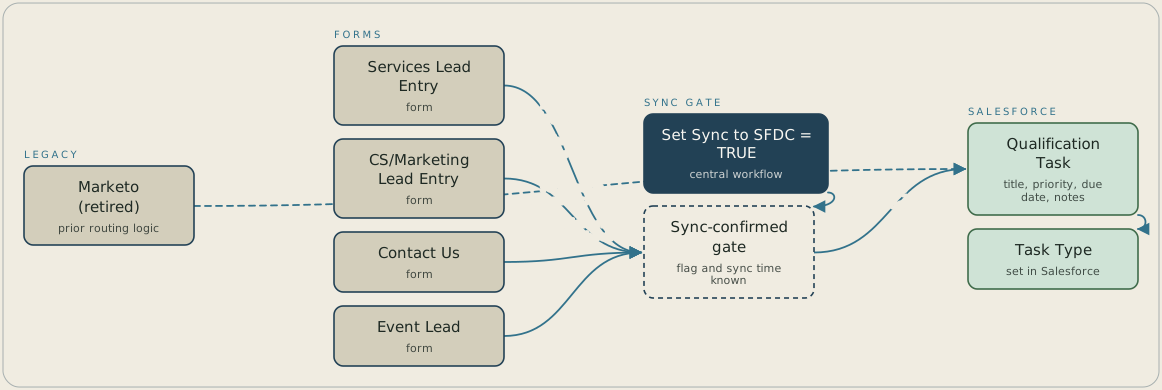
A submission on any of four HubSpot form families starts that family's intake workflow. A central workflow sets sync_to_salesforce to TRUE for eligible contacts, and each intake workflow waits until that flag is TRUE and Last Salesforce sync time has a value before it creates a Salesforce Qualification Task. HubSpot's task action sets only title, priority, due date and notes, so Task Type is set in Salesforce. Marketo's retired routing was the reference the new tasks were checked against before cutover.
FAQ
HubSpot's native Create Salesforce Task action can only set a task's title, priority, due date, and notes. Task Type is a Salesforce field the action doesn't expose, so it is set on the Salesforce side, where the record-type rule governing it already lives.
A flag can be set to TRUE before the contact's Salesforce record has actually finished syncing. Checking Last Salesforce sync time confirms the record exists before a task is attached, so a workflow never creates a task against a contact Salesforce can't yet find.


