

Salesforce CRM Migration to HubSpot for a Passenger Ferry Operator
Salesforce held every contact, company, deal and logged activity record the operator's sales and service teams worked from daily. The rest of the HubSpot migration needed that same data to build against. We moved it onto HubSpot's native Salesforce integration, matched on contact email address and kept current through an ongoing sync rather than a single export. A record changed after go-live still carried across, without a second migration pass.
Executive Summary

Context
A government-owned ferry operator ran its sales and service teams off Salesforce contact, company and deal records, and the Salesforce licence was approaching the end of its purchased term. We migrated that CRM data onto HubSpot's native Salesforce integration, matched on contact email address and kept current through an ongoing sync rather than a one-time export.

What We Built
We migrated contacts, companies, deals and activity history from Salesforce into HubSpot on the native Salesforce-HubSpot integration, matched on contact email address and running as a continuing sync rather than a one-time export. Alongside it, we ran a phased deduplication pass against the incoming contact base using NeverBounce's email-address matching.

Tech Stack
- Salesforce Sales Cloud, Salesforce Service Cloud, HubSpot Sales Hub Enterprise, HubSpot Service Hub Enterprise, HubSpot Smart CRM Enterprise, HubSpot Data Hub Enterprise, NeverBounce
Not a fit if most of your CRM records have no reliable email address, since this migration's matching key depends on one. A system keyed mainly on phone number or an internal ID needs a different matching approach. Also not a fit if you need a single cutover event rather than an ongoing sync window, since this approach keeps both systems reconciling until the source system is retired.

The Challenge
Salesforce held the contact, company and deal records that both the sales team and the service team worked from daily. Every other HubSpot workstream in the migration, from the rebuilt email journeys to the post-trip surveys, would eventually need to read against that data. A hard Salesforce licence deadline meant the records had to move before the marketing rebuild's own cutover. Otherwise every hub built on top of them would be built against data that was still split across two systems.
Moving the CRM data as a single export would have frozen it at the moment of migration. Any record a sales rep updated in Salesforce afterwards would quietly diverge from HubSpot. We needed the connection to stay live past go-live, not stop at it, so a one-time data load was ruled out in favour of a continuing sync between the two systems.

Our Approach
We used HubSpot's native Salesforce integration rather than a custom-built import. It matches each contact to its Salesforce record on email address and runs the sync in real time on an ongoing basis. A contact updated in Salesforce after go-live still reaches HubSpot without anyone re-running a migration step, so the sales and service teams work from one current record instead of a copy that ages from the day it was pulled.
Matching on email address means any contact or lead with no email address on file has no key to match against, so those records don't cross over in the sync. We treated that as a disclosed limit of the connector, not a data problem to engineer around, and scoped a separate deduplication pass instead.
In a phased clean-up, we checked the incoming contact base against NeverBounce's email-verification matching. That reduced duplicate and invalid addresses before the ongoing sync started feeding from it.

Impact

Sales and service teams work from one current CRM record
Contacts, companies, deals, and activity history now sync from Salesforce into HubSpot on a real-time, ongoing basis rather than a frozen export, so a record a sales rep or service agent updates carries across without anyone re-running a migration step. Both teams read and write against the same current record instead of two copies drifting apart the moment one system changes.
A disclosed data limit instead of a silent gap
Matching contacts on email address was a deliberate, disclosed choice. Any contact or lead with no email address on file has no key to migrate against, so it stays out of the sync instead of arriving in HubSpot as an incomplete or mismatched record. We can name that limit precisely, instead of the migration quietly dropping records nobody could later explain.
A separate cleanup pass, not a bigger migration
Rather than migrate whatever duplicate or invalid contact records already existed in Salesforce, we ran a phased deduplication pass using NeverBounce's email-address matching against the incoming contact base. That kept the cleanup scoped as its own tracked piece of work, not folded into a migration step meant only to move records across.
The full CRM object model moved, not just contacts
The migration carried companies, deals and logged activity across alongside contact records, preserving the relationships between them. Contacts didn't move as a flat list stripped of the account and deal context the sales and service teams relied on in Salesforce.
The migration uses HubSpot's native Salesforce integration rather than a custom-built import script, with each incoming record matched to its Salesforce counterpart on contact email address. That key lets the sync run continuously instead of as a series of one-off exports.
Records sync from Salesforce to HubSpot on an ongoing basis, so a contact, company, or deal changed after the initial migration still reaches the HubSpot side without a second migration pass. The connector keeps the two systems in step rather than treating the move as a one-time handoff.
Contacts and leads with no email address on file have no key to match against, so the sync leaves them out rather than attempting a fuzzy match that could merge two different people into one record. We chose that matching key deliberately, trading a small number of excluded records for a connector that never guesses at identity.
A phased pass checked the contact base against NeverBounce's email-address verification, run as its own tracked piece of Phase 2 work rather than bundled into the migration itself. Cleaning the data this way kept the ongoing sync feeding from a base already checked for duplicates and invalid addresses.
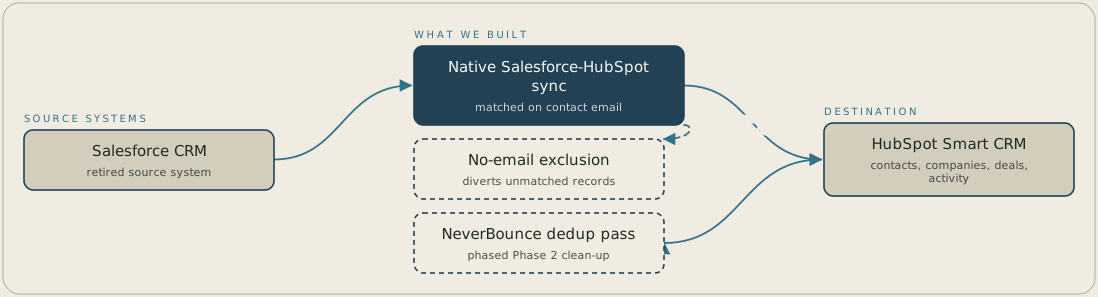
Salesforce, the retired source system, feeds HubSpot through the native Salesforce-HubSpot integration, which syncs contact, company, deal and activity records in real time. Each record is matched on contact email address and lands in HubSpot Smart CRM, and a record with no email address is left out of the sync. A separate NeverBounce deduplication pass checks the contact base before it feeds the sync.
FAQ
The migration matched each Salesforce record to HubSpot using contact email address as the key, so any contact or lead with no email address on file had nothing to match against and did not cross over in the sync. That is a disclosed limit of the matching key chosen, not a record the migration lost track of.
The native Salesforce integration moves records, but it doesn't decide which of two similar contacts is the duplicate. We ran a phased pass against the incoming contact base using NeverBounce's email-address matching, as its own tracked piece of work. That caught duplicate and invalid addresses before they fed the ongoing sync, rather than carrying them across for someone to find later.


