

Winner-Rule Dedupe Gates a Retention-Aware Salesforce Migration

A B2B events and exhibitions operator running 90+ annual conferences across 35 brands had years of Prospect, Contact, Project Attendance, Opportunity, Lead, and Subscription records split across regional Salesforce groupings ahead of a Salesforce sunset, and the same person was often duplicated with conflicting attendance and financial history. Moving to HubSpot meant deciding case by case which duplicate survived, and whether each retention clock would carry over or reset. We scored the duplicates to settle the first question and carried the clocks forward for the second.
Executive Summary

Context
A B2B events and exhibitions operator running 90+ annual conferences across 35 brands needed to retire Salesforce Marketing Cloud and Salesforce Data Cloud for HubSpot without losing years of Prospect, Contact, Project Attendance, Opportunity, Lead, and Subscription records split across regional duplicates, each type carrying its own retention period.

What We Built
We migrated Prospect, Contact, Project Attendance, Opportunity, Lead, and Subscription records from Salesforce Marketing Cloud and Salesforce Data Cloud into HubSpot via a staged CSV import. We resolved duplicates with a winner rule scored per country grouping, and carried each object type's retention period into HubSpot as an ongoing sync-eligibility check.

Tech Stack
- HubSpot, Salesforce Marketing Cloud, Salesforce Data Cloud, AWS (S3, RDS, Lambda)
Not a fit if every migrated record already carries one unambiguous match key, since a scored winner rule earns its cost only where duplicates disagree on recency, attendance, or financial completeness. It also assumes the legacy systems already enforced retention periods that were explicit enough to carry forward.

The Challenge
Regional Salesforce groupings held years of Prospect, Contact, Project Attendance, Opportunity, Lead, and Subscription records, and the same contact was often duplicated with conflicting attendance and financial detail. A single match field couldn't tell a stale UK record from the Canada, Singapore, or US record that reflected the live relationship. So the migration needed multi-key ID matching, not one rule, to decide which duplicate survived.
Each object type also carried its own clock: four years for Project Attendance, and two for Lead and Opportunity data. Those clocks had to carry into HubSpot or reset at cutover.

Our Approach
We ran the migration as a sequential pass, Accounts first and then Contacts, with the criteria relaxing at each pass so that a record that missed a strict first match had a later, looser chance to merge.
Where more than one candidate remained, a winner-rule score broke the tie. We weighted it per country grouping (UK-only, Canada/Singapore/UK, and US-only), favouring the record with the most recent activity, the most Project Attendances, and the most complete financial data. A single shared key couldn't arbitrate fairly across regions with different data habits, so the score stood in for the judgement call we would otherwise have made by hand.
Each object type carried a clock that was already running: four years for Project Attendance, two for Lead and Opportunity data, and a Suspects rule that varied between two and three years. Resetting those clocks at cutover would have let HubSpot keep syncing records that Salesforce had already aged out, so we carried the elapsed time forward, keyed to each record's Project Edition End Date. A workflow checkbox now marks a record as eligible or ineligible for sync, and a Contact drops out once none of its related objects still meets its window.

Impact

A scored rule decides which duplicate record survives
Instead of keeping whichever record happened to import first, a winner-rule score weighs recency, Project Attendance count, and financial-data completeness before a duplicate is dropped, so the surviving record is the one with the strongest documented relationship.
Retention windows keep running after the migration, not just during it
The same four-year Project Attendance and two-year Lead and Opportunity clocks that governed the legacy systems keep running inside HubSpot through a workflow checkbox, so a record ages out of sync eligibility on schedule instead of staying indefinitely because the migration reset its clock.
Each region gets its own scoring instead of one rule for every market
UK-only, Canada/Singapore/UK, and US-only groupings each run their own winner-rule weighting, so a merge in one region isn't forced through criteria tuned for how a different region's team actually used the fields.
Attendance and financial history survive the merge instead of being overwritten
Because the winner rule favours the record with the most Project Attendances and the most complete financial data, a merge keeps the fuller picture of the relationship rather than defaulting to whichever record HubSpot happened to import last.
The migration runs Accounts first, then Contacts, with match criteria relaxing at each successive pass, so records that miss a strict first match still get a chance to merge on a later, looser pass.
A winner-rule score, weighted per country grouping (UK-only; Canada, Singapore, and UK; US-only), settles which duplicate record survives a merge, generally favouring the most recent record with the most Project Attendances and the most complete financial data.
Project Attendance, Lead, Opportunity, and Suspect records each carry their own Salesforce-defined retention period, four years, two years, two years, and a historically two-to-three-year window, mapped explicitly rather than treated as one blanket rule.
A workflow checkbox evaluates each record's elapsed time since its Project Edition End Date and marks it eligible or ineligible for HubSpot sync, removing a Contact once none of its related objects still meets its own retention window.
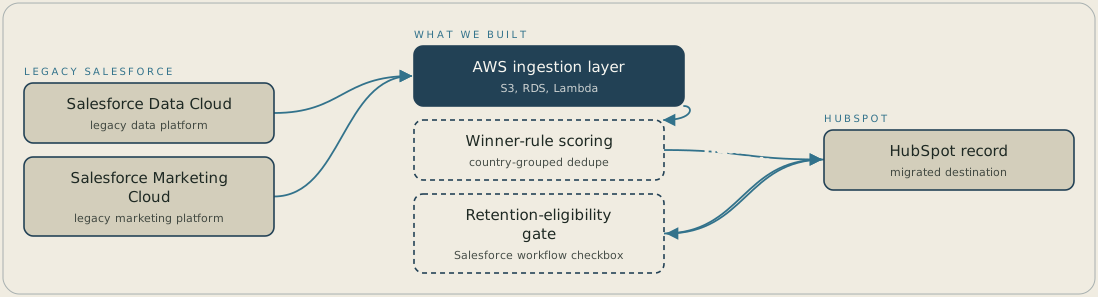
Records from Salesforce Marketing Cloud and Salesforce Data Cloud arrive through a staged CSV import on AWS, Accounts first and then Contacts. A winner-rule score, weighted per country grouping, decides which duplicate survives into HubSpot. Once a record is in HubSpot, a workflow checkbox reads its Project Edition End Date and marks it eligible or ineligible for sync under the retention period for its object type.
FAQ
A single field, such as email alone, couldn't arbitrate fairly across three regional groupings with different data habits. A winner-rule score weighted on recency, attendance, and financial completeness made a defensible, and different, call for each grouping.
The legacy systems had already been enforcing four-year and two-year data-lifecycle rules on Project Attendance, Lead, and Opportunity records. Resetting those clocks at cutover would have let HubSpot sync records that had already aged out, so we carried the elapsed time forward instead.


