

Custom object model and dedupe on HubSpot CRM

Contact and Deal alone couldn't describe a childcare business built around physical locations and individually enrolled children. We added two custom objects, Campus and Children, each associated back to the standard CRM. A Children record ties to the family's Contact and to the Campus the child attends, and a Campus record carries its own pipeline views and tickets. Configuring views and permissions across all four objects was an ongoing, ad hoc stream of requests, answered and logged daily rather than a single rollout.
Executive Summary

Context
The object model briefly carried data nobody could trust. An earlier CSV import had duplicated most of both new objects' records, and the duplicates had to be identified and removed before the deal pipelines and tickets already keyed to Campus could rely on that data.

What We Built
We built two custom HubSpot objects, Campus for each physical location and Children for each enrolled child, both associated to the standard Contact and Deal records. Alongside the build, we configured and maintained Contact, Deal and Ticket views and permissions on an ongoing basis, then cleaned up the duplicate Campus and Children records left behind by an earlier CSV import.

Tech Stack
- HubSpot CRM
- Campus custom object
- Children custom object
- Contact and Deal objects
- CSV import
- record deduplication
Not a fit if a business already fits inside the standard Contact and Deal model. A second location object earns its place only when the native CRM has nowhere to put that structure. It also assumes the feeding CSV import is trustworthy from day one. Here it wasn't, and matching happened after the fact rather than at import time.

The Challenge
A childcare network with dozens of physical locations and thousands of enrolled children had nowhere in a standard Contact and Deal model to represent either one as its own record. Locations needed their own pipeline views and ticket routing. Children needed a record independent of the parent Contact filling out a form.
On top of that gap, an earlier CSV import had duplicated 5,911 of 6,001 Campus records and 5,913 of 8,990 Children records. Only 90 Campus and 3,077 Children records were left that the import hadn't touched.

Our Approach
We built Campus and Children as custom objects associated to Contact and Deal, because a property on Contact can't carry its own pipeline views or tickets. A Children record ties to the family's Contact and to the Campus the child attends. A Campus record carries the pipeline views and tickets scoped to that location.
We configured and adjusted views and permissions continuously as requests came in, rather than fixing them once at launch.
Once we found the duplication, we isolated the 5,911 and 5,913 duplicate rows in each object and removed them. That left the 90 Campus and 3,077 Children records the import had left correct. How one duplicate row was matched to another, by field or by tool, wasn't recorded.

Impact

Campus and Children exist as their own CRM records
A location and an enrolled child each hold a dedicated record, associated to the standard Contact and Deal objects rather than folded into either one, so a location's pipeline views and a child's history are each queryable on their own terms.
A child's record travels with a Campus and a Contact
Every Children record associates to its Campus and to the family's Contact, the same association other workflows on this account already pull from when they copy a ticket's Campus from its contact.
Campus records dropped from 6,001 to the 90 that were not duplicates
Of the object's 6,001 Campus records, 5,911 were duplicates from an earlier CSV import and were removed, leaving the 90 that the import had never touched.
Children records dropped from 8,990 to the 3,077 that were not duplicates
Of the object's 8,990 Children records, 5,913 were duplicates from the same import and were removed, leaving the 3,077 that were already correct. That restored both objects to a state the running deal, ticket and view work could rely on.
Campus and Children were built as HubSpot custom objects rather than properties on Contact or Deal. A Children record associates to the family's Contact and to the Campus the child attends. A Campus record carries the pipeline views and tickets scoped to that location.
Contact, Deal and Ticket views and their permissions were built and adjusted continuously rather than set once at launch, with requests answered and logged daily across the engagement.
We isolated the rows created by an earlier CSV import. 5,911 of 6,001 Campus records and 5,913 of 8,990 Children records were duplicates, and we removed them.
Ninety Campus and 3,077 Children records were not part of the duplication and remained in place, the base the running deal pipeline and ticket work relied on.
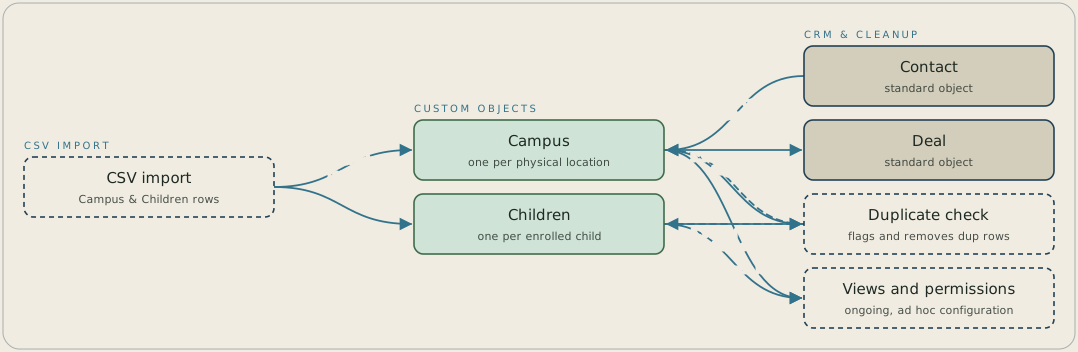
A CSV import creates Campus and Children records in HubSpot, alongside the standard Contact and Deal objects. Each Children record associates to a Campus and to a Contact, and each Campus scopes its own pipelines. A duplicate check flagged 5,911 of 6,001 Campus rows and 5,913 of 8,990 Children rows and removed them, which left 90 Campus and 3,077 Children records. Views and permissions across all four objects were configured on an ongoing basis.
FAQ
The material reviewed gives the volumes duplicated, 5,911 of 6,001 Campus records and 5,913 of 8,990 Children records, but not the matching logic or tool used to identify one duplicate row against another.
A property on Contact can't carry its own pipeline views or its own tickets. Campus and Children needed to stand as their own associated records so a location and a child could each be viewed and permissioned on its own terms.


