

A gated Book a Consultation workflow for a licensed financial advisory practice

A pre-qualification form can't tell a reviewer whether the person behind it is ready to book paid adviser time, and a licensed retirement advice practice can't open its calendar to everyone who fills one out. The practice rebuilt its site on a purchased HubSpot CMS theme, and it needed a lead flow that qualified a visitor automatically wherever it safely could. It also needed to keep a person in the loop wherever licensing risk required it. We built that flow end to end, from the form to a gated booking link.
Executive Summary

Context
The practice advises individual investors on retirement and wealth management under an Australian Financial Services Licence. Its new website needed a way to turn a visitor's interest into a booked adviser consultation without handing calendar access to anyone who simply filled out a form.

What We Built
We built a four-stage lead workflow that replaces an open contact form with a gated one. A pre-qualification form feeds an automated questionnaire email, and only a reviewed, approved response unlocks the practice's private booking link.

Tech Stack
- HubSpot CMS forms
- HubSpot Workflows
- HubSpot Marketing email
- HubSpot Meetings scheduling
- purchased HubSpot CMS marketplace theme

The Challenge
Before the rebuild, a prospective client's only route to adviser time was a generic contact form that fed straight into an inbox. Nothing separated a ready investor from someone who was still researching, so every submission needed a person to read it and judge fit before a meeting could be set. A licensed advice practice couldn't skip that judgement to move faster.
The purchased HubSpot CMS theme carrying the rebuild added a constraint of its own: it shipped without an email template. We needed a flow that qualified visitors automatically where that was safe, and that kept a person in the loop where licensing risk required it.

Our Approach
The theme's own default was a bare contact form that captured a name and an email, dropped it in a list and left a rep to follow up whenever they got to it. No qualification signal reached anyone until a person read the message. We built a form for Name, Email and Inquiry Type as the trigger instead, and we wired its submission to send an automated follow-up email that carries a deeper qualification questionnaire on demand.
Because the theme carried no email template, we built that follow-up email from scratch instead of falling back to the bare-bones default. That cost build hours, and it gave the client a matching first touch.
A completed questionnaire never releases a booking link on its own. It routes to manual review, and only an approved response unlocks the private booking-link page. We left automating that review for a later phase, so that the practice can prove the manual gate works first.

Impact

a booking link that only reaches a qualified prospect
The manual review step keeps an adviser's calendar closed to anyone who hasn't completed the qualification questionnaire. The practice can publish a booking link without opening unrestricted access to adviser time, and a person decides when to release it.
a follow-up email the theme never shipped
Because the purchased theme carried no email template, a submission would otherwise have waited until someone noticed it in a list. The custom follow-up email sends the qualification questionnaire the moment a form arrives, whatever the team's own schedule.
qualification that runs before a person has to
The pre-qualification form captures Name, Email and Inquiry Type, and it sends the deeper questionnaire automatically. The team's first read of a lead is therefore a completed questionnaire and not a bare contact request, which moves manual effort from chasing details to judging an answer.
a phased path to automation, not a rushed one
We pushed automating the review and approval step to a later phase instead of the first release, so that the practice can prove the manual gate works before trusting a rule to make the same call. Until then, a person keeps the licensing-sensitive decision.
A short on-page form asks only for Name, Email, and Inquiry Type, keeping the first ask small enough that a visitor completes it before deciding whether to book adviser time. Its submission is the single trigger the workflow runs on.
Every submission sends a follow-up email that carries a deeper qualification questionnaire, on demand and not on a fixed schedule. We built it from scratch because the purchased theme shipped no email template, so its content and timing stay within the team's control.
A completed questionnaire response goes to the internal team for manual review before anything reaches the prospect. This is the one step we chose not to automate in the first release, which keeps a licensing-sensitive judgement with a person.
Only a reviewed, approved questionnaire response unlocks this page, so a prospect never reaches adviser availability without first clearing the review gate. The page stays inaccessible until that approval is given.
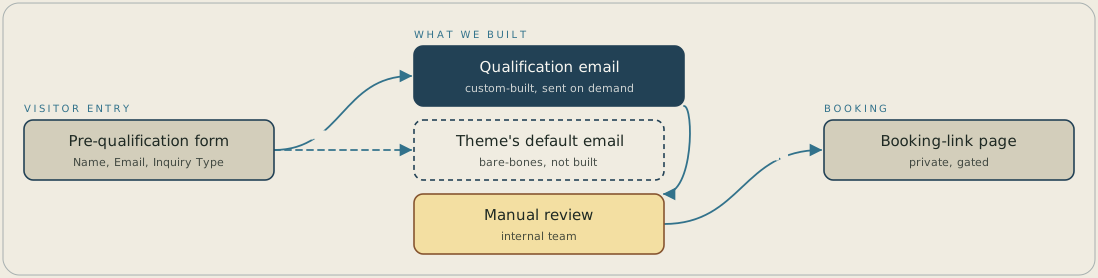
A visitor submits a short form that asks for a name, an email and an inquiry type, and the submission sends a custom-built questionnaire email. The theme's bare-bones default email isn't used. The completed questionnaire goes to the internal team for manual review, and only an approved response unlocks the private booking-link page.
FAQ
A short form collects your name, email and reason for inquiry, and submitting it triggers an automated qualification questionnaire email. Your response goes to the team for manual review, and only an approved response unlocks the private booking link.
The practice kept a manual review step between the questionnaire and the booking link on purpose, so that a person confirms fit before adviser time is offered. Automating that approval step was deferred to a later phase, so a person makes the call today.


