

HubSpot portal migration across four sibling brands

A shared HubSpot portal carrying four sibling brands had passed roughly 95,000 records, several thousand priced above its marketing-contact tier, ahead of a HubSpot renewal cutoff. We purged the excess contacts first, then used HubSpot's native Migration Tool and a manual rebuild, filtered on one Business Unit property, to carry one brand's full record set into its own standalone portal.
Executive Summary

Context
The client is a multi-brand business process outsourcing and customer experience group operating across the Asia-Pacific region, running four sibling brands through one shared HubSpot portal. Every contact, company and deal lived in the same tables and was told apart only by a Business Unit property. The group was also approaching a marketing-contact billing ceiling at renewal.

What We Built
A standalone HubSpot portal for one brand, populated by filtering the shared legacy portal on its Business Unit property and carrying every associated object type across in one scheduled cutover.

Tech Stack
- HubSpot Marketing, Sales, Service and Content Hub Enterprise
- Data Hub Professional
- Migration Tool
- Salesforce
Not a fit if your organisation can't license HubSpot's own Migration Tool before the project starts, since the receiving portal must be provisioned first. It also assumes every contact and company already carries a consistent business-unit property. Without one, this migration's filtering has nothing to key against.

The Challenge
Four sibling brands ran on a single shared HubSpot portal, and a Business Unit property was the only thing that told one brand's contacts, companies and deals from another's. The portal held close to 95,000 legacy records.
Roughly 6,000 active contacts sat above the marketing-contact tier the group's subscription allowed, and a renewal cutoff was closing in. Moving everything across as recorded would have carried the same billing problem into the new portal.
So we had to decide which contacts still justified marketing-contact spend before any record moved. That made the purge the project's first phase rather than an afterthought.

Our Approach
We mapped every object type against the Business Unit property that already carried the Probe, Probe.Group, Innovior and Convai values, and we audited the legacy portal before touching a record. The plan put discovery and purge first, migration and rebuild second, and testing, governance and training third, over 60 days, so the billing constraint came ahead of the move.
HubSpot's native Migration Tool, which the group licensed in late September, carried contacts, companies, deals recorded from July 2024 forward, pipelines, engagements, tickets, files and associations. We filtered it end to end on the Business Unit property so each brand's records landed as a coherent set. A manual rebuild handled what the tool couldn't carry across cleanly.
The cutover then ran as a fixed three-day window. The legacy portal went read-only on 29 October, new data entry was under embargo the next day, and the new standalone portal went live on 31 October. Throughout, the marketing-contact eligibility flow was gated so that the portal stayed under the paid tier.

Impact

One brand's data now lives in its own portal, not a shared filter
Every contact, company and deal for the group's core brand now sits inside its own HubSpot portal instead of one shared instance filtered by a Business Unit value, so a workflow built for that brand can't pick up a sibling brand's record by mistake. The migration moved 20,911 contacts plus their associated companies and deals in one pass, splitting the four brands on a single cutover.
The portal moved under its marketing-contact ceiling, not over it
The legacy portal carried close to 95,000 records with roughly 6,000 contacts priced above the marketing-contact tier, and copying them across would have re-triggered the same billing problem in the new portal. Resolving which contacts still justified that spend before the migration ran meant the group crossed its HubSpot renewal cutoff on a portal already sized to the tier it was paying for.
The cutover ran on a fixed three-day window
The legacy portal went read-only on 29 October, new data entry was placed under embargo the next day, and users were welcomed into the standalone portal on 31 October, so every team knew which system was authoritative on each of the three days. The embargo covered all four brands at once, so no sibling brand could write into the old portal after the new one became the system of record for another.
Brands stay separable by property, not by convention
The rebuild carried the same Business Unit property forward into the standalone portal, so the filtering logic that kept four brands distinguishable inside one shared instance now does the same job inside a portal built for just one, without a new taxonomy to design. That gives the team a structure that can carry additional brand-specific needs without having to settle again how records are told apart.
Every object type in the legacy portal, contacts, companies, deals, pipelines, engagements, tickets, files and associations, already carried a Business Unit property set to Probe, Probe.Group, Innovior or Convai. The migration used that existing property as its filter key, the brand partitioning a shared portal depends on, isolating one brand's full record set without touching the others.
With close to 95,000 legacy records and roughly 6,000 contacts priced above the marketing-contact tier, we resolved which contacts still justified that spend before the Migration Tool ran, not after. That kept the overage from crossing into the new portal and re-triggering the same billing problem.
The group licensed HubSpot's Migration Tool, the vendor's own portal-to-portal transfer app, at the end of September to carry the bulk of the record set, associations included, while a manual rebuild handled what the tool could not reproduce automatically.
The legacy portal was set read-only on 29 October, an embargo blocked new data entry across all four brands on 30 October, and users moved to the new standalone portal on 31 October, on one fixed schedule for every brand's team.
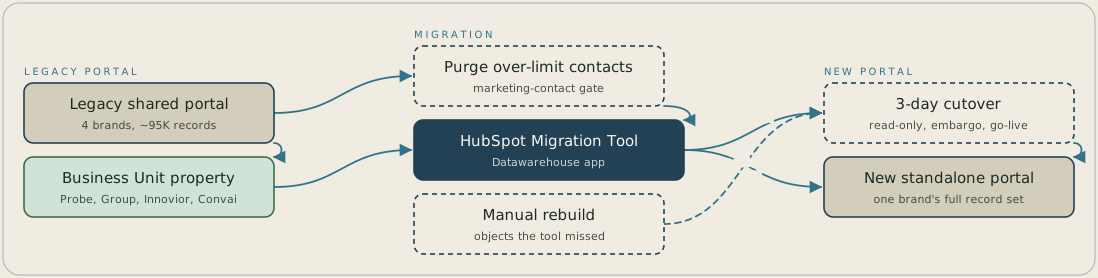
The shared legacy portal holds four brands' records, each tagged with a Business Unit property, and about 6,000 contacts sit over the marketing-contact limit. A purge removes those over-limit contacts first, and HubSpot's Migration Tool then uses the Business Unit property as its filter key to carry one brand's records into a new standalone portal. A manual rebuild adds the objects the tool missed, and the cutover runs over three days: read-only on 29 October, an embargo on 30 October and go-live on 31 October.
FAQ
A shared portal keeps every brand's records in the same tables, so even a cleaned-up instance still relies on a property staying correctly set to keep brands apart. Splitting each brand into its own portal removes that dependency. A workflow built for one brand can't include another brand's contact, because that data sits in a different portal entirely.
The limit applied to the legacy portal, so copying every record across as recorded would have carried the same overage into the new one, with the same renewal penalty. We had to decide which contacts still justified marketing-contact spend before the Migration Tool ran, which is why the purge became the project's first phase.


