

Routing non-owner Salesforce Account Team roles into HubSpot Owner properties
An enterprise HCM and payroll SaaS provider runs a segmented sales organization of roughly 1,500 sellers. Every Salesforce account carries four non-owner Account Team roles, CAE, RAE, SDR, and Spend Management AE, each a User lookup on a related list rather than a single field, so none could populate a HubSpot owner-type property through standard mapping. A custom code action now resolves each role's Salesforce user ID to a HubSpot Owner, backed by a weekly BigQuery pipeline for the rest.
Executive Summary

Context
The client is an enterprise HCM and payroll SaaS provider whose sales team spans Outbound, Inbound SMB, Mid-Market, and Enterprise segments, roughly 1,500 sellers. Each Salesforce account carries a CAE, an RAE, an SDR, and a Spend Management AE, and HubSpot's alerting needed to reach all four, not only the native owner.

What We Built
We built a custom code action that resolves a role-specific Salesforce user ID to a HubSpot Owner property, fed by a weekly Data Studio to BigQuery pipeline for the roles the native connector can't map.

Tech Stack
- Salesforce Account Team object, HubSpot Operations Hub custom code action (middleware), HubSpot Owner properties, Google BigQuery (logical partitioning per role). Also in scope: Google Data Studio, native Salesforce-HubSpot connector, HubSpot API, HubSpot custom objects (considered, not built).
Not a fit if your Account Team roles already live on one long-settled Salesforce instance, or if the sales team behind them is small enough for manual reassignment to keep pace. This exists because a roughly 1,500-seller organization, freshly consolidated from three Salesforce instances, needed role-to-owner resolution automated, not tracked by hand.

The Challenge
The native Salesforce-HubSpot connector already synced each account's primary owner without trouble. But the CAE, RAE, SDR and Spend Management AE roles also sit on every account, and HubSpot's internal alerting needed to reach all four, not just the owner the connector already carried. With roughly 1,500 sellers across several segments, tracking those roles by hand wasn't realistic.
Salesforce stores those four roles as a User lookup on the Account Team related list, not as a single field. So no standard field mapping could expose them to HubSpot. HubSpot added its own limit: its internal-notification workflow action accepts only a HubSpot User or Owner property type, never a raw Salesforce ID or a dropdown value.

Our Approach
We considered building HubSpot custom objects to mirror Account Team, and set that aside because it would duplicate a relationship Salesforce already models. Instead, a custom code action watches a role-specific text field, such as cae_rep, for a Salesforce user ID. It matches that ID against an sfdc_id property on the HubSpot User object, and when the match misses, it falls back to an API lookup by email. The action exits without writing anything when the source field is blank, so a company that's missing a role never gets a false assignment.
The CAE role reaches HubSpot through the native connector, because Account Team stores a single CAE cleanly enough for direct field-level sync. The other three roles don't map that cleanly, so a separate pipeline carries them. Data Studio pulls each role's relationship into its own BigQuery dataset every Monday at 3:00 AM, and the same resolution step reads it.
The trade-off is timing. The three pipeline roles update on a Monday-morning cadence, not continuously, and four of the roughly ten planned roles are live.

Impact

Internal alerts reach the right role, not just the account owner
The custom code action resolves CAE, RAE, SDR, and Spend Management AE assignments automatically, so HubSpot's internal alerting reaches the specific role a workflow needs, not just the account's native owner. Four of an eventual ten planned roles run in production.
Salesforce stays the one place role assignments change
The resolution step reads Salesforce's own Account Team relationship rather than duplicating it in custom objects, avoiding a second data model. A change in Salesforce never has to be repeated by hand in HubSpot.
Roles without a real-time path still resolve to an owner
The SDR, RAE, and Spend Management AE roles can't ride the native connector the way CAE does, so a weekly BigQuery pipeline carries their data into the same resolution step instead. Each still gets a usable HubSpot Owner property, on a Monday-morning cadence rather than continuously.
A blank role field never produces a false assignment
The custom code action checks the source Salesforce field first, so it never touches the HubSpot record when that field is empty. That gate matters across a roughly 1,500-seller organization, where an incorrect alert routes attention to the wrong rep.
A custom code action reads a role-specific Salesforce user ID field, such as cae_rep. It matches that ID against an sfdc_id property on the HubSpot User object, then falls back to an API lookup by email before leaving the property unset.
The CAE role reaches HubSpot through the standard connector, since Account Team stores a single CAE cleanly enough for direct field-level sync. It is the one role handled outside the custom pipeline.
SDR, RAE, and Spend Management AE assignments don't fit the connector's mapping model. Data Studio extracts each role's relationship into its own BigQuery dataset every Monday at 3:00 AM. The same resolution step then reads that dataset the way it reads the native sync.
This same code action holds the gate: before writing an Owner property, it checks the source field and stops if it's empty, leaving the property untouched instead of writing a placeholder.
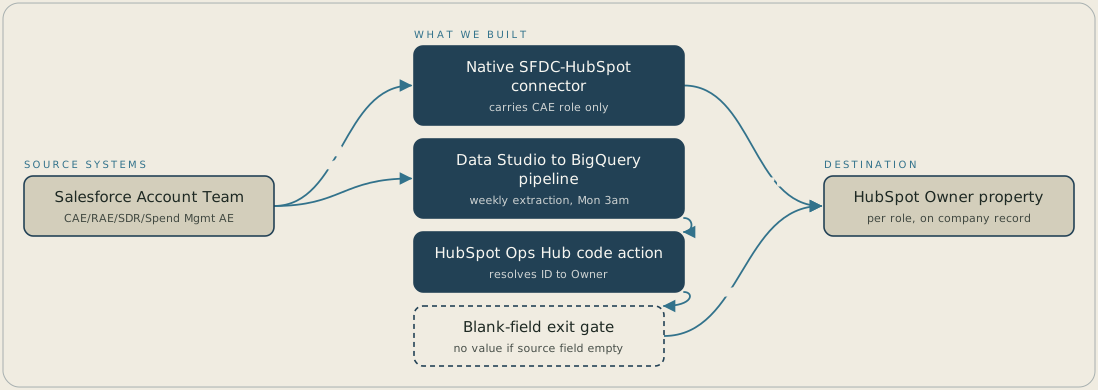
A company's Account Team roles start in Salesforce. The CAE role reaches HubSpot through the native Salesforce-HubSpot connector, while the SDR, RAE and Spend Management AE roles are pulled by Data Studio into BigQuery every Monday at 3:00 AM. A custom code action in HubSpot Ops Hub resolves each role's Salesforce user ID to a HubSpot Owner, and it stops without writing anything if the source field is blank. The result is a per-role Owner property on the company record that internal alerts can use.
FAQ
Custom objects would mean rebuilding Account Team's model and keeping both copies in sync by hand. Reading Salesforce data directly through a code action avoids that duplication, so Salesforce remains the one place role assignments get created or changed.
The custom code action checks the source field first and exits without writing anything if blank. A company missing a Spend Management AE keeps that Owner property empty rather than holding a stale name.


