

Parent-child company model unifying two disconnected legacy systems

A workforce-management and payroll software platform kept its own customer records split across an internal platform and Monday.com, with neither source mapping cleanly onto a single HubSpot company. We built a parent-company and child-company structure instead, plus several properties that didn't exist anywhere in HubSpot before this engagement.
Executive Summary

Context
The company's own customer base lived in two systems that had never shared a schema, so every account carried a different shape depending on its source. A standard Company object could hold one of those shapes, never both.

What We Built
We built a parent-company and child-company structure and several net-new custom properties, replacing a flat field-to-field migration that had nowhere to put data either legacy source held and HubSpot didn't.

Tech Stack
- HubSpot Sales Hub
- HubSpot Service Hub
- custom company properties
- Monday.com
Not a fit if your customers are single, flat organisations rather than businesses whose own employees and admins need their own records. A standard Company object already covers that case. It also assumes someone can produce a complete field-level inventory across every legacy source before mapping starts, since a partial list leaves custom properties to be discovered mid-build rather than planned for upfront.

The Challenge
Before this build, the company's own customer records lived in an internal platform and in Monday.com, and neither system's fields lined up with HubSpot's native Company and Contact objects. A straight field mapping would have forced every customer into one flat company record. That left no separate place for the employees a customer uploaded, and no way to flag which of them held admin rights.
Several fields tracked by both legacy systems had no matching HubSpot property at all. They included a Customer Success Manager owner, a go-live date, a renewal date, a contract signatory and a contract-status flag. So we had to decide what kind of record each piece of data belonged on before a single field got mapped.

Our Approach
We first considered a single flat Company record per customer, matching legacy fields one to one. That shape had no room for an employee layer: contacts and account details would share one record, with no property to flag which contacts could act as an administrator.
Instead, we built a parent-company and child-company structure. A customer's employee list uploads as a CSV, and each row lands as a non-marketing contact on a child-company record associated to that customer's parent-company record. Admin rights get one dedicated role field on the parent-company record rather than being copied onto every child company, so the system checks a single place to know who can act for an account.
Building this shape meant leaving five fields unmapped rather than forcing them onto an existing property that meant something else. Customer Success Manager, Go Live Date, Renewal, Contract Signatory and the contract-status flag each became a new custom property instead.

Impact

The client's own customers get a two-tier record instead of one flat account
Each customer now has a parent-company record for its own top-level account and one or more child-company records beneath it, so a customer with its own structure has somewhere to put that structure instead of one flat Company row.
Employee lists import without mixing employee and account-level data
A CSV-based employee list upload adds each person as a non-marketing contact on the matching child-company record, so importing a customer's staff no longer means writing contact data onto the record that holds the account's own commercial details.
Admin rights sit in one property instead of being checked record by record
A dedicated role field marks admin users at the parent-company record rather than on each child company beneath it, so the system checks one property to know who can act for a customer instead of hunting across every associated record.
Fields with no native HubSpot equivalent stopped falling out of the mapping
Customer Success Manager, Go Live Date, Renewal, Contract Signatory, and a contract-status flag each became a new custom property instead of being approximated with an existing field, because neither legacy source had a HubSpot equivalent to map onto.
A customer's own top-level account is a parent-company record, and its branches or sub-accounts are child-company records associated to it. The split exists so account-level data and the employees working inside that account never have to share one record.
A customer's employee list uploads as a CSV, and each row lands as a non-marketing contact on the matching child-company record. Non-marketing status keeps these imported employees out of marketing sends while still tying each one to the correct account.
A dedicated property flags which contacts hold admin rights, set once on the parent-company record rather than repeated across every child company beneath it. One property answers who can act for an account, regardless of how many child records sit under it.
Customer Success Manager, Go Live Date, Renewal, Contract Signatory, and a contract-status flag were built as new company properties because neither the client's internal platform nor Monday.com had a HubSpot field that already meant the same thing.
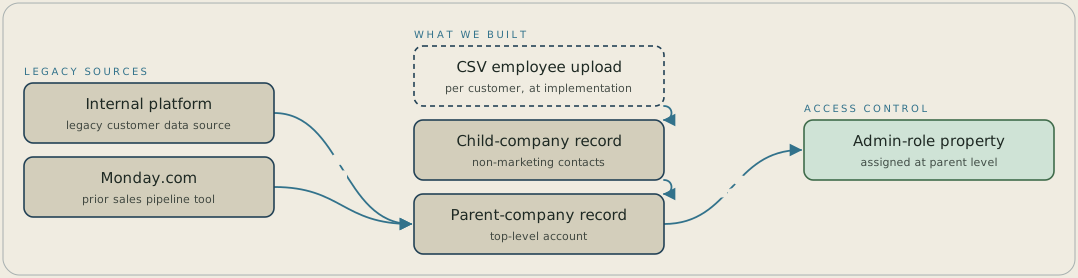
Customer data from the client's internal platform and from Monday.com maps into a HubSpot parent-company record, which holds the top-level account. A customer's employee list uploads as a CSV, and each row lands as a non-marketing contact on a child-company record associated to that parent. The admin-role property is set on the parent only, so one field answers who can act for the account.
FAQ
A flat Company object had no way to hold a customer's account-level details separately from the employees working inside it. Splitting the record into a parent company for the top-level account and one or more child companies beneath it gives each layer a home of its own.
Fields such as Customer Success Manager, Go Live Date, Renewal, Contract Signatory, and a contract-status flag became new custom properties rather than being mapped onto an existing field that meant something else. That kept each field's original meaning intact.


