

Attribution Reporting for a Lead-Score Property HubSpot Doesn't Track

Marketing couldn't point to the page or form that had pulled a given contact's lead score up, because HubSpot's reporting tool doesn't have a native report that attributes a custom scoring property back to the content feeding it.
We built a three-report view inside HubSpot's own reporting tool instead: pages ranked by the total lead score of the contacts who viewed them, a submission count scoped only to the two forms the scoring rules reference, and a second submission count spanning every form in the portal. All three refresh on a rolling 30-day window.
Executive Summary

Context
A global print-management software vendor sold through a multi-tier authorised-partner and reseller channel had already built a lead-score property on every contact in HubSpot, but marketing had no way to see what was actually driving it.

What We Built
We built a three-report lead-score attribution view in HubSpot: a top-pages report, an exact-match submission report limited to the two forms written into the scoring rules, and an all-forms submission report, all run on a rolling 30-day window.

Tech Stack
- HubSpot
- Zendesk
- SendGrid
- in-house system of record
Not a fit if your lead-scoring rules are not already built and stable, since this layer reads score contributions after the fact and cannot substitute for defining what earns the score. Teams still setting or revising their scoring model should finish that work first.

The Challenge
Marketing had set a lead-score property on every contact and used it to prioritise outreach. But nobody on the team could say which page or form had raised a given contact's score, because HubSpot's reporting tool doesn't have a built-in report that attributes a custom scoring property to the content driving it.
Two of the forms feeding the score had names close enough to other forms that a standard submission report pulled in unrelated submissions alongside them. That left marketing guessing which content to double down on.

Our Approach
We first tried a standard form-submission report filtered to the two forms that fed the score. It kept returning submissions from a nearby form that shared part of its label, because HubSpot's filter matches on label text and the forms' names were close enough to collide. Renaming both scoring forms with a distinguishing suffix gave the filter an exact string to match, so the count could be scoped to only the forms the scoring logic reads.
With the filter fixed, we built three reports rather than one composite view. A top-pages report ranks pages by the total lead score of their viewers. A submission-totals report covers just the two renamed forms. A second submission-totals report spans every form in the portal, because a form outside the scoring rules can still tip a contact over a threshold later, and the narrower report alone would miss that.
All three run on a rolling 30-day window, which trades a live view for one that marketing can read consistently each week.

Impact

Seeing which pages actually move the score
The top-pages report ranks every page by the total lead score of the contacts who viewed it, so marketing can point to the pages pulling contacts towards a higher score instead of guessing from traffic volume. That let the team weigh content decisions against what the score actually rewarded, not just what drew the most views.
Counting only the submissions the score actually reads
Renaming the two forms written into the scoring rules with a distinguishing suffix gave the submission-totals report an exact string to filter on, so the count reflects only the forms the lead-score property reads. Marketing could finally trust that a submission spike in the report was the scoring forms and nothing else.
Catching contributions from every other form too
A second submission-totals report spans every form in the portal rather than just the scoring forms, since any submission can still add value to a contact's score on a later visit even when the form itself is not a named trigger. That gave marketing a wider net for explaining a score change the narrower report alone would miss.
A reporting cadence marketing can return to every week
All three reports run on a rolling 30-day window, so the view refreshes on its own schedule instead of marketing re-deriving the filter logic each time someone asks what moved the score. A one-off investigation became a report the team could check routinely.
A HubSpot report ranking pages by the total lead score of the contacts who viewed them, built to surface which content is actually associated with a rising score rather than which content gets the most traffic.
The two forms written into the lead-scoring rules were renamed with a distinguishing suffix so a report filter could match on an exact string instead of a partial label, removing a nearby form's submissions from the count.
One submission-totals report is filtered to just the renamed scoring forms; a second spans every form in the portal, because a submission on a form outside the scoring rules can still raise a contact's score on a later visit.
All three reports are set to a rolling 30-day window rather than a fixed date range, so the view marketing checks each week stays current without anyone resetting the filter by hand.
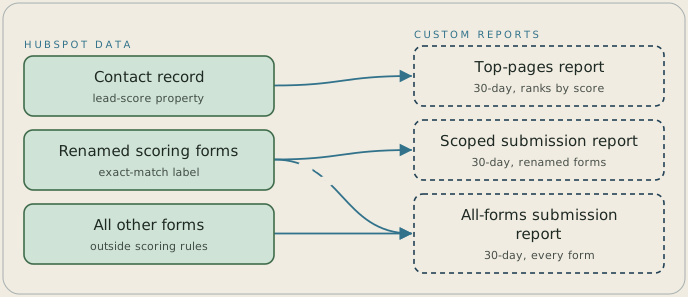
The top-pages report ranks pages by the total lead score of the HubSpot contacts who viewed them. The two forms written into the scoring rules were renamed with a distinguishing suffix, which lets a second report match them by exact label and count only their submissions. A third report counts submissions on every form in the portal, because a form outside the scoring rules can still raise a score on a later visit. All three reports run on a rolling 30-day window.
FAQ
HubSpot's lead-scoring property tracks a running number on the contact record, but its reporting tool has no built-in report that attributes that number back to the page or form that raised it. Getting that view took building custom reports around the property rather than turning one on.
A single report could not do all three jobs: ranking pages needs the contact's score, the exact-match count needs a filter scoped to the renamed forms only, and the all-forms count needs to stay unscoped, since a form outside the scoring rules can still move the score later. Splitting them kept each filter exact.


