

Custom Salesforce-HubSpot Sync After a Native Connector Failure

A B2B events and exhibitions operator running 90+ annual conferences across 35 brands was midway through connecting Salesforce Sales Cloud to a new HubSpot Marketing Hub when the native Salesforce connector became unstable under real volume. We retired it and built a two-lane replacement: Data Hub Studio pulls qualifying records in, and a custom API layer writes events back out, both gated by an audited sharing-rules review.
Executive Summary

Context
A B2B events and exhibitions operator running 90+ annual conferences across 35 brands was replacing Salesforce Marketing Cloud with HubSpot Marketing Hub, keeping Salesforce Sales Cloud as its sales system of record. The native connector meant to keep them in step proved unstable once live.

What We Built
We replaced the native connector with a custom two-lane sync: HubSpot Data Hub Studio pulls in flagged Salesforce Contact records, and a custom API layer writes HubSpot lifecycle events back to Salesforce. Both lanes are gated by the same audited sharing-rules review.

Tech Stack
- HubSpot Marketing Hub, HubSpot Data Hub Studio, Salesforce Sales Cloud, AWS (S3, RDS, Lambda)
Not a fit if your Salesforce org doesn't have an auditable sharing-rules and Organization-Wide Defaults setup, since a selective sync needs record-level visibility that can be known before it's scoped. It also assumes budget for a custom API layer over a licence-tier connector, since a similarly complex environment can destabilise a native integration once it's live.

The Challenge
A native Salesforce connector was meant to keep Salesforce Sales Cloud and a new HubSpot Marketing Hub in step automatically. Instead it began causing stability issues once real production volume hit it. An operator running 90+ annual conferences across 35 brands needs that sync to hold continuously, because Project Attendance records, lifecycle-stage changes, and opt-outs all move between the systems before a campaign's next send.
The decision was whether to keep trusting the connector at all, with a July go-live depending on the answer.

Our Approach
We first designed the build to trust the native connector's built-in object mapping to keep Contacts and Project Attendance moving both ways. That mapping held in testing but not in production, so we decommissioned it rather than keep debugging a point we couldn't instrument.
In its place we built two lanes, each gated independently, so that sync governance runs in both directions rather than through one shared pipe. Inbound, Data Hub Studio pulls a Salesforce Contact when it's created or updated with pardot_sync set to true, matched on contact email and checked against the HubSpot Integration Role's own visibility into it. Outbound, a custom API layer writes back to Salesforce when a HubSpot contact opts out, hard bounces, or changes lifecycle stage. Together the two lanes act as middleware between the systems.
Both lanes run on the same sharing-rules review, so a record syncs only when the integration user's role can already see it. Contact sync runs hourly, and Project Attendance sync stayed manual. That's the trade-off: code we can debug, in place of a one-click connector's convenience.

Impact

A sync that keeps running under real production load
The custom two-lane sync keeps Contact and Project Attendance data moving on an hourly interval, so campaign sends and lifecycle updates stay current instead of stalling the way the native mapping used to.
Record visibility decides what syncs, not a blanket connection
An audited sharing-rules review gates the sync, so only records the integration user can already see move across. Marketing works from the same access boundaries sales already trusts, not a wider, unaudited pipe.
Sales and marketing events reach the other system without manual re-entry
A Salesforce Contact created or updated with pardot_sync true reaches HubSpot through Data Hub Studio without a person re-keying it, and a HubSpot opt-out, hardbounce, or lifecycle-stage change writes back through the custom API layer the same way.
A debuggable integration instead of a packaged connector
The write-back layer is custom code, not a vendor's packaged connector, so the team can trace a stalled sync to its cause instead of waiting on a third-party fix. That's what kept the integration live after the native connector had already failed once.
Data Hub Studio watches Salesforce Contact records for a pardot_sync flag set to true and pulls the matching record into HubSpot, matched on contact email. It pulls only what the integration user's sharing-rule visibility permits, so the sync inherits Salesforce's own access boundaries rather than a separate permission model.
A custom API layer pushes HubSpot workflow events, an opt-out, a hardbounce, or a lifecycle-stage change, back to the matching Salesforce record. It replaced the native connector's outbound mapping once that mapping proved unstable, trading a packaged connector's convenience for a write path the team can trace end to end.
An audited review of sharing rules and Organization-Wide Defaults set the rule the sync runs on, so a record syncs only when the integration user's role can already see it. The audit doubled as the selective-sync specification, since visibility had been inherited entirely from the parent Account beforehand.
Contact records sync on a recommended hourly interval so lifecycle and opt-out changes stay current between sends. Project Attendance sync was still manual at time of writing, the one part of the design not yet on the same automated schedule.
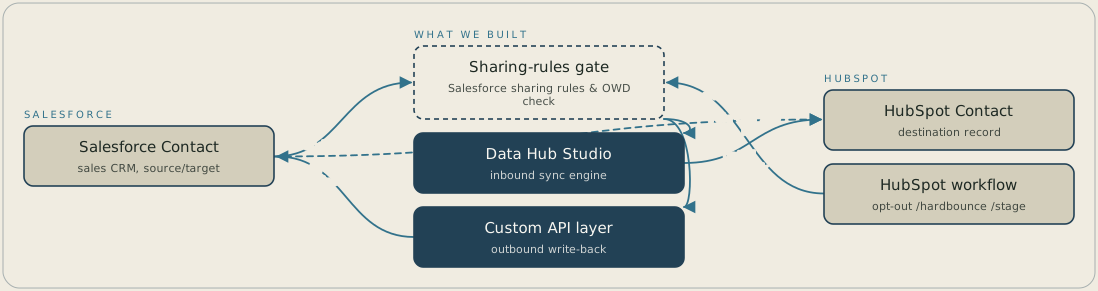
A Salesforce Contact that's created or updated with pardot_sync set to true passes a sharing-rules check, and Data Hub Studio then pulls it into HubSpot, matched on email. In the other direction, a HubSpot opt-out, hard bounce or lifecycle-stage change goes through the same check before a custom API layer writes it back to the Salesforce record. The check means a record only syncs when the integration user's role can already see it. The native connector that used to do this job has been retired.
FAQ
The instability showed up once the connector carried real production volume, not in a configuration screen, so no single setting fixed it. Rebuilding the outbound path as a custom API layer gave the team a write path they could instrument directly, instead of guessing at a packaged connector's behaviour.
Record visibility decides it. Sharing rules and Organization-Wide Defaults set what the integration user's role can see, and the sync only moves what that role already views. An audited review of those rules became the selective-sync specification, since visibility had been inherited entirely from the parent Account beforehand.


