

Reengaging Lapsed Pest Control Customers in Microsoft Dynamics

A household that let its general pest service lapse had no path back into an active plan, and Microsoft Dynamics couldn't simply personalise its way out of the problem. A seventeen-and-a-half-month inactivity trigger now flags the lapse, and a last-service-type property recommends the plan tier that fits.
Executive Summary

Context
A residential and commercial pest control services provider needed a systematic way to bring lapsed general pest customers back inside Microsoft Dynamics, rather than leaving renewal to chance once a service interval passed.

What We Built
We built a reactivation nurture inside Microsoft Dynamics. It flags a household that has lapsed at seventeen and a half months, reads its service history to recommend one of five plan tiers, and reaches it through static, segment-specific email versions in place of one dynamic send.

Tech Stack
- Microsoft Dynamics workflows, properties and email/SMS sends
- Mural for workshop mapping
- Lucidchart for the final flow diagrams handed to the build partner
Not a fit without an existing Microsoft Dynamics CRM, or a relationship with a Dynamics implementation partner, since this design work stops short of the platform build itself. It also depends on service history logged consistently enough for a last-service-type property to work as a key, and on content arriving from the client on schedule.

The Challenge
General Pest customers went quiet for months, and no system flagged when a lapse had become a lost account. The retainer's brief was specific: recommend a plan tier from a household's own service record, not one blanket renewal offer.
Microsoft Dynamics, the client's CRM, couldn't render a single email that changed by property value. So we wrote separate email versions instead of one adaptive send.

Our Approach
We set the inactivity trigger at seventeen and a half months since a household's last service, three months after an earlier Overdue Service Reminder had gone unanswered. A last-service-type property became the segmentation key. A termite inspection alone routed to an entry-tier termite plan, and a termite inspection paired with treatment routed to a mid-tier combined plan. A lighter general-pest history routed to an entry-tier pest plan, a heavier one routed to the top-tier pest plan, and both histories together routed to the top-tier combined plan.
Dynamics couldn't vary one email by that property, so we built the logic as static versions: two versions of the second email and five of the third, each written for its segment and not personalised at send time. Three emails ran on a fixed cadence, one at workflow start and two more spaced thirty days apart.
Once the content was approved, we handed finished specifications to the client's Dynamics implementation partner. The partner built the workflow and ran acceptance testing ahead of each country's launch date.

Impact

A lapsed household gets a plan recommendation, not a blanket offer
The segmentation key reads a household's own service record before any email goes out. A termite-only customer sees a termite-tier recommendation and a combined-history customer sees the combined-tier one, so lapsed accounts don't all get the same generic message.
Personalisation survives a platform that cannot render it dynamically
Static email versions replace the one adaptive send that Dynamics couldn't produce. The recommendation logic still reaches five distinct segments, even though the platform has no per-property content blocks.
A fixed nurture launched on schedule in two countries
The three-email sequence went live in New Zealand on 1 October 2024 and in Australia a month later, each on the date the rollout plan set. The implementation partner completed the Dynamics build and testing ahead of both dates.
The retainer earned a second term
The client signed a second three-month statement of work at the same value as the first shortly after the Traditional and Home Protection renewal programs launched, extending the same retainer this nurture was scoped under.
The workflow watches for a service gap of seventeen and a half months, timed to fire three months after an earlier Overdue Service Reminder went unanswered. The nurture therefore only reaches households that stopped responding to routine reminders.
A single property records whether a household's last service was a termite inspection, a termite inspection with treatment, or a general-pest visit of either severity. That value drives which of five plan tiers the nurture recommends.
Dynamics can't vary one email by property value, so we wrote two versions of the second email and five of the third, one for each segment. The recommendation still reaches the household despite the platform limit.
Once the trigger, key and content were approved, we passed finished specifications to the client's Dynamics implementation partner. The partner built the workflow and ran acceptance testing before the New Zealand and Australia launch dates.
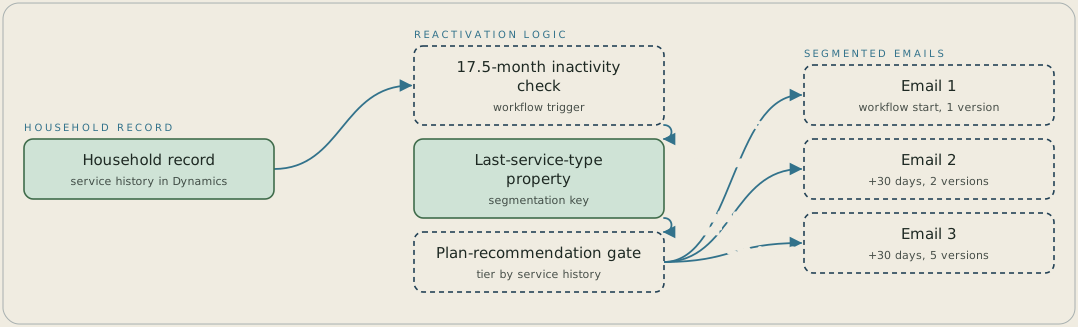
A household record enters the workflow once it has gone seventeen and a half months without a service. A last-service-type property then decides which of five plan tiers to recommend. Three emails follow on a fixed cadence: the first at workflow start with one version, and the second and third thirty days apart, with two and five static versions written for each segment, because Dynamics can't vary one email by property value.
FAQ
The interval is set three months past an earlier Overdue Service Reminder that already went unanswered. The nurture therefore only reaches households that had a prior chance to respond and didn't.
Microsoft Dynamics can't change a single email's content by a property value. We built two versions of the second email and five of the third instead, one for each service-history segment, and the workflow chooses which one to send.


