

MAU-tiered customer success automation on HubSpot Service Hub
A workforce-management and payroll software platform serving labour-hire agencies and direct-employer businesses ran Customer Success by memory: a quiet account got noticed only when a CSM remembered to check. We replaced that with Service Hub automation that tiers accounts by usage, escalates stale tickets on a fixed clock, and suppresses a six-month check-in once one contact replies.
Executive Summary

Context
The company's Customer Success Managers each owned a growing book of accounts, with no system flagging which ones needed attention before a renewal call or a ticket went cold. Account health sat in each CSM's own notes, not a property HubSpot could route a task against.

What We Built
We built a Service Hub automation suite that assigns a CSM on go-live, tiers outreach by usage, and escalates or flags tickets against fixed thresholds. It replaces manual judgement with properties and workflows HubSpot itself enforces.

Tech Stack
- HubSpot Service Hub, custom company properties, HubSpot workflows, Zendesk
Not a fit if support, CX, product, and CS leadership can't sit in one workshop to map the ticket and account-health rules end to end before a build starts. This design came from a single cross-functional session, and skipping it leaves the automation guessing at thresholds nobody agreed on. It also assumes CSMs already hold a paid HubSpot seat, since check-in workflows merge in meeting links only a licensed user can generate.

The Challenge
Before this build, no system tracked whether an account had gone quiet. A ticket in New status stayed there until someone reviewed the queue by hand.
The brief asked for tickets to escalate from Medium to High priority if unopened for more than three hours. But HubSpot's filters measure only in whole days, so we substituted a coarser one-day threshold.

Our Approach
We started from properties already tracked inside the Service Hub architecture rather than adding a separate monitoring tool. For escalation, HubSpot's filters only support day-level granularity, so the three-hour SLA became a ticket in New status for more than one day.
For account health, Low MAU and High MAU split accounts against a hundred-user threshold. That feeds a trigger that works as ticket health flagging. It fires after ninety days of inactivity, or a hundred and eighty for Low MAU, and a Low Activity Flag workflow tasks the CSM Manager only once it's set.
The CSM introduction sequence enrols through one of the sales-to-CSM handoff gates, once a CSM Manager is known. At or above 400 monthly active users it sends immediately, and below that line it sends a follow-up two weeks later, guarded against re-firing. The 182-day check-in email has a suppression gate too. A companion workflow sets a shared property on any reply, and that blocks the reminder for everyone else.

Impact

CSMs stop relying on memory to catch a quiet account
Every account carries a trigger that flips on once its last activity date crosses ninety or a hundred and eighty days, so a CSM Manager gets a task the moment an account goes quiet, without anyone checking by hand.
Tickets left unopened get escalated on a fixed clock
A ticket in New status for more than a day now escalates from Medium to High priority automatically, so a CSM Manager sees the change in their queue instead of finding an aging ticket during a manual sweep.
New accounts get the right introduction without a CSM building the list
A company enrols in the CSM introduction sequence only once a CSM Manager is assigned, and a parent/child-company check stops it firing twice. Accounts at or above 400 monthly active users hear from their CSM immediately. Smaller accounts get a two-week-delayed version.
One reply stops six months of duplicate check-in reminders
The 182-day check-in email sends to every contact, but the moment any one replies or books a meeting, a shared property suppresses the reminder for everyone else, so a client gets one coordinated touchpoint instead of several near-identical emails.
Low MAU and High MAU are custom properties set against a hundred-user usage threshold. A Low Ticket Activity Trigger fires after ninety days of inactivity for High MAU accounts, or a hundred and eighty for Low MAU ones, then clears itself after a one-minute delay.
A ticket in New status for more than one day escalates automatically from Medium to High priority, the closest substitute once HubSpot's day-only filters ruled out the client's three-hour target. The rule runs against ticket status alone, regardless of pipeline.
A company enrols once its CSM Manager (the Company owner property) is known, which is only true after implementation hands the account to Customer Success. The 400-MAU threshold decides an immediate or two-week-delayed send, and a parent/child-company check stops the sequence firing twice.
The check-in email sends 182 days after the same enrolment criteria as the introduction sequence, with a 7-day delay before a companion workflow checks for engagement. That workflow sets a shared property, Engaged with 6 Month Check In Email, on any reply, and every other reminder reads it first.
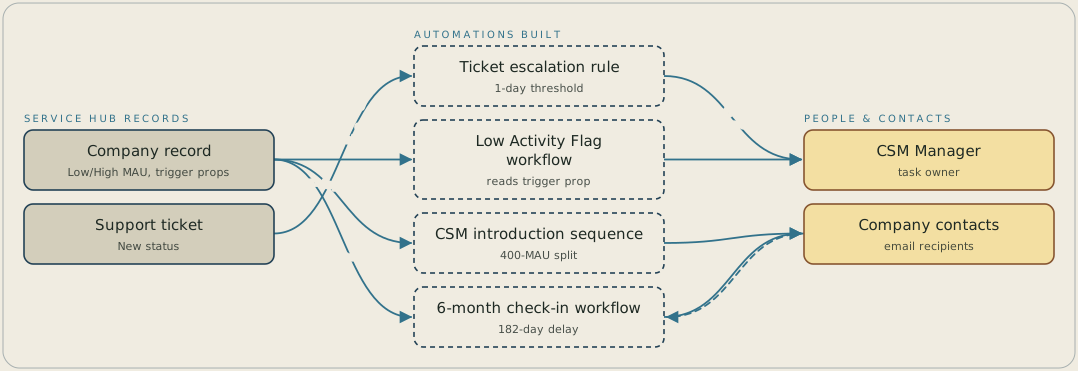
A company record carries Low MAU and High MAU properties. When a company goes ninety or a hundred and eighty days without activity, a Low Activity Flag workflow creates a task for the CSM Manager. Separately, a ticket that stays in New status for more than one day escalates from Medium to High priority, because HubSpot's filters only work in whole days. The six-month check-in email goes to every contact, and a reply sets a shared property that suppresses the reminder for the others.
FAQ
HubSpot's workflow filters resolve only to whole days, not hours, so a three-hour rule can't run inside a standard trigger. We substituted the closest achievable granularity, a ticket in New status for more than one day, rather than building escalation in a separate tool.
A single company-level property, set to yes the moment any contact replies or books a meeting, suppresses the reminder for every other contact at the company. You get one coordinated touchpoint per account instead of one email per contact record.


