

A custom Person object for shared clinic inboxes
HubSpot's Contact object deduplicates on email, but this provider's clinics route front-desk staff, veterinarians, and practice managers through a single shared inbox, so a straight migration would collapse all of them into one record. We designed a custom HubSpot Person object, backed by three matching workflows and a dedicated Account Contact Relationship pipeline, so each individual gets their own record while HubSpot still tracks one Best Match Contact per person.
Executive Summary

Context
A veterinary prescription-management and practice-services provider was migrating from Salesforce Marketing Cloud to HubSpot Marketing Hub Enterprise while keeping Salesforce as its system of record. Its clinics behave like shared front desks: several distinct staff work behind one practice email address, and HubSpot's Contact object treats all of them as one person.

What We Built
We designed a custom Person object connected to Salesforce through three HubSpot workflows and a dedicated Account Contact Relationship pipeline, replacing a plan that would have relied on HubSpot's native Contact-Salesforce sync alone.

Tech Stack
- HubSpot Custom Objects, HubSpot Operations Hub coded actions, Salesforce Data Loader, Salesforce Apex, Salesforce Platform Events
Not a fit if your CRM has no existing HubSpot-Salesforce connector or your HubSpot instance lacks Operations Hub Enterprise. The matching workflows, and the coded action they could call instead of native branching alone, assume a live Salesforce sync already in place and a license tier supporting custom logic beyond standard workflow actions.

The Challenge
HubSpot's Contact object deduplicates records strictly on email. The provider's clinics route front-desk staff, veterinarians and practice managers through one shared inbox, so a straight migration would fold every one of them into a single record.
A workflow addressed to that record would reach whichever person the native Salesforce connector had most recently updated. A service case meant for the practice manager could then land with the front desk, and nobody could tell which of several real people the system meant.
The same connector doesn't sync Account Contact Relationship data at all, so the per-hospital active or inactive status that Salesforce tracks against each contact had nowhere to live in HubSpot. And because Salesforce had to remain the system of record, the fix had to sit on top of the existing sync rather than replace it.

Our Approach
We looked first at native workflow branching. But it could only react after HubSpot's own Salesforce connector had already re-linked a Contact to whichever Salesforce record changed most recently, so the identity behind a shared inbox flipped on the connector's schedule instead of a deliberate one.
So we built a custom Person object instead, with one record per real individual. Records enter through two workflows keyed on email or the Salesforce Contact ID, depending on which record arrives first. A Best Match refresh keeps the Contact label current by re-scoring on every bridging-field change and nightly.
Account Contact Relationship data got its own pipeline, because the standard connector doesn't carry those records at all. It maps Salesforce IDs to HubSpot Persons and Companies, and sets each Person-to-Company association to Active or Inactive per hospital. The initial load runs as a one-time batch export. The ongoing method, and whether the matching logic moves into an Operations Hub coded action, were still open decisions.

Impact

Every clinic contact resolves to one real person
The Person object's two intake workflows mean a front-desk email and a veterinarian's email behind the same shared inbox each land as their own Person record, so no individual gets merged into a colleague's history. HubSpot still tracks one Best Match Contact underneath, so sales and service tools built for one contact per email keep working unchanged.
Hospital status stays current in HubSpot, not just Salesforce
The Account Contact Relationship pipeline maps Salesforce Account IDs to HubSpot Companies and updates one of HubSpot's own association labels, Active or Inactive, the moment a hospital's status changes in Salesforce. That status has nowhere else to live in HubSpot, because the native connector does not sync ACR data at all.
One Best Match Contact, kept current automatically
The third workflow re-scores Best Match on every bridging-field update and again nightly, so the label moves to the correct Contact instead of drifting to whichever Salesforce record synced most recently. That keeps outbound sends and service routing pointed at the person who currently holds the relationship.
A migration path that does not wait on a full rebuild
Because the ACR pipeline's initial load runs as a one-time batch export, the Person object and its workflows can go live on the existing Salesforce sync before the ongoing sync method is finalized. That decouples the identity model from an unresolved data-engineering decision so it does not block the rest of the marketing migration.
A distinct custom object gives each real individual their own record, related to a HubSpot Contact through a Best Match association label instead of being folded into it. The relationship to Contact and Company went through a six-step implementation and sandbox-validation plan before build.
Two workflows handle orphaned-record reconciliation from both directions. One fires when a Person is created with no matching Contact, keys on email after a two-minute wait for Salesforce sync, and applies Best Match or creates a new Contact; the other fires when a Contact appears with no Person yet, keying on the Salesforce Contact ID first and email second.
Re-scores on email plus first and last name whenever a Contact's bridging fields change, plus a nightly pass over the full base, and removes the prior Best Match label before assigning the new one so exactly one Person holds it at any time.
Maps Salesforce Contact IDs to HubSpot Persons and Account IDs to Companies, then sets the Person-to-Company association label Active or Inactive per hospital. The initial load runs as a one-time Data Loader export; the ongoing method, a scheduled batch or an event-driven push, was still under evaluation.
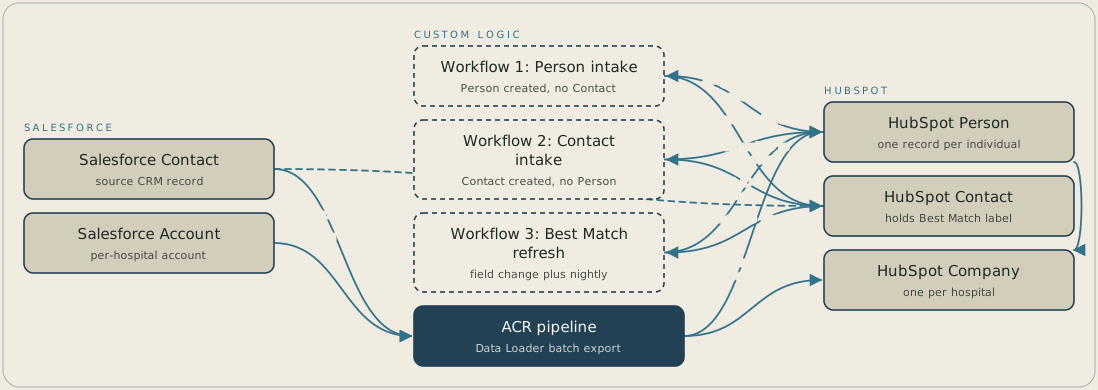
When a HubSpot Person is created without a Contact, the first workflow matches on email and applies the Best Match label, or creates the Contact. When a Contact appears without a Person, the second workflow creates one using the Salesforce Contact ID, then email. The third workflow re-scores Best Match whenever bridging fields change, and again nightly. Separately, a Data Loader batch export moves Salesforce Contact and Account IDs onto HubSpot Persons and Companies and marks each Person-to-Company association Active or Inactive.
FAQ
Because HubSpot's Contact object performs record deduplication strictly on email, and a shared inbox with several real people behind it collapses into a single record the moment you rely on Contact alone. A separate Person object keeps one record per individual while HubSpot still tracks a single Best Match Contact for tools, like sequences and service routing, built around one contact per email.
The Account Contact Relationship data runs through its own pipeline instead of the standard connector, which does not sync ACR records at all. Salesforce Contact IDs map to your HubSpot Persons and Account IDs map to Companies, with an initial one-time batch load and an ongoing method, either a scheduled batch or an event-driven push, still being decided.


