

Keap to HubSpot CRM Migration for a Healthcare Recruitment Agency

Keap's contact records carried the agency's client companies as flagged people, not as true company objects, so a standard path couldn't turn them into linked HubSpot companies. We ran a sample migration first to expose that gap, then built the properties and workaround the full migration needed.
Executive Summary

Context
The client is a medical and healthcare recruitment agency based in Australia, running its CRM on Keap and preparing to move its full contact, company and activity history onto HubSpot. Recruitment depends on accurate company-to-contact relationships and correctly attributed activity history, both modelled differently across the two platforms.

What We Built
We migrated the agency's Keap CRM to HubSpot in two coordinated passes: a TruJay-run contact, company and task migration validated against a sample pull, and a SyncMatters workstream for the record types the native path couldn't carry. Custom properties covered the fields Keap tracked that HubSpot doesn't.

Tech Stack
- HubSpot CRM, Keap (Infusionsoft), TruJay migration tooling, SyncMatters
Not a fit if your organisation needs verified data completeness before a full migration is scheduled: a standard sample pull covers only a fraction of the source database, so confidence in linked contacts and companies arrives with the full run, not before it. It also assumes every rep logged in the old system gets a destination account ahead of cutover, or their notes and activities default to a placeholder user instead of the right owner.

The Challenge
Keap doesn't have a true parent or child company object, so the agency's associated companies existed only as contact records with a person type field set to company. A standard migration path read those records as people, not as linked companies. Keap also didn't hold a company owner field, so ownership needed manual, region-based reassignment.
HubSpot didn't have a default equivalent for a primary contact flag, a fax number field, or a tags property either. So the standard path had nowhere to put any of them.

Our Approach
We ran TruJay's sample migration first, pulling contacts, companies, tasks and notes ahead of the full run. The sample surfaced the person type gap immediately. TruJay's tool pulls through at most ten percent of the database, so we resolved every discrepancy the sample surfaced before the full run.
We built three custom properties: a checkbox for Keap's primary contact designation, a Fax Number field, and a Tags property seeded by CSV upload and kept current through form submissions. For the record types the standard path couldn't carry, we used SyncMatters instead, running test passes to confirm the mapping before calibration.

Impact

Company relationships survived the platform gap
Every associated company that Keap stored as a flagged contact came across as its own object in HubSpot, not flattened inside a person record, because we built the CSV workaround before the full run committed the same records. The agency's account hierarchy read correctly from day one.
Activity history moved with the records it belonged to
Record types that neither platform could move by default, such as notes, emails, tasks, meetings and sales activity, still reached the new CRM, because SyncMatters carried them through a bulk process calibrated with test runs before go live. The agency kept its full interaction history.
Record ownership landed with the right person
Notes and activities stayed attributed to the rep who created them rather than defaulting to a placeholder account, because every Keap-logged user had a HubSpot account before the full migration ran. The recruitment team could trust the record the moment it appeared.
The agency was working in HubSpot with minimal correction
Only minor fixes were needed once the migration ran. The agency's data was aligned and accessible, and day-to-day recruiting carried on uninterrupted by the switch. Non-native data that the standard path couldn't touch was brought across too, which gave the team confidence in the new CRM.
A TruJay sample pull of contacts, companies, tasks and notes runs ahead of the full migration as a controlled failure test, not a proof of readiness. Because the sample covers at most ten percent of the database, every discrepancy it surfaces gets resolved before the full run repeats it at scale.
When a source CRM has no true parent or child company object, its associated companies arrive as contact records carrying a person type value instead of linked companies. The fix pairs a manual CSV upload with a review before the full migration, so the destination company hierarchy matches the agency's actual structure.
Three fields the source platform tracked natively, a primary contact flag, a fax number, and tags, had no destination equivalent, so each became a custom HubSpot property. The tags property is seeded once by CSV upload and kept current afterwards through form submissions, rather than staying a one-time import.
Sales activities, notes, emails, tasks and meetings that the core path couldn't export or import move through a separate tool instead, with data points specified for bulk processing. Test runs confirm the mapping before calibration to the client's own use.
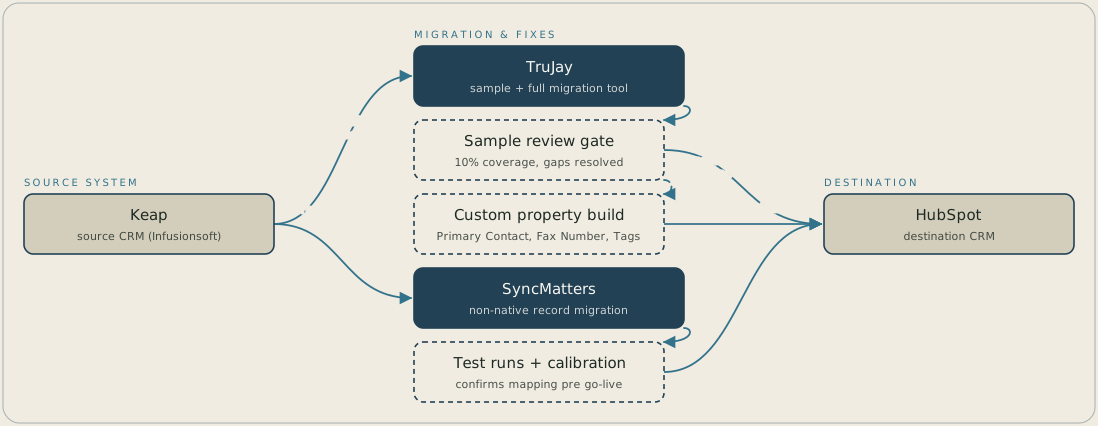
TruJay pulls a sample of contacts, companies, tasks and notes out of Keap and passes it through a review gate, where gaps such as the person type problem get resolved before the full migration into HubSpot. Custom properties for the primary contact flag, the fax number and the tags fill the fields HubSpot doesn't have by default. Record types the standard path can't carry go through SyncMatters instead, with test runs to confirm the mapping before it's calibrated for go live.
FAQ
If your source platform doesn't have a true company object, your associated companies likely exist as contact records carrying a flag marking them as a company. A standard migration path reads that flag literally and brings the record across as a contact, not a linked company. The fix is a reviewed CSV upload once the sample pull shows which records need it.
A standard sample migration typically pulls through at most ten percent of the database, so you see a slice of your data, not the whole picture. It catches structural problems, like a contact standing in for a company, but full confidence arrives only once the complete migration has run.


