

Migrating a Multi-Brand Product Catalogue Off a Legacy CMS
An environmental and hydro-meteorological monitoring equipment manufacturer ran its site on a custom CMS hosted by a sister company, on a hosting deal that ended on a fixed date. We replaced it with HubSpot Content Hub Enterprise: a HubDB-driven product catalogue across four locales, and a redirect layer that consolidates six-plus legacy sub-brand domains into two branded sites.
Executive Summary

Context
The client manufactures environmental and hydro-meteorological monitoring instrumentation under a multi-brand water-quality technology platform, selling to municipal, industrial and research buyers across North America and Europe. A hosting arrangement from a sister company was ending on a fixed date, so the platform move was mandatory.

What We Built
We rebuilt the manufacturer's site on HubSpot Content Hub Enterprise: a HubDB-driven product catalogue across four locales, and six-plus legacy sub-brand domains consolidated into two branded sites behind a mapped redirect layer.

Tech Stack
- HubSpot Content Hub Enterprise
- HubDB
- Salesforce Sales Cloud
- SiteSearch360
- GA4
Not a fit if you need two independent Salesforce syncs from one HubSpot portal: HubSpot supports only one Salesforce connection per portal, so a shared portal means a shared sync. Also not a fit without HubSpot experience and budgeted training before go-live, or if your quote-cart and RFQ forms can't be rebuilt without risking existing revenue.

The Challenge
Editors couldn't add or reprice a product listing without a developer ticket. The site ran on a custom CMS hosted by a sister company, and that hosting deal ended on a fixed date, so the platform had to change. Six-plus legacy sub-brand domains each had their own template and search history, which made a single consistent product experience impossible.
HubSpot Content Hub Enterprise became the target platform, and the product catalogue was the hardest piece. It needed twenty-plus page templates built on HubDB, product content in four locales, and a redirect map that folded every sub-brand domain into two branded sites without losing search visibility. The existing quote-cart and RFQ forms already produced significant attributed revenue, so the rebuild had to carry them through the cutover instead of pausing them.

Our Approach
The product catalogue needed relational lookups across Categories, Sub-Categories, Brands and Applications, keyed on Page Path and Product Number. HubDB's column limit meant we couldn't hold four-locale Overview, Summary and CTA text on the Products table. So we moved that text into a separate Product Translations table, which splits the catalogue schema in two, with both tables joined on the same keys.
A table edit creates a draft, and Publish has to be clicked on every modified table before the change goes live. Because of that, the launch published the dependent tables in a fixed order. We built the templates to meet WCAG accessibility requirements once, at the template level.
Redirects followed a 301 mapping scheme, one to one by top-performing slug, with batch rules for shared slug patterns. A page with no equivalent returns a 410 Gone instead of a homepage default, which protects crawl-budget recovery. HubSpot can't run two Salesforce-to-HubSpot integrations from one portal, so the second brand's site shares the first portal's sync instead of getting its own.

Impact

A product catalogue that updates without a developer ticket
A HubDB catalogue keyed on Page Path and Product Number lets the team add or reprice a product by editing a table row, so a change no longer waits on a developer ticket. A separate linked table holds locale-specific overview and CTA text, so four-language content fits without pushing the parent table past HubDB's column ceiling.
Six-plus retired domains land on one search-visible structure
Mapped one-to-one redirects, with batch rules for pages that share a slug pattern, carry each legacy page's search equity onto its new equivalent, while an unmatched page returns a deliberate 410 instead of a homepage default. The plan targets retaining 70 to 80 percent or more of legacy search authority, stabilising within roughly six months.
One portal, one Salesforce sync, two brands
Because HubSpot supports only one Salesforce-to-HubSpot sync per portal, the second brand's site shares the first portal's sync rather than requesting its own, so one lead-routing and reporting path stays live across both brands instead of splitting Salesforce visibility.
Revenue-generating quote and RFQ flows carried through the rebuild
The existing quote-cart and RFQ forms were scoped to carry over rather than be rebuilt, so the redesign did not force the sales team to re-learn or re-integrate tooling already driving its pipeline.
The Products table carries Page Path and Product Number as unique identifiers, with relational lookups to Categories, Sub-Categories, Brands and Applications. Long per-locale text, such as Overview, Summary and CTA copy, moved into a separate Product Translations table, because HubDB's column limit couldn't hold four languages directly on Products.
Adding or editing a Products row creates a draft, and it doesn't go live until Publish is clicked on every table it touched. The launch sequence accounted for this by publishing dependent tables in a fixed order rather than all at once.
Each legacy page redirects to its top-performing equivalent by slug, with batch rules covering pages that share a slug structure across brands. A page with no clear equivalent returns a 410 Gone rather than a homepage default, stating an intentional removal instead of masking it.
HubSpot cannot run two Salesforce-to-HubSpot integrations from one portal, so the second brand's site was built inside the same portal as the first, keeping one Salesforce sync serving both brands.
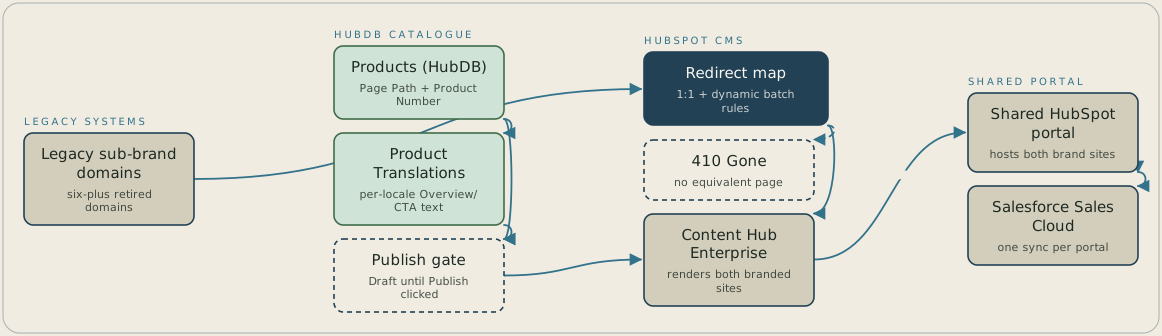
Each product is a row in a HubDB Products table keyed on Page Path and Product Number, and the locale text for that row sits in a linked Product Translations table, because HubDB's column limit couldn't hold four languages on one table. Edits stay as drafts until Publish is clicked on every modified table, and only then does Content Hub Enterprise render the live site. A request to a retired sub-brand domain goes through the redirect map: a matched page gets a 301 to its equivalent, and a page with no match returns a 410 Gone. Both brand sites run in one shared HubSpot portal, which carries the single Salesforce sync to Salesforce Sales Cloud.
FAQ
A blanket homepage redirect tells search engines the old page still has an equivalent, diluting crawl budget and landing visitors somewhere unrelated to what they searched for. A 410 Gone response states plainly that a page with no real equivalent is retired, so crawlers stop indexing it instead of crawling a dead end.
HubSpot allows only one Salesforce-to-HubSpot integration per portal, and Salesforce Sales Cloud wasn't up for replacement here. Separate portals would have meant a second, parallel sync that HubSpot doesn't support, so both brands run from one portal and share its one sync.


