

GDPR Unsubscribe and Erasure Workflow for a Reseller Channel

A print-management software vendor sold through a network of authorised partners and resellers didn't have a consistent path for unsubscribe and data-deletion requests. They arrived through a support ticketing tool, staff inboxes and a separate email sender, which left a GDPR-regulated company with more than 180,000 contacts exposed to inconsistent suppression handling. We built a single classify-then-enrol unsubscribe workflow and a right-to-erasure procedure on HubSpot's GDPR delete-and-warn function, so support staff have one repeatable path across four connected systems.
Executive Summary

Context
The client sells print-management software through a multi-tier channel of authorised partners and resellers spanning thousands of downstream accounts, and is subject to GDPR across its European contact base. Its requests reached the business through a ticketing tool and directly to staff, with no documented sequence to follow.

What We Built
We built a single manual-enrolment workflow that classifies each request as partner or customer and as unsubscribe or deletion, then opts the contact out of email, marks it non-marketing, adds it to a blocked-contacts list, and logs the ticket reference, paired with a right-to-erasure procedure on HubSpot's native GDPR function.

Tech Stack
- HubSpot
- Zendesk
- SendGrid
- in-house system of record
Not a fit if your support team already routes suppression and erasure requests through one connected system with its own audit trail, or if no legacy system of record exists that customer-of-record changes still have to reach. The value here is coordinating classification across systems that don't share data.

The Challenge
Unsubscribe requests reached the client through a support ticketing tool or straight to staff, and nothing documented what to do next. A request first had to be sorted as partner or customer, and separately as an unsubscribe or a full deletion. Treating the two alike risked opting out a live account, or erasing a contact who only wanted to stop receiving email.
Four systems were involved. HubSpot held the marketing relationship, and a separate ticketing tool logged the request. An outside email sender ran trial nurture sends that HubSpot's own suppression didn't cover, and a decades-old in-house system held the true customer of record. A support agent guessing at that sequence risked a compliance gap on every request.

Our Approach
We mapped unsubscribe and erasure requests separately instead of building one blanket suppression rule, because the two carry different consequences under GDPR. The procedure starts with classification: partner or customer, then unsubscribe or right-to-erasure.
An unsubscribe goes into a manual enrolment step. That step opts the contact out of email, sets it to non-marketing, adds it to a static blocked-contacts list, and logs a note with the ticket reference. A right-to-erasure triggers a permanent delete under HubSpot's GDPR functionality, which warns if the contact is added again later. That replaced a separate check we would otherwise have built.
Trial nurture emails go out through the separate email sender, so we stop them from inside HubSpot rather than at the sender. The enrolment step is manual, so an agent still has to start it, and the contact owner coordinates the matching deletion in other systems.

Impact

Support staff resolve unsubscribe requests without touching multiple settings
A request that once required an agent to judge partner from customer and unsubscribe from deletion now routes into a single enrolment step that opts the contact out, marks it non-marketing, and logs the ticket reference on the record.
A right-to-erasure request cannot be silently reversed
HubSpot's native GDPR delete function warns if a contact is ever re-added after a right-to-erasure request, flagging the prior deletion. That warning does the work a separate re-identification check would otherwise have had to do, while the contact owner coordinates the matching deletion elsewhere.
Trial nurture suppression is enforced from one place
Trial nurture emails are sent through a separate email provider rather than HubSpot itself, so a suppression recorded only in HubSpot could be silently bypassed by that outside send. The procedure now stops those sends from inside HubSpot, so one action governs every channel.
Customer-of-record changes stay with the system that owns them
Because the client's decades-old in-house system, not HubSpot, is the true record of who owns an account, the procedure routes any customer-of-record change there instead of encoding it as a HubSpot property. HubSpot stays focused on the marketing relationship it actually governs.
Before any system changes, the request is sorted twice: partner or customer, and unsubscribe or right-to-erasure. HubSpot's GDPR delete function doesn't distinguish the two on its own, so treating them alike risked opting out an active partner account or erasing a contact who only asked to stop receiving email.
A support agent manually enrols the contact into the unsubscribe workflow, which opts it out of marketing email, sets it non-marketing, and adds it to a static blocked-contacts list, with a note carrying the ticket reference.
A right-to-erasure request triggers a permanent delete under HubSpot's native GDPR functionality, which flags a later re-add with a warning of the prior deletion. The contact owner coordinates the matching deletion elsewhere.
Trial nurture emails run through a separate email sender, not through HubSpot's own send infrastructure, so the unsubscribe step also stops that outside send. Governing both from inside HubSpot keeps one action authoritative across every channel.
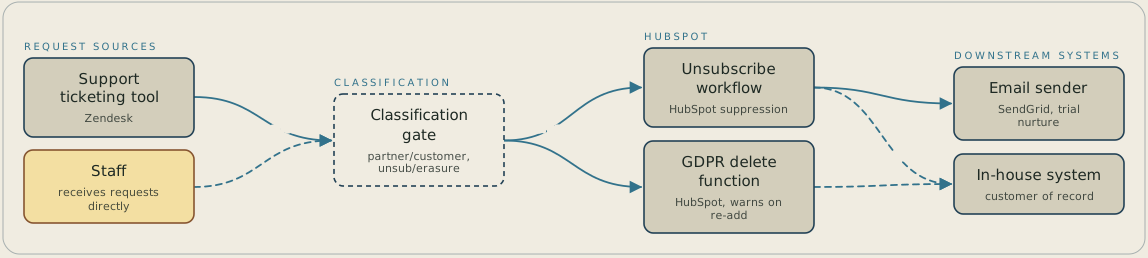
A request arrives through the Zendesk ticketing tool or directly to staff, and goes first to a classification step that sorts it as partner or customer and as unsubscribe or erasure. An unsubscribe runs the HubSpot suppression workflow, which also stops trial nurture sends at SendGrid. An erasure runs HubSpot's GDPR delete function, which warns if the contact is ever added again. Both paths pass customer-of-record changes and matching deletions to the in-house system, where the contact owner coordinates them.
FAQ
We classify every request twice before touching a system: partner or customer, then unsubscribe or right-to-erasure. The two carry different consequences under GDPR, so an unsubscribe enrols the contact into a suppression workflow while an erasure triggers a permanent delete.
HubSpot's native GDPR delete function flags a contact if anyone tries to re-add it after a right-to-erasure request, warning that a prior deletion took place. That warning does the work a separate re-identification check would otherwise have to do.


