

Double Opt-In Newsletter Segmentation for an Executive Education Provider

A data and analytics company's executive-education contacts populated one undifferentiated list with no record of who had actually agreed to marketing email. We built a double opt-in workflow and a marketing opt-in form that split the list on legal basis: alumni moved straight to confirmed status while prospects and clients were held until they clicked to confirm, then fed a five-tag newsletter architecture, Alumni Warm, Alumni Cold, Prospect-Newsletter, Client-Newsletter, and Staff, with its own suppression gate for anyone who opted out.
Executive Summary

Context
The client is a data and analytics company that runs a paid, invitation-only executive-education program for senior leaders and board members at large listed companies. Its contact database held program alumni alongside prospects and clients who had never explicitly opted in, with no workflow distinguishing who could be emailed under an existing legal basis from who still needed fresh consent.

What We Built
We built a double opt-in workflow and a marketing opt-in form that split contacts by legal basis, then fed the confirmed list into a five-tag newsletter architecture with its own suppression gate for opt-outs.

Tech Stack
- HubSpot Forms, HubSpot Workflows, HubSpot Email, HubSpot Lists
Not a fit if you can't say, list by list, which segments already hold a legal basis for contact and which don't. The double opt-in build depends on that distinction being settled before the workflow runs, not discovered after a send goes out. Also not a fit if your newsletter has no existing template to segment against, since this build extended one rather than designing a new one.

The Challenge
The client's executive-education program had built up years of alumni, prospects and clients inside a single HubSpot contact list. Nothing recorded which contacts had actually agreed to receive marketing email. Alumni already held a legal basis for contact from their time in the program, but nothing distinguished them from prospects and clients who had only ever submitted an event registration form. So every send risked emailing someone who had never opted in.
The marketing team was preparing to launch a monthly newsletter into that same list. It couldn't tell a confirmed subscriber from an unconfirmed one, and it couldn't send a Staff contact a different message than an Alumni contact. Left as it stood, the newsletter would have shipped to a mixed list and treated every audience the same way.

Our Approach
We ruled out treating every contact the same way. Alumni already held a legal basis for marketing contact, and prospects and clients who had never submitted a form did not, so a blanket re-consent campaign would have suppressed alumni who were already reachable. We built a double opt-in workflow instead. It triggers when a contact is added to a cleansed list or submits the marketing opt-in form.
A one-click confirmation is the key that moves a contact out of unconfirmed status, and it leaves a consent audit trail on the contact's timeline that proves when they opted in. The workflow ran once against the existing list, then switched to fire for each new signup. Unconfirmed contacts are gated out of every marketing send, but alumni bypass that gate: their existing legal basis routes them straight to confirmed status, while prospects and clients stay withheld until they click to confirm.
Once a contact is confirmed, a subscription-type selection on the opt-in form tags them into one of five segments: Alumni Warm, Alumni Cold, Prospect-Newsletter, Client-Newsletter and Staff. Those tags feed a monthly newsletter built on the existing template. The segmentation also carries its own suppression gate, so an unsubscribe or opt-out on any list drops that contact from the send.

Impact

Confirmed contacts are the only ones a send can reach
Every marketing send now checks confirmed status before it reaches a contact, so an unconfirmed prospect or client can't receive a newsletter they never agreed to. The gate holds regardless of which list a contact came from, because the same one-click workflow confirms every contact, every time.
Alumni kept their standing instead of re-confirming what they already agreed to
Alumni moved straight to confirmed status because their existing legal basis was built into the workflow as its own path. So the program didn't have to run a blanket re-consent campaign asking people who had already agreed to ask again. Prospects and clients still went through the confirmation step the workflow requires of them.
Five audience tags replace one undifferentiated list
A contact's subscription-type selection on the opt-in form now tags them into one of five segments, Alumni Warm, Alumni Cold, Prospect-Newsletter, Client-Newsletter, and Staff, so the monthly newsletter can speak to each audience differently instead of sending one message to everyone on the list. The tagging happens at the point of opt-in, so a new signup is placed correctly before the first send it is eligible for.
An opt-out removes a contact from every future send
The five audience tags carry a suppression gate of their own: an unsubscribe or opt-out on any list drops that contact from the newsletter send instead of leaving them countable in a segment they no longer belong to.
A double opt-in workflow fires when a contact is added to a cleansed list or submits the marketing opt-in form, and a one-click Yes, I want to subscribe confirmation is the key that moves a contact out of unconfirmed status. The workflow ran once against the existing list, then switched to fire per new signup.
Legal basis, rather than list source alone, decided whether a contact had to click through the confirmation step. Alumni already held one from their time in the program and moved straight to confirmed status, while prospects and clients were held until they clicked.
A contact's subscription-type selection on the opt-in form tags them into one of five segments, Alumni Warm, Alumni Cold, Prospect-Newsletter, Client-Newsletter, and Staff, and that tag is what the monthly newsletter reads to decide which message a contact receives.
A suppression gate checks opt-out and unsubscribe status ahead of every send, dropping a contact from the newsletter regardless of which of the five segment tags they still carry.
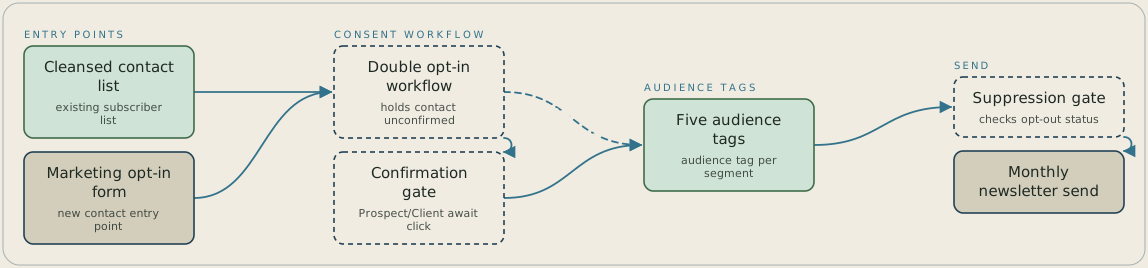
A contact enters the double opt-in workflow either by being added to the cleansed contact list or by submitting the marketing opt-in form, and the workflow holds them as unconfirmed. Prospects and clients wait for a one-click confirmation, while alumni skip that gate because they already have a legal basis. Confirmed contacts are tagged into one of five audience segments, and the suppression gate checks each contact's opt-out status before the monthly newsletter goes out.
FAQ
Alumni already held a legal basis for marketing contact from their time in the program, so routing them through the same confirmation step as a cold prospect would have added friction without a legal reason behind it. The workflow checks which list a contact came from, moving alumni straight to confirmed status while prospects and clients complete the one-click confirmation.
A suppression gate runs alongside the five audience tags, so an unsubscribe or opt-out on any list removes that contact from the newsletter send regardless of which segment they were tagged into. The gate checks suppression status ahead of the tag, so a former subscriber never receives a send because their tag was left stale.


