

An Information-Wall Permission Model for a Corporate Advisory Firm
A licence condition required the firm to wall off its capital-markets deals from its M&A team, but nothing in HubSpot enforced that boundary: any record behind the wall was visible to whoever had a login. We mapped the firm's managing director, director and team tiers onto HubSpot's own roles and teams and added a Sensitive Contact flag for the one exception neither tier nor team could cover.
Executive Summary

Context
An Australian corporate advisory firm running M&A, equity capital markets and corporate broking mandates operated under an ASIC licence that required an information wall between its capital-markets and M&A teams, yet its single HubSpot instance gave every user the same default view of every record.

What We Built
We mapped the firm's managing director, director and team tiers onto HubSpot's native roles and teams, then layered a per-user permission matrix and a Sensitive Contact property on top for the one exception the tier structure alone could not cover.

Tech Stack
- HubSpot Sales Hub Enterprise
- HubSpot Data Hub
- PandaDoc
- Microsoft Teams
Not a fit if no one inside the firm owns the access model as a living document. The matrix names forty-one people individually, so a hire or team move that isn't reflected in it quietly breaks the wall it was built to hold. It also assumes a tier structure already exists to mirror, meaning it is settled who counts as a director and which teams are real. A firm still settling its own reporting lines needs to do that first.

The Challenge
Before the matrix existed, everyone with a HubSpot login saw the same default view of every contact, company and deal, capital-markets and M&A alike. That was a licensing problem. The firm's ASIC licence carries an information-wall condition between the two practices, so an adviser browsing a deal on the wrong side of it was a live breach exposure.
HubSpot's own permission model offers role and team assignment but nothing finer. It has no setting for a director whose oversight legitimately crosses the wall. And it has no way to mark one record as sensitive regardless of who owns it.

Our Approach
A straight team-based wall would separate capital-markets and M&A staff. It would also block the directors who legitimately oversee both teams, and it couldn't single out one record needing protection regardless of who held it.
So the firm tied default visibility to seniority first and team second. A managing director sees every team's records, a director sees their own book plus their team's, and a team member sees only their own team's work. The matrix documents this by name for all forty-one people, and only three of them sit entirely outside the ASIC compliance perimeter.
Contacts stay firm-visible by default. The one gap the tier model left, a record needing a gatekeeper regardless of team or seniority, is covered by a Sensitive Contact checkbox instead of a second wall. A director can also mark one deal private to a team or group. The trade-off is a documented manual matrix in place of the rule engine a bigger platform tier might have offered.

Impact

A visibility model every user in the firm can point to
Every HubSpot user now maps to one of three tiers, managing director, director or team member, so a new hire's visibility is a question of which team and tier they join, not a judgement call made record by record.
One flag that protects a record without a second wall
A contact needing a gatekeeper, regardless of team or tier, now carries a Sensitive Contact checkbox instead of a rule of its own, so the firm can protect one relationship without rebuilding the access model around it.
An audit-ready record of who can see what, and why
The Security Matrix lists every person against their team, tier and per-object permissions, giving the firm a single reference for who falls inside the compliance perimeter and who sits outside it, rather than a role list scattered across HubSpot's own settings screens.
Room for a director to tighten a deal past its default
A director can mark one deal private to a team or group when a mandate needs tighter cover than its tier gives by default, so an exception is a checkbox on the record, not a change to the underlying model.
Every user's default view of contacts, companies and deals is set by one of three tiers rather than by team membership alone: a managing director sees every team's records, a director sees their own book plus their team's, and a team member sees only their own team's work. The tier is what enforces the wall between capital-markets and M&A day to day.
HubSpot's role settings assign each of the firm's forty-one users to one of five teams, Corporate, Capital Markets, M&A, Consultants and Advisory Board, and one of five roles, Super Admin, Director, Team Member, No Seat or No Access, each with its own delete, edit and view flags on deals, custom objects and dashboards.
Contacts are firm-visible by default, since most carry no conflict risk. A Sensitive Contact checkbox on the individual record overrides that default and routes visibility through a gatekeeper regardless of the viewer's team or tier, because it is the record, not the team, that needs protecting.
A director or managing director can mark a single deal private to one team or group, tightening it below what their tier would normally grant, without a change to anyone's underlying role or team assignment.
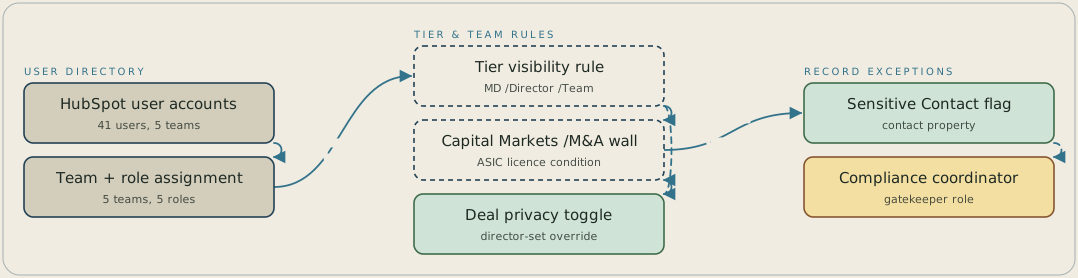
Each of the firm's 41 HubSpot users is assigned one of five teams and one of five roles, and a three-tier rule (managing director, director, team member) sets the default view of contacts, companies and deals. That rule lets managing directors and directors cross the wall between capital markets and M&A that the firm's ASIC licence requires, while a director can mark a single deal private to one team. One more exception sits on the contact: a Sensitive Contact flag routes that record's visibility through the compliance coordinator as gatekeeper.
FAQ
HubSpot's native settings assign a role and a team to each user. That separates capital-markets and M&A staff well enough, but there's no tier between seeing your own team and seeing everything. So a director who legitimately oversees both sides of the wall has no clean setting that matches their seniority, and there's no record-level flag independent of team or role. The tier model and the Sensitive Contact checkbox cover exactly those two gaps.
The matrix names all forty-one people individually against their team and role, so it stays only as current as the firm's own process for updating it when someone joins, leaves or changes teams. It's a named, auditable document rather than a rule that recalculates itself, because the audit trail is what the ASIC obligation asks for.


