

Importing Legacy Leads Into HubSpot Without Losing Their History

Two years of home care enquiries lived in two spreadsheets, outside the CRM sales worked every day. We loaded both files into HubSpot using email to catch duplicates. New properties held the original create date and source HubSpot wouldn't let us set directly, and we removed every sensitive medical reference by hand before a single record went in.
Executive Summary

Context
A not-for-profit aged care, home care and retirement living provider held two years of home care leads in spreadsheets outside HubSpot. Sales needed every historic lead in the CRM without losing the dates, sources or stages HubSpot's own fields could not hold.

What We Built
We built a one-time import that loaded two legacy lead spreadsheets into HubSpot. It deduplicated by email, split a combined stage field into two properties matching the live intake form, and moved every historic note to the activity log after a manual scrub for medical references.

Tech Stack
- HubSpot CRM
Not a fit if your legacy records use a dedupe key other than email that a spreadsheet does not consistently hold, since this import's exclusion rule depends on email being present and distinct. It also assumes new custom properties can stand in for a destination platform's own locked create-date and source fields; a system that allows a direct override needs no such workaround.

The Challenge
Two spreadsheets, New Leads and Previous Leads, held roughly two years of home care enquiries that had never touched HubSpot. Because the files sat outside the CRM everyone else worked from, sales had no record of a prospect's original enquiry date or source. HubSpot sets its own create date and source the moment a contact is created, and it refuses an override on either at import. A straight load would have replaced every historic date with the load date and erased months of real activity.
Seven contacts had no email on file, and HubSpot dedupes by email, so those records couldn't be loaded safely without risking a collision with an existing prospect. A handful of couples shared one email across both household members. The sheets also carried medical references inside free-text notes, the same category of data that the Privacy Act 1988 later barred from HubSpot entirely.

Our Approach
We loaded New Leads and Previous Leads as two separate imports, so that each sheet kept its own column mapping. Email became the dedupe key. We excluded the seven contacts with no email rather than loading them with a placeholder address, and where two people shared one email, the import created a single point-of-contact record instead of two competing ones.
HubSpot wouldn't accept an override on its own create date or source fields, so two new properties, Historic Create Date and Historic Source, took the spreadsheet's original values instead. The real timeline survived, even though HubSpot's own record reads as the import date. We also split the sheet's single combined stage column into two live properties, Home care package level approved and What stage of the journey are they at?, matching the categories sales already used on new leads.
Every free-text note was scrubbed of medical references by hand before load, and then moved into the HubSpot activity log against its contact.

Impact

A lead's real history survives a limit HubSpot's own fields could not get around
Historic Create Date and Historic Source hold each lead's real enquiry date and channel, so sales can see how long a prospect had already been active before the import.
Two years of enquiries stopped living outside the CRM
Every home care lead in New Leads and Previous Leads became a working HubSpot contact, so sales stopped splitting its pipeline between the CRM and two static spreadsheets.
Deduplication ran without creating a collision
Excluding the seven no-email contacts and collapsing shared-email couples to one point of contact meant the email dedupe key never produced a false match against an existing prospect.
Sales history moved forward without the detail HubSpot could not hold
Notes moved into the HubSpot activity log only after a manual scrub for medical references, so sales kept the history it needed without the CRM holding data it isn't licensed to store.
The import matched on email to catch duplicates across both spreadsheets. Seven no-email contacts were excluded rather than loaded with a placeholder, and shared-email couples collapsed to a single contact.
HubSpot assigns create date and source itself and refuses an override at import, so two new properties, Historic Create Date and Historic Source, carried the spreadsheet's original values instead.
The sheet's combined current-stage column split into two live properties already in use on new leads, Home care package level approved and What stage of the journey are they at?.
Every note was scrubbed of medical references by hand before it reached HubSpot, then moved into the activity log, preserving history without carrying forward data the CRM couldn't safely store.
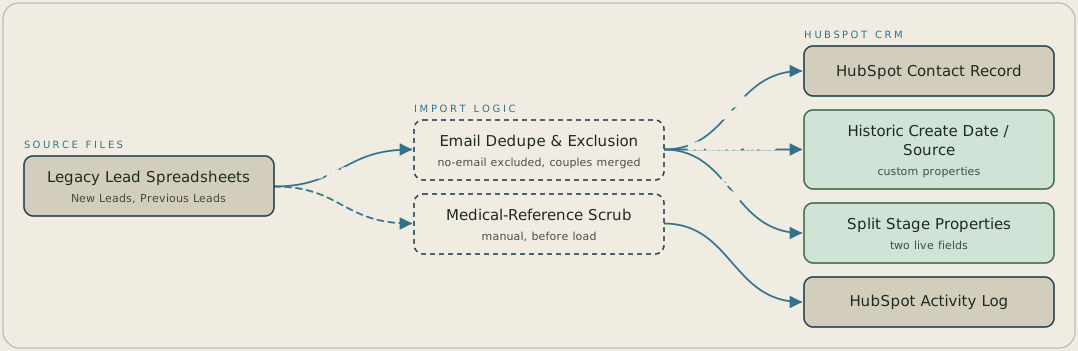
Two legacy spreadsheets, New Leads and Previous Leads, load into HubSpot with email as the dedupe key. Contacts with no email are excluded, and couples who share an email become one point-of-contact record. Because HubSpot won't accept an override on its own create date and source, the original values are written to two custom properties, Historic Create Date and Historic Source, and the combined stage column is split into two live properties. Notes are scrubbed of medical references by hand before they are moved into the HubSpot activity log.
FAQ
HubSpot assigns its own create date at creation and refuses an override at import, so a separate Historic Create Date property carried each spreadsheet's original date instead, keeping the real timeline visible.
Email was the dedupe key the import matched on. The seven contacts with no email were left out rather than loaded with a placeholder, and where two people in a household shared one email, the import created a single point-of-contact record instead of two competing ones.


