

HubSpot Lead Source Property Governance for a Commercial Design Firm

A commercial design firm's HubSpot portal took most of its contacts from a continuous Salesforce sync, and its Lead Source property had grown to more than 440 dropdown values referenced across 151 workflows. We scoped a fix to the trigger that mattered: a workflow and sync-preference rule for every Salesforce-sourced contact, plus a company-to-contact association setting the first audit had found disabled.
Executive Summary

Context
A commercial interior design and workplace-strategy firm ran its HubSpot portal on contacts synced continuously from Salesforce, its CRM of record. By its second portal audit, the firm's Lead Source property carried more than 440 values and the account sat within a few thousand contacts of its 200,000-contact tier ceiling.

What We Built
We built a Lead Source workflow and sync-preference rule that sets the property to Salesforce for every Salesforce-sourced contact, and closed a company-to-contact association gap the first audit had flagged as disabled.

Tech Stack
- Salesforce, HubSpot Marketing Hub Enterprise, HubSpot CMS Hub Enterprise
Not a fit if most of your contacts do not arrive through an external CRM sync carrying its own source-of-record signal, since the fix depends on a reliable Original Source and Drill-Down combination to trigger on. Also not a fit if your contact tier has comfortable headroom below its ceiling, since this work was driven by an account already within a few thousand contacts of its limit.

The Challenge
Contacts entering the firm's HubSpot portal from Salesforce carried an Original Source of Offline and a Drill-Down value of SALESFORCE, and each one wrote to a Lead Source property meant to record where it came from. That dropdown had already grown to more than 440 values by the first portal audit, with 28 workflows referencing it. Fourteen months later the same property appeared in 151 workflows, more than five times as many, while the contact count climbed from 216,209 to 243,448.
The growth ran into a harder ceiling. The Marketing Hub Enterprise tier was licensed for 200,000 contacts, and the account had already used 199,851 of them at the first audit, leaving almost no room for new Salesforce-sourced volume without a tier upgrade or a purge. A property referenced in dozens of workflows could not simply be pruned without breaking whatever those workflows checked it for.

Our Approach
Trimming the dropdown to a shorter list was the obvious first move, but with 151 workflows already keyed to specific values, removing options risked breaking logic none of them had been re-audited against, so we left the existing values alone. Instead we scoped the fix to the trigger that mattered: a contact created through the Salesforce integration, identified by an Original Source of Offline and a Drill-Down value of SALESFORCE. For that trigger, we built a workflow that sets Lead Source to Salesforce and set the property's sync rule to Prefer Salesforce, so a record with a system of record already established stops competing for attribution credit. We also closed the company-to-contact association gap the first audit had flagged as disabled, since an unassociated company left every contact under it invisible to account-level reporting. Governing the sync direction on one property against one trigger left the account able to absorb continued growth without the tier ceiling forcing an upgrade or a purge.

Impact

Offline-sourced contacts stop competing for Lead Source credit
Every contact created through the Salesforce integration now sets Lead Source to Salesforce under the sync rule Prefer Salesforce, so the property stops splitting attribution credit for records that already have a system of record. The 151 workflows referencing Lead Source keep working, because the fix governs which value a record gets rather than removing an option they depend on.
The contact tier stopped forcing an immediate upgrade decision
Governing the property did not shrink the portal's 200,000-contact ceiling, but it stopped new volume from adding to the sprawl that had pushed the account to 199,851 of those contacts, so the firm could keep absorbing growth without an immediate upgrade or a purge.
Contacts became visible to account-level reporting again
Automatic company-to-contact association, flagged as disabled at the first audit, was enabled by the second, so contacts synced from Salesforce started rolling up under their company record instead of sitting unassociated. Reporting grouped by account could count records it had been missing.
The database kept growing without the workflow layer breaking
The contact database grew from 216,209 to 243,448 between the two audits, and workflow references to Lead Source grew alongside it, from 28 to 151, without a workflow failing because a value it checked for had been deleted. Governing the trigger instead of the value list let both keep climbing on the same property.
A contact created through the Salesforce integration carries an Original Source of Offline and a Drill-Down value of SALESFORCE, the two properties the workflow checks before touching Lead Source. Scoping the fix to this trigger left HubSpot-native form submissions untouched.
The workflow sets Lead Source to Salesforce for every matching contact, and the property's sync rule is set to Prefer Salesforce so that value holds against whatever the native two-way sync would otherwise write. The two settings together decide which system wins attribution.
Lead Source stayed a single dropdown carrying more than 440 values and referenced by 151 workflows, none removed or renamed by this fix. Governing the trigger that populates one value left every other workflow keyed to the property's existing values working as it had before.
Automatic company-to-contact association, the setting linking a contact record to its company without manual intervention, had been left disabled at the first audit. Enabling it meant Salesforce-synced contacts rolled up under the correct company instead of arriving as an orphaned record.
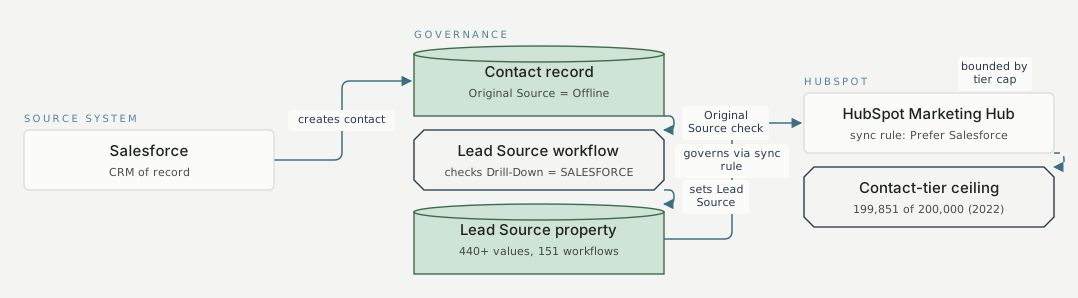
Source system Governance HubSpot Salesforce CRM of record Contact record Original Source = Offline Lead Source workflow checks Drill-Down = SALESFORCE Lead Source property 440+ values, 151 workflows HubSpot Marketing Hub sync rule: Prefer Salesforce Contact-tier ceiling 199,851 of 200,000 (2022) creates contact mechanism 1 Original Source check mechanism 1 sets Lead Source mechanism 1 governs via sync rule mechanism 1 bounded by tier cap mechanism 1
FAQ
Because 151 workflows already referenced the property, and pruning values risked breaking logic checked for one you removed. Governing which value a new Salesforce-sourced contact gets, rather than editing the list, fixed the attribution problem without touching workflows that depended on values already in place.
It works where the property already has a defined source-of-record trigger you can check, such as an Original Source and Drill-Down combination. If your portal cannot distinguish a Salesforce-sourced contact from a native one, you would need to build that identification first.


