

CRM Foundation and Custom Objects for a Residential Appliance Manufacturer
A residential kitchen and refrigeration appliance manufacturer needed a working Contact, Company, Deal, and Ticket model in HubSpot before any other build could start, alongside a planned lead-routing engine and native Outlook logging. We built the core CRM data model, two custom objects for service assets and warranty claims, and role-based record layouts, then closed the routing and email pieces as reasoned decisions once the client's own team and an email-platform conflict overtook them.
Executive Summary

Context
The manufacturer's sales, service, and marketing teams needed one shared record for every contact, company, deal, and ticket before any specialized build, custom objects, automation, or later integration work, could start on top of it.

What We Built
We built the account's core Contact, Company, Deal, and Ticket data model, an Asset custom object for each serviced unit, a GW Claim custom object for each warranty claim, and role-based record layouts across the service, sales, and marketing teams.

Tech Stack
- HubSpot CRM (Contact, Company, Deal, Ticket)
- HubSpot Marketing Hub
- Custom Objects (Asset, GW Claim)
- Microsoft Outlook
- SMTP2GO
- HubDB
Not a fit if you don't already have an internal team capable of designing routing logic yourselves: this account's lead-routing scope narrowed to an advisory role once the client's own staff shipped a working zip-to-territory lookup before we finished its planned version. It also assumes your outbound email doesn't route through a separate relay service whose own configuration can block HubSpot's native OAuth connection.

The Challenge
The account had no working Contact, Company, Deal or Ticket model, so the custom objects and automation planned for later waves had nothing to build on until that foundation existed.
Two more items stayed on the same build list: a lead-routing engine that matched a lead's zip code, brand and territory to a district sales manager, and Outlook email logging tied to the right record. Both then ran into limits. Early in the build, on June 11, 2026, the client's own team delivered a four-table HubDB lookup that solved the zip-to-DSM match itself. Separately, the client's SMTP2go email relay configuration blocked HubSpot's native OAuth connection outright, a conflict that no workflow design could route around.

Our Approach
We built the standard Contact, Company, Deal and Ticket objects first, then two custom objects on top: an Asset object keyed by serial number, and a GW Claim object keyed by the vendor's own claim number. Role-based layouts gate what a service rep, a sales rep and a dealer-facing user each see.
Once the client's own team built its HubDB lookup for the zip-to-DSM match, we dropped our parallel routing build and kept a review role over the client's table instead.
We scoped Outlook logging as a native OAuth API connection, but the client's SMTP2go configuration rejected that handshake outright. That conflict originated in the client's own email infrastructure rather than in HubSpot's configuration, so we closed the item as blocked instead of building a workaround. The trade-off is that Outlook email logging stays outside HubSpot.

Impact

A single data model service, sales, and marketing teams share
Every ticket, deal, contact, and company record now belongs to one model, so a service rep and a sales rep work from the same record instead of reconciling two systems. That gives every later build on the account, the custom objects and the Marketing Hub programs, a foundation rather than a set of assumptions to test first.
Every serviced unit and warranty claim gets its own record
The Asset object gives each unit its own record keyed by serial number, and the GW Claim object gives each warranty claim its own record keyed by the vendor's claim number, so a rep can pull up either without leaving HubSpot. Role-based layouts limit what a service, sales, or marketing user sees to their own part of the process.
Lead routing shipped without a second system to maintain
Because the client's own team built the zip-to-DSM lookup first, the account got working routing logic without two competing systems to reconcile. Our remaining role is reviewing that table rather than owning a parallel build.
A named platform limit closed out Outlook logging early
The client's SMTP2go relay configuration blocks HubSpot's native OAuth connection to Outlook, a limit inside the client's own email infrastructure rather than a workflow gap. Closing that item early meant the rest of Wave 1 shipped without an open dependency nothing in HubSpot's native connector could unblock.
The standard four-object CRM model underlies every later build on the account, the custom objects, the role-based layouts, and the workflows that came after it. Building it first gave the Asset and GW Claim custom object schemas a foundation to attach to rather than a data structure still being designed.
Each serviced appliance unit gets its own Asset record, keyed by serial number, associated to a ticket or a warranty claim. The serial number is what lets a claim or a ticket resolve back to a specific unit rather than a generic product line.
Each warranty claim gets its own GW Claim record, keyed by the vendor's own claim number, associated back to the ticket and the asset it covers. Building the object in Wave 1 gave the later claim-creation work a record to write to rather than a schema still being designed.
Record layouts differ by role, so a service rep's ticket view surfaces asset and claim fields a sales or marketing user's view leaves out. Each team works from the same record without seeing properties from a different part of the process.
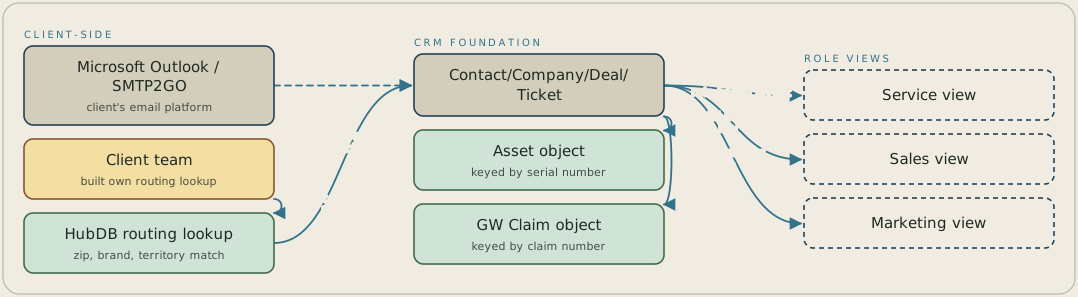
The standard Contact, Company, Deal and Ticket records sit at the center, with an Asset object keyed by serial number and a GW Claim object keyed by claim number attached to them. Service, sales and marketing each get their own layout of those same records. Two paths sit outside the build: the client's own HubDB table matches zip code, brand and territory to a district sales manager, and the client's SMTP2GO email relay blocks HubSpot's native OAuth connection to Outlook.
FAQ
The client's own team shipped a four-table HubDB lookup matching zip code, brand, and territory to a district sales manager before we finished its planned version. We dropped its build and kept an advisory role over the client's table instead.
The client's SMTP2go email relay configuration blocked HubSpot's native OAuth connection to Outlook outright, a limit inside the client's own email infrastructure that no HubSpot workflow could route around. We closed the item as blocked rather than build an unsupported workaround.


