

Closed Won deal handover into a gated HubSpot implementation ticket pipeline

A Deal marked Closed Won in HubSpot Sales Hub had nowhere to go: no ticket, no assigned owner, and no gate stood between a closed deal and a live customer. We built an Implementation Onboarding pipeline that creates a ticket the moment the deal closes, then pushes it through six named stages, each guarded by a required field or a completed manager task, ending at Go-Live.
Executive Summary

Context
A workforce-management and payroll software platform serving labour-hire agencies and direct-employer businesses closed deals in HubSpot Sales Hub with no system-side link to the implementation team responsible for standing a new account up. A signed contract became a live customer only once someone remembered to start that conversation by hand.

What We Built
We built a ticket-based Implementation Onboarding pipeline that auto-creates a Service Hub ticket at Pre-Kick-Off Call the moment a Sales Hub deal is marked Closed Won. From there it advances through five further stages, each tied to specific fields and completed Implementation Manager tasks.

Tech Stack
- HubSpot Sales Hub, HubSpot Service Hub, custom ticket properties, HubSpot tasks and workflows

The Challenge
Before this pipeline existed, a Deal moving to Closed Won in Sales Hub triggered nothing on the implementation side. The account had no ticket, no assigned Implementation Manager, and no record of a target go-live date. New customers waited on someone in sales noticing the closed deal and telling implementation by hand.
The client's own onboarding methodology for its labour-hire and direct-employer customers runs roughly eight weeks to go-live, with two to four weeks of handover and enablement before Customer Success ownership begins. A delayed start pushed that entire calendar, not just the first call.

Our Approach
We started from the Deal record Sales Hub already tracked, rather than adding a separate task-tracking tool. The automation watches for Closed Won and creates a ticket inside the Service Hub architecture, parked at Pre-Kick-Off Call. A task on that ticket routes to the Head of Implementations to name an Implementation Manager.
Advancing past Kick-Off Call Completed requires Target go-live date to be set on the ticket, so the eight-week timeline the client's methodology assumes gets a real start date rather than an assumed one. Advancing past Information Received and Configuration requires three further fields, Platform URL, Pay Week and Pay Cycle, to be confirmed on the record. That way Config Testing never starts against settings nobody has supplied.
Payroll Testing carries its own task chain. An Implementation Manager task to complete a parallel pay run for the first pay period has to finish before the follow-up task to make amendments fires. Only then does a ticket reach Go-Live, with a payroll cycle already run and corrected, not merely scheduled.

Impact

A closed deal creates its own implementation ticket the same day
A Deal marked Closed Won in Sales Hub creates a ticket directly in Service Hub, parked at Pre-Kick-Off Call, so a new account exists on the implementation side before anyone in sales has to remember to tell anyone.
An Implementation Manager gets named without anyone hunting for one
The new ticket carries a task routed straight to the Head of Implementations to assign an Implementation Manager, so a named person takes responsibility for a fresh account inside the same system the deal closed in, not an email chain.
A kickoff call cannot count as complete without a real go-live date
The ticket can't move past Kick-Off Call Completed until Target go-live date is actually set on the record, so every account entering configuration already has a date the rest of the six-stage timeline can be measured against.
Payroll testing only closes once a live pay run has been corrected
Config Testing can't start until Platform URL, Pay Week and Pay Cycle are confirmed. Payroll Testing itself won't advance until the Implementation Manager's task to complete a parallel pay run for the first pay period finishes and any amendments are made, so Go-Live follows a tested payroll cycle.
A Deal moving to Closed Won in Sales Hub creates a ticket in Service Hub's pipeline at the Pre-Kick-Off Call stage, with a task assigned to the Head of Implementations to name an Implementation Manager.
The ticket advances past Kick-Off Call Completed only once Target go-live date is set on the record, tying the client's own onboarding methodology to a specific date rather than an estimate.
Platform URL, Pay Week, and Pay Cycle all have to be set before the ticket can leave Information Received and Configuration, so Config Testing always starts against confirmed settings rather than placeholders.
An Implementation Manager task to complete a parallel pay run for the first pay period has to finish before the follow-up task to make amendments fires, and only after that chain closes does the ticket reach Go-Live.
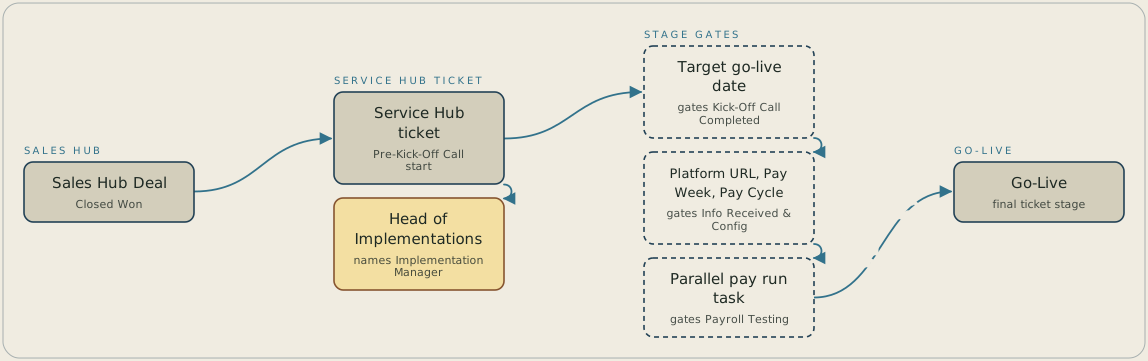
A Sales Hub Deal reaching Closed Won creates a ticket in Service Hub at Pre-Kick-Off Call and sends a task to the Head of Implementations to name an Implementation Manager. The ticket then moves through five further stages, and each one opens only when its gate is met. Kick-Off Call Completed needs a target go-live date, Information Received and Configuration needs the platform URL, pay week and pay cycle, and Payroll Testing needs the parallel pay run task completed before Go-Live.
FAQ
A ticket is created automatically in Service Hub's pipeline at the Pre-Kick-Off Call stage, and a task routes to the Head of Implementations to assign an Implementation Manager. Nobody has to notice the deal closed or open a second system to start implementation.
No stage can be skipped: each of the six requires its own field or completed task before the next one opens. Kickoff needs a target go-live date, configuration needs the platform, pay week, and pay cycle fields, and payroll testing needs the parallel pay run task completed. The sequence holds regardless of how fast a customer wants to move.


