

A second HubSpot sales pipeline for an on-site bakery assessment motion
Once the manufacturer's HubSpot Sales Hub was live, one pipeline could not represent how independent-bakery deals actually closed: a standard demo-to-contract motion and an on-site bakery assessment motion needed different stage gates. The team built a second pipeline, Route Channel, alongside the standing Sales Pipeline, each with its own stages, a state-based routing key, and scheduled follow-up tasks.
Executive Summary

Context
The client is an Australian frozen-dough manufacturer selling into wholesale and foodservice channels through a Singapore-based parent. Its sales team needed to run two different deal motions, on-site bakery assessments and ordinary B2B sales, inside one HubSpot Sales Hub instance.

What We Built
We built two custom HubSpot Sales Hub deal pipelines, Route Channel for on-site bakery assessments and a general Sales Pipeline for standard B2B deals, each with its own stage gates, state-based routing, and scheduled follow-up tasks.

Tech Stack
- HubSpot Sales Hub Professional
- Flowmapp
- Trello
Not a fit if your sales motion already maps cleanly onto one deal pipeline: this build exists because it did not. It also assumes someone owns the fallback queue for a contact a state-based rule cannot place, and keeps running the Friday closed-won review once the build team has moved on.

The Challenge
The manufacturer's existing Sales Pipeline modelled a standard demo-to-contract deal, but its independent-bakery segment sold through an on-site assessment at the bakery itself, a different motion with different signals that a deal was moving. Forcing both through one pipeline meant a stage label stopped reliably describing where a deal actually sat.

Our Approach
The team built a second HubSpot Sales Hub pipeline, Route Channel, running On-Site Bakery Assessment through On-Site Assessment Complete, Follow Up After Bakery Assessment, and Price List Sent before Closed Won or Closed Lost, alongside the Sales Pipeline's own stages through Contract Sent. New contacts route by their state property through a Sales Team Contact Assignment by States workflow; New South Wales contacts split further into a round-robin task queue across two regions. A two-day delayed task fires after On-Site Assessment Complete and again after Price List Sent, and every Friday at 8am AEST an automated task reviews that week's Closed Won deals. One case the workflow does not resolve on its own: an unmatched state goes to a named reviewer rather than an automated rule, an open item the team's own manual records as a manual fallback.

Impact

Separate deal motions in one system, without overwriting each other
The build let the manufacturer track an on-site bakery assessment and an ordinary B2B sale as two distinct deal records, each moving through its own named stages, instead of one pipeline's stage labels meaning two different things depending on the deal.
State-based routing without a dead end
New contacts are assigned to a rep by their state property through an automated workflow, so a lead reached a person without a manual triage step. New South Wales volume split further into a round-robin queue, and a contact whose state could not be matched still reached a named reviewer rather than sitting unassigned.
Follow-up that happens without someone remembering to do it
A two-day delayed task fires once a bakery assessment is marked complete, and again once a price list goes out, so a deal keeps moving without a personal reminder. A standing Friday 8am task reviews every deal closed that week, a fixed weekly checkpoint.
A named fallback for the case automation cannot resolve
When a contact's state does not match a defined routing rule, the workflow defers to a named reviewer rather than leaving the record unassigned. That handoff is the team's own open item, a plain account of where the automation stops and a person decides.
Route Channel runs On-Site Bakery Assessment, On-Site Assessment Complete, Follow Up After Bakery Assessment, and Price List Sent before Closed Won or Closed Lost. The Sales Pipeline runs its own stages through Contract Sent, with lifecycle stage auto-set to Sales Qualified Lead, Opportunity, and Customer as a deal advances.
A new contact created through a form, a social ad, or another channel enrols in the Sales Team Contact Assignment by States workflow, keyed on the contact's state property. New South Wales contacts split further, round-robin, into a task queue across two regions.
A two-day delayed task is created after a deal reaches On-Site Assessment Complete, and again after Price List Sent, so a rep has a standing reminder. Every Friday at 8am AEST, an automated task reviews each deal that reached Closed Won that week.
A contact whose state does not match a defined rule is not left unrouted: the workflow assigns it to a named reviewer instead of an automated step, a manual fallback the documentation leaves as an open item.
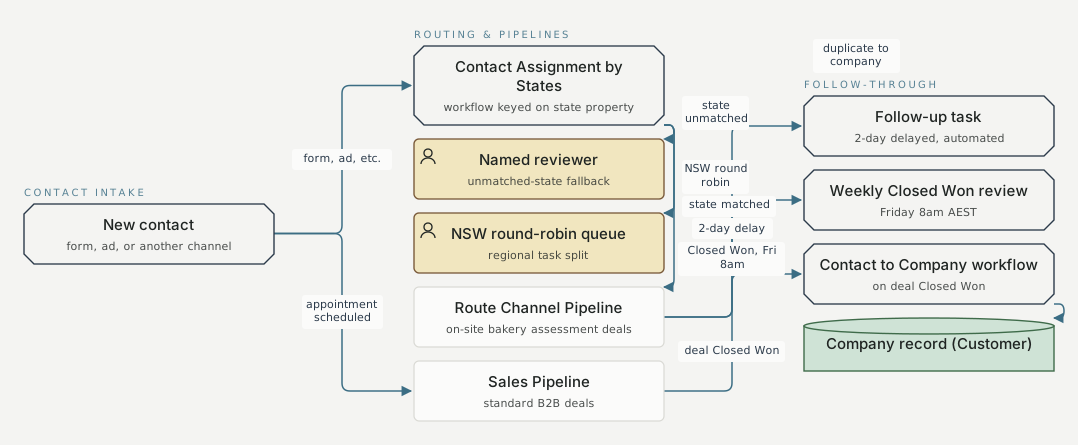
Contact intake Routing & pipelines Follow-through New contact form, ad, or another channel Contact Assignment by States workflow keyed on state property Named reviewer unmatched-state fallback NSW round-robin queue regional task split Route Channel Pipeline on-site bakery assessment deals Sales Pipeline standard B2B deals Follow-up task 2-day delayed, automated Weekly Closed Won review Friday 8am AEST Contact to Company workflow on deal Closed Won Company record (Customer) form, ad, etc. mechanism 1 state matched mechanism 1 state unmatched mechanism 1 NSW round robin mechanism 1 appointment scheduled mechanism 2 2-day delay mechanism 1 Closed Won, Fri 8am mechanism 1 deal Closed Won mechanism 3 duplicate to company mechanism 3
FAQ
The two motions do not share the same signals that a deal is moving. An on-site bakery assessment does not map onto a standard demo-to-contract sequence, so the team kept two pipelines with their own stage gates rather than overloading one pipeline's stages with two meanings.
The contact is not left unassigned. The routing workflow hands it to a named reviewer instead of an automated rule, a fallback the team's own documentation records as an open item.


