

AEO foundations for a film and series catalog on HubDB
AI tools answering questions about this producer's films had little first-party data to draw on: no page said where each title streams, and the main home page carried no structured data. We built a where-to-watch hub on HubDB whose rows write both the page and its JSON-LD structured data, linked markup across four sites, and Wikidata records for the organization and its titles, after recording how AI tools answered first.
Executive Summary

Context
A Catholic media nonprofit produces films, TV and digital series that stream on several partner platforms, and runs five websites in a HubSpot portal shared with its parent organization's other ministries. Its Wikidata item held a label and nothing else.

What We Built
We built a HubDB-driven where-to-watch hub whose rows write the page and its ItemList JSON-LD, linked Organization and film markup on 9 pages across 4 sites, sourced Wikidata items, and a register of 40 third-party pages that mention the organization.

Tech Stack
- HubSpot Content Hub
- HubDB
- HubSpot Design Manager
- HubSpot AEO
- HubSpot AI Search Grader
- Wikidata
- Google Search Console
- Bing Webmaster Tools
- Google Rich Results Test
- Wayback Machine
Not a fit if nobody on your team can confirm which platform carries each title, because the hub hides any title without a confirmed link and a near-empty hub helps nobody. It also assumes independent coverage of your titles exists, since Wikidata and Wikipedia accept sourced statements only.

The Challenge
Before any change, we recorded 25 prompts in HubSpot AEO and ran the AI Search Grader. The organization appeared in 4 of the 25 prompts, and the Grader scored it 33 on ChatGPT, 56 on Perplexity and 53 on Gemini. The where-to-watch page didn't exist yet, so viewers and AI tools had to piece together streaming availability from partner sites.
The shared portal ruled out the usual shortcut. Adding markup through the site-wide header would have put it on other ministries' pages too. Streaming availability also changes, and an unconfirmed link in the markup would send AI tools and viewers to the wrong place.

Our Approach
We built the hub on HubDB rather than as a hand-edited page, so one row per title and platform writes both the watch button and the ItemList JSON-LD (Movie and TVSeries). A title renders only when its row's show flag is ticked and it has a link. The hub went live on 22 October with 33 titles and 58 watch buttons, and older titles on DVD list with their descriptions.
Across the sites, each Organization, sub-brand and film block went into its own page's head HTML. Sub-brand blocks point back to the parent site's Organization by @id, and film blocks carry director, release date, producer, and Wikidata and IMDb links. We filled the organization's Wikidata item and created items for its parent and six titles, each with sources. Wikipedia changes went only as disclosed paid-editor requests on talk pages, and one correction was accepted within a day.
Off the site, a register of 40 third-party pages records which mention the organization, which link back and which have a saved copy. Ten link to one title page, eight from a public broadcaster, so that address can't change. Before a distributor's rights to that title ran out, we saved 21 pages about it to the Wayback Machine so their citations survive. ChatGPT and Gemini lean more on training data that predates this work, so we expect Perplexity, which searches the live web for every answer, to move first.

Impact

Watch links that always match the markup
Because the page and its JSON-LD come from the same HubDB rows, a changed streaming link updates both at once. A title without a confirmed link stays hidden from viewers and AI tools alike.
Structured data that parses on every page
Schema validation passed on the live pages: the JSON-LD parses on all 9 pages across 4 sites and on the hub, and the Rich Results Test passes the main home page's Organization. No other ministry's page has the markup.
The organization and its titles on Wikidata
Wikidata now holds sourced items for the organization, its parent and six titles, each naming the organization as producer. The film markup links to those items, so a title can be matched to the organization that made it.
A baseline taken before anything changed
The prompts were recorded and the Grader run before go-live, so later readings compare against 4 of 25 prompts and scores of 33, 56 and 53. The 25 prompts stay unedited so each reading compares like with like.
One HubDB row per title and platform, joined to the existing projects table. A row reaches the page only when its show flag is ticked and it has a link.
The custom module writes the visible buttons and an ItemList of Movie and TVSeries entries from the same rows, with Wikidata and IMDb links where a title has them.
The parent site's Organization block carries the @id that each sub-brand and film block points back to, placed in each page's head HTML rather than the shared site-wide header.
Each of 40 third-party pages is logged with whether it names the organization, links back and has a Wayback copy. The 8 unlinked mentions become link requests.
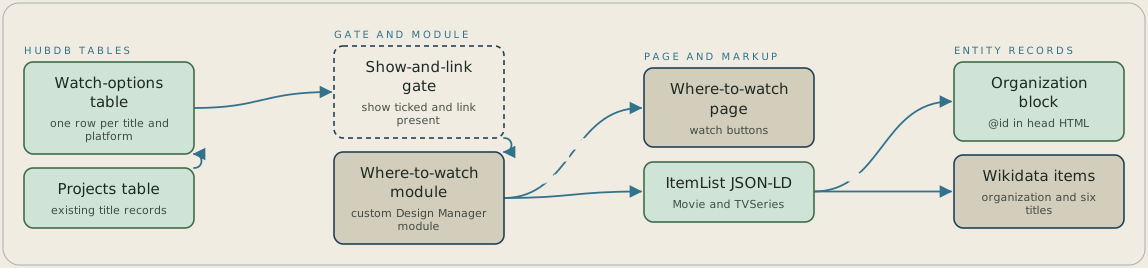
Systems: a HubDB watch-options table (one row per title and platform); the existing HubDB projects table (title records); a show-and-link gate (a row renders only when its show flag is ticked and it has a link); a custom Design Manager module (writes the page and its markup); the where-to-watch page (visible watch buttons); the ItemList JSON-LD (Movie and TVSeries entries); the parent site's Organization block (carries the @id); Wikidata items for the organization and six titles. Flows: the watch-options table joins the projects table on the title, then passes the show-and-link gate into the module. The module writes two outputs from the same rows: the watch buttons on the page and the ItemList JSON-LD. Film entries in the JSON-LD point to the Organization @id and link out to their Wikidata items. Layout: left to right. Tables on the left, the gate and module in the middle, the page and JSON-LD on the right, with the Organization block and Wikidata items in a fourth column at the far right.
FAQ
Put each JSON-LD block in its own page's head HTML rather than the site-wide header, because the site-wide header reaches every brand in the portal. Here each sub-brand and film block points back to the parent site's Organization by @id, so the markup stays linked without touching other ministries' pages.
It depends on how each AI tool finds its answers. Perplexity searches the live web for every answer, so it is likely to move first, while ChatGPT and Gemini lean more on training data that predates the change and lag until that catches up. Record your prompts and a baseline before changing anything, as this client did, so later readings compare like with like. A first conversation would look at the prompts your buyers ask and where your organization appears in the answers today.


