

A persona auto-assignment workflow that excludes manually imported contacts

A contact arriving through an offline channel carries no built-in signal for which nurture path it belongs on, and a portal that takes in contacts from more than one source can't sort each one by hand. We built a Prospective Client persona keyed on a new contact's HubSpot persona property, triggered the moment a contact is created from an offline source. We paired it with a workflow that removes the persona once it no longer applies.
A contact added through a bulk manual import is excluded from the automatic assignment by design, because a batch import hasn't been through the same offline capture that the trigger is built to recognise. A supporting view shows the team who currently carries the persona, and we built and tested both workflows before leaving them to run.
Executive Summary

Context
The practice advises individual investors on retirement and wealth management under an Australian Financial Services Licence. Its HubSpot portal took in new contacts from more than one source, and only some of those arrivals needed the same automatic nurture-path treatment as an individually captured, offline-sourced lead.

What We Built
We built a Prospective Client persona property and a paired set of workflows. One assigns the persona automatically when a qualifying offline-sourced contact is created, and the other removes it once the contact no longer qualifies. A supporting view lets the team see who currently holds the persona.

Tech Stack
- HubSpot Workflows
- HubSpot contact persona property
- HubSpot saved views
This pattern depends on a portal that can tell an offline-sourced contact apart from a bulk manual import at the point of creation. A portal where every contact arrives through a single channel has no distinction for the trigger to key on, so the exclusion rule would have nothing left to exclude.

The Challenge
Before this build, a new contact arriving in the portal carried no property that distinguished an individually captured, offline-sourced lead from a contact dropped in as part of a bulk manual import. Treating every new contact the same way risked assigning a live nurture persona to import batches that hadn't been through the same qualification as the offline channel.
Contacts that arrived offline still needed a consistent, immediate way onto the right nurture path, and that couldn't depend on someone assigning them by hand.

Our Approach
We added a new Prospective Client value to the contact's persona property and built a workflow that assigns it the moment a contact is created from an offline source. The workflow is triggered by that event and doesn't run on a schedule. Its trigger definition excludes manually imported contacts, so a bulk import never receives the automatic assignment that an individually captured offline lead does.
We built a paired workflow alongside it that removes the persona once it no longer applies, so nobody has to undo the assignment by hand. We also added a supporting view so the team can see which contacts currently carry the persona. We built and tested both workflows before handing them over.

Impact

a nurture path assigned the moment it applies
An offline-sourced contact now receives the Prospective Client persona automatically as soon as it's created. Its nurture path is set the same day, and it doesn't wait for someone to notice it and assign it by hand.
manually imported contacts held out of automatic assignment
A batch of manually imported contacts doesn't trigger the same automatic assignment that an offline-sourced contact receives. An import job therefore never applies a persona in bulk to records that haven't gone through the offline capture the trigger recognises.
an assignment that removes itself when it no longer applies
The paired workflow removes the persona once it no longer applies, so an outdated assignment doesn't sit on a contact record until someone remembers to take it off by hand.
visibility into the rule while it runs
The supporting view lets the team check which contacts currently carry the Prospective Client persona at any time. We also tested both workflows before leaving them to run on their own.
A new persona value was added to the contact's HubSpot persona property, giving offline-sourced contacts a distinct, reportable label the rest of the portal's workflows and views can key on.
An event-triggered workflow assigns the Prospective Client persona the moment a contact is created from an offline source. Its trigger definition is what excludes a manually imported contact from the same automatic assignment.
A matching workflow removes the persona once it no longer applies, so both the assignment and its reversal are automatic, and the removal isn't left as a manual cleanup task.
A dedicated view surfaces every contact currently carrying the Prospective Client persona, giving the team one place to check the automation's current state instead of searching contact by contact.
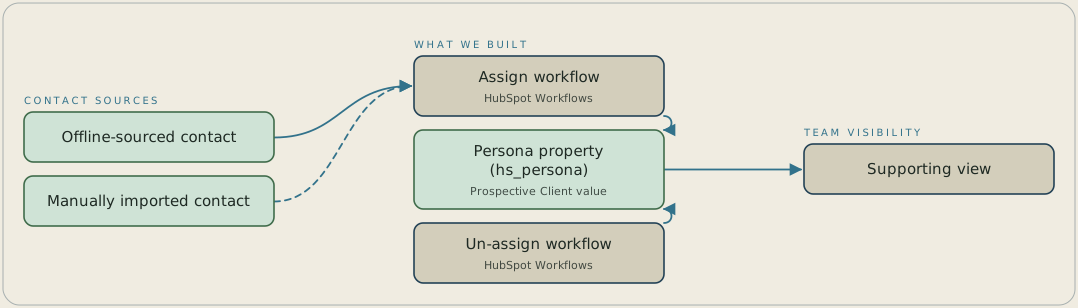
A contact created from an offline source triggers a workflow that sets the Prospective Client value on the persona property. A manually imported contact is excluded from that trigger, so a bulk import never reaches the assignment. A paired workflow clears the persona once it no longer applies, and a supporting view lists every contact that currently carries it.
FAQ
The assignment workflow triggers only when a new contact is created from an offline source. A contact added through a bulk manual import doesn't meet that trigger condition, so it's excluded from the automatic Prospective Client assignment by design.
A paired workflow removes the persona automatically once it no longer applies, so the removal doesn't rely on someone doing it by hand.


