

Rebuilding a Travel Subscription CRM Around a Role-Keyed Platform Sync
We audited a direct-to-consumer travel subscription and wholesale-rate aggregation service's CRM and found 1,500+ contacts, all logged under a single Offline Source label, with zero company records, zero deal records, and only one static list to work from.
We purged that base and rebuilt it from a clean import, then connected the client's own booking platform to the CRM by user role, so a voucher registration, a membership purchase, and an affiliate signup could each route to its own workflow.
Executive Summary

Context
The client runs a subscription-based travel service that aggregates wholesale hotel and flight rates for its members, with its own booking platform sitting alongside a HubSpot instance that had never held a usable customer record. Contact data existed only as a single undifferentiated import, with no company or deal structure underneath it to build a sales or lifecycle process on.

What We Built
We purged and rebuilt the CRM's contact base, enforced required fields on every intake form, and connected the client's own booking platform to the CRM by user role, gating separate onboarding and membership-promotion workflows off that one property.

Tech Stack
- HubSpot Marketing Hub
- HubSpot Sales Hub
- Stripe
- SendGrid
- a custom booking and aggregation platform (client-owned)
Not a fit if you don't already run your own booking or transaction platform with an API surface to integrate against, or lack developer capacity on your side to build and maintain that integration. This sync depends on the client's own platform API, maintained by their own development team, with a promo-code field still missing months into the work. Without an owned platform and a development team behind it, there is no API for a sync like this to key against.

The Challenge
At audit, the CRM held 1,500+ contacts, every one logged under a single Offline Source label, with zero company records and zero deal records anywhere in the portal.
One ad hoc workflow set a Membership Score property when a contact clicked a tracked link in a sample newsletter, but only one contact had ever completed it, so no real scoring model existed to route anyone. A second workflow was built to gate further sends on whether a contact's type equaled Member, and it had never been turned on.
The existing contact import also carried two unresolved errors. Because the base was uniformly Offline Source with no company or deal structure, repairing it in place meant building lead scoring and role-based routing on top of data that was already flagged as unreliable.

Our Approach
We considered repairing the existing import in place first. But fixing two unresolved errors would still leave every later workflow validating the same flawed records. So, at the client's explicit request, we purged the entire contact base and reimported it clean. That traded the existing contact history for a base with no inherited errors to carry forward. We then added required-field enforcement to the intake forms, so that a submission couldn't re-enter the clean base missing fields the next stage depended on.
With intake set, we designed a lead-scoring model to replace the single sample workflow that had only ever scored one contact, and began Stripe integration prep to map payment events onto contact and deal properties.
The booking platform integration is ongoing and API-driven, keyed on User ID and user role. A voucher registration, a membership purchase or an affiliate signup each post a role, and that role decides whether the contact enters the onboarding workflow or the membership-promotion workflow. The gate itself works. The trade-off is that the integration was still missing a promo-code field as of the last recap, which kept full data capture from closing.

Impact

A clean contact base ready for lifecycle segmentation
The purge eliminated the two unresolved import errors and the uniform Offline Source label, so segmentation by role or lifecycle stage now has real records to build from instead of carrying the same errors forward again.
Every new submission arrives complete or not at all
Required-field enforcement means a submission entering the newly purged base cannot repeat the same gaps the old import carried, so the lead-scoring model and role-based routing built on top of it are not undermined at intake.
A lead-scoring model built to replace a workflow nobody used
A lead-scoring model was scoped to replace the ad hoc workflow that had only ever scored one contact, so segmentation moving forward runs on a designed model instead of a workflow nobody had actually used.
Contact and deal properties structured for live payment data
Stripe integration prep mapped payment events onto contact and deal properties ahead of the sync going live, so membership and voucher purchases will write onto the same record type the team already tracks, without a second manual reconciliation step.
The existing contact import carried two unresolved errors on top of a base that was already uniformly Offline Source with no company or deal records. At the client's explicit request, the team purged the entire contact base and reimported it clean instead of repairing the individual errors, so every later workflow builds on one verified state rather than a patched one.
Forms that previously accepted a submission with missing fields now enforce required fields at the point of entry. A record failing that check does not reach the CRM, which keeps the newly purged base from re-accumulating the same gaps the old import carried.
The client's own booking platform posts a User ID and a user role, lead, new voucher user, active voucher user, or member, to the CRM on an ongoing, API-driven basis every time someone registers a voucher, buys a membership, or signs up as an affiliate. That role gates whether the contact enters the onboarding workflow or the membership-promotion workflow, though the integration was still missing a promo-code field as of the last recap, which kept full data capture from closing.
Stripe integration prep began mapping payment and subscription events onto CRM contact and deal properties ahead of the sync going live. Once active, a membership or voucher purchase will write its payment status directly onto the same record the booking-platform sync already updates, rather than onto a separate ledger the team has to reconcile by hand.
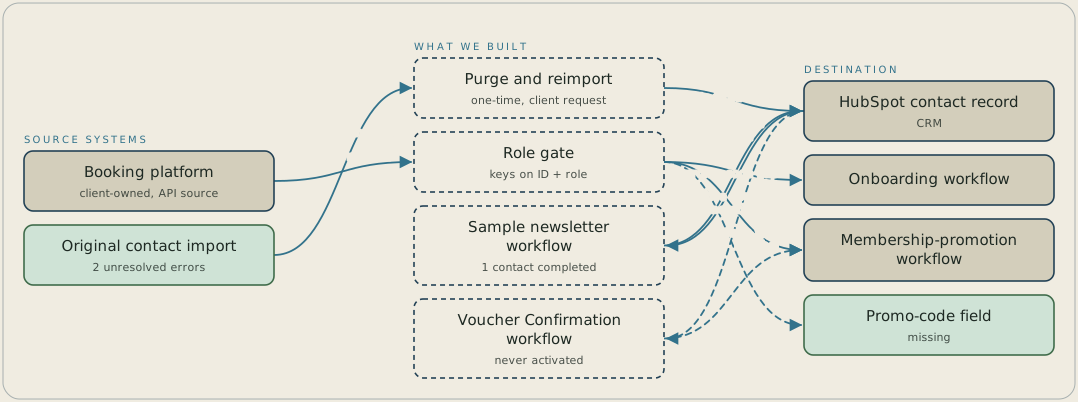
The old contact import was purged and reimported into clean HubSpot contact records. The booking platform then posts a User ID and role to a role gate on an ongoing basis. Leads and new voucher users go to the onboarding workflow, and active users and members go to the membership-promotion workflow. A promo-code field is still missing from that sync, and a Voucher Confirmation workflow that gates on Contact type equal to Member was never activated.
FAQ
Because the two unresolved errors were already present in a base that was uniformly Offline Source with zero company and deal records, repairing them in place would still leave every later workflow validating the same flawed structure. A full purge and reimport gave the team one verified state to enforce required fields and design lead scoring against, instead of patching a base already flagged as unreliable.
The booking platform generates four distinct actions, voucher registration, membership purchase, active use, and affiliate signup, that need different email treatment. A single lifecycle stage couldn't gate onboarding sends separately from membership-promotion sends, so keying the sync on User ID and role lets each action route to its own workflow. Finishing the integration still depends on every field that role logic touches, including the promo-code field that remained outstanding.


